
lufei_gjP40_1215 - Minecraft Skins & Skin History
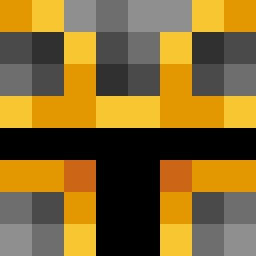
Current Minecraft skin of the player lufei_gjP40_1215, loaded from the official Mojang API. Rotate the 3D model with your mouse or finger, then download the skin as a PNG file and use it in Minecraft: Bedrock Edition or Java Edition for free. When lufei_gjP40_1215 changes their skin, this page updates automatically and the old skin stays in the history below.
Other players with this skin (389)
lufei_gjP40_1215 was the 26th player we have seen with this skin, first spotted on 30.07.2026. The same skin was seen on these players. Open a nickname to see their current skin and skin history.
 kcriptoi Kingbman3 Esmeralda_2009 ManchesterCity YellowMaster18 CopyPastw BabuW Yowasu antiher0_
 R4i1Gun krissemicolon sirgold1 Chounizadi Bbfe z0tte BunsenBurner Tinder_pedro jeonwoojoo DiffTeo Ironaxe8899 WadbiGo Mihail_Solo_Play oxioko Yeshifeel WinRAW LushPushGaming WbOz4 GhostSould Melonik357 superkongle BONEZIES123 OS2Y Deisvid fwkris clasqq Praxidious CoffeeIsaGoddess yusufccicek 5lele 2use jtskiiii Prozmyyy Pracigam superdia14
 BadAtThis123 sqwinm Risuspupa ULGee phzinho8282 ShadowNoble zacthekid98 Julian0369 mtosta Moth_Man_the_III Salo0 yuyu161 10db DriftBoat KOS398 Belinha0105
How to install the lufei_gjP40_1215 skin
- Press the Download button above to save the skin as a PNG file.
- Minecraft: Bedrock Edition (PE): open the Dressing Room from the main menu (or tap your character → Edit Character), go to Classic Skins → Owned, press the + (new skin) button, choose the downloaded PNG and pick the Classic (Steve) model. Works on PC and mobile; consoles cannot import custom skins.
- Minecraft: Java Edition: open the Minecraft Launcher, go to the Skins tab, click New Skin, load the PNG, pick the Classic (Steve) model and press Save & Use. You can also upload it at minecraft.net → Profile → Change Skin.
The skin does not show up after import - what should I do?
Restart Minecraft and open the Dressing Room again - imported skins sometimes appear only after a restart. Also make sure you selected the imported skin and picked the Classic (Steve) model.
Which model should I choose, Classic or Slim?
This skin is designed for the Classic (Steve) model. If you pick the wrong model, the arms of the skin will look stretched or squeezed.
Is the skin of lufei_gjP40_1215 free to download?
Yes. Press Download, save the PNG file and use it in Minecraft: Bedrock Edition or Java Edition - no payment or registration needed. The skin also works on multiplayer servers and Realms.
More skins
Looking for more? Go back to all Minecraft skins and check the top skins of the week, month and all time, or find any player's skin by nickname.