
li4nisdead - Minecraft Skins & Skin History
Current Minecraft skin of the player li4nisdead, loaded from the official Mojang API. Rotate the 3D model with your mouse or finger, then download the skin as a PNG file and use it in Minecraft: Bedrock Edition or Java Edition for free. When li4nisdead changes their skin, this page updates automatically and the old skin stays in the history below.
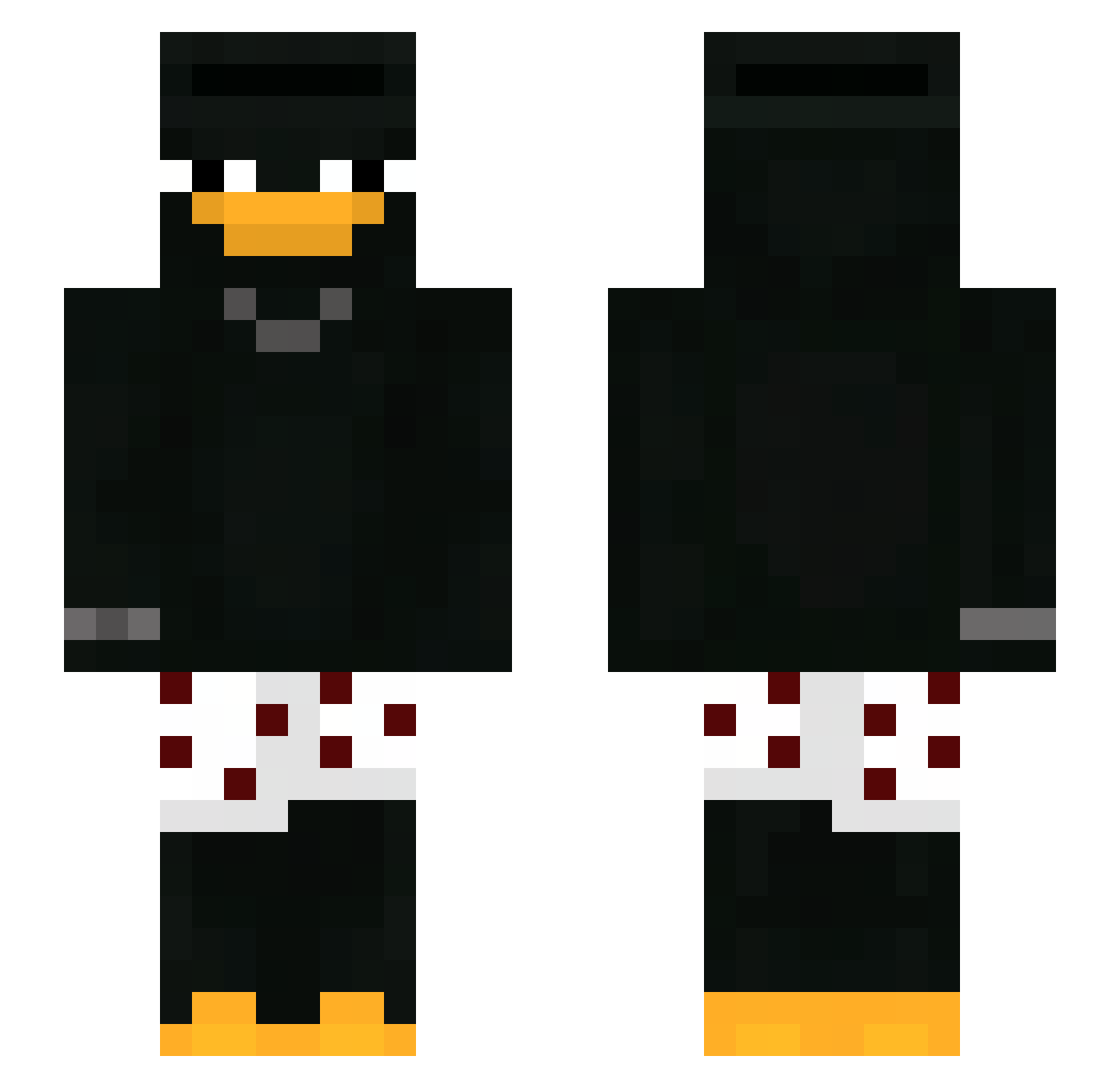
Other players with this skin (62)
li4nisdead was the 39th player we have seen with this skin, first spotted on 16.09.2026. The same skin was seen on these players. Open a nickname to see their current skin and skin history.
 BOSSMILK VPix3l TuferR Jxstemilyy markus4 MarikPS pay153 WCBY haroldzz Larryxz999 THE_CihokssTR BENJIFISHIS xerteMB abukhalil99 T_3 Kryze_67 Wehdi
 IvanovicMC GWMP MikiChen Maekoskei_YT PaulyB27 Klapeczunio
 Goiaba_zzz Betty_Waraha Error404Missing King_Webb Lucaxinn10 gabslindao
 Sntoo7 EtieFoTheFirst Fighter_Pr Fran52132 LowAyacbb dayiro_poton
 Masny_Michu
 Ultraaura_
 Malledetto _REAL_WOOPER_ sipra
 FraniXX26 Rared drippy_Burza Bigode_criminoso DahModan
 zNikita eoadrian Dark056 Paninho Rugalkz pikpak_59 Toxicy1 NotCrisYT erhasier Fefko Roan2012 Ra4ul_
 SuperGabi14 naruw
 Elias_Kempter
More Boxers Minecraft skins
How to install the li4nisdead skin
- Press the Download button above to save the skin as a PNG file.
- Minecraft: Bedrock Edition (PE): open the Dressing Room from the main menu (or tap your character → Edit Character), go to Classic Skins → Owned, press the + (new skin) button, choose the downloaded PNG and pick the Slim (Alex) model. Works on PC and mobile; consoles cannot import custom skins.
- Minecraft: Java Edition: open the Minecraft Launcher, go to the Skins tab, click New Skin, load the PNG, pick the Slim (Alex) model and press Save & Use. You can also upload it at minecraft.net → Profile → Change Skin.
The skin does not show up after import - what should I do?
Restart Minecraft and open the Dressing Room again - imported skins sometimes appear only after a restart. Also make sure you selected the imported skin and picked the Slim (Alex) model.
Which model should I choose, Classic or Slim?
This skin is designed for the Slim (Alex) model. If you pick the wrong model, the arms of the skin will look stretched or squeezed.
Is the skin of li4nisdead free to download?
Yes. Press Download, save the PNG file and use it in Minecraft: Bedrock Edition or Java Edition - no payment or registration needed. The skin also works on multiplayer servers and Realms.
More skins
Looking for more? Go back to all Minecraft skins and check the top skins of the week, month and all time, or find any player's skin by nickname.