
kyky3002 - Minecraft Skins & Skin History
Current Minecraft skin of the player kyky3002, loaded from the official Mojang API. Rotate the 3D model with your mouse or finger, then download the skin as a PNG file and use it in Minecraft: Bedrock Edition or Java Edition for free. When kyky3002 changes their skin, this page updates automatically and the old skin stays in the history below.
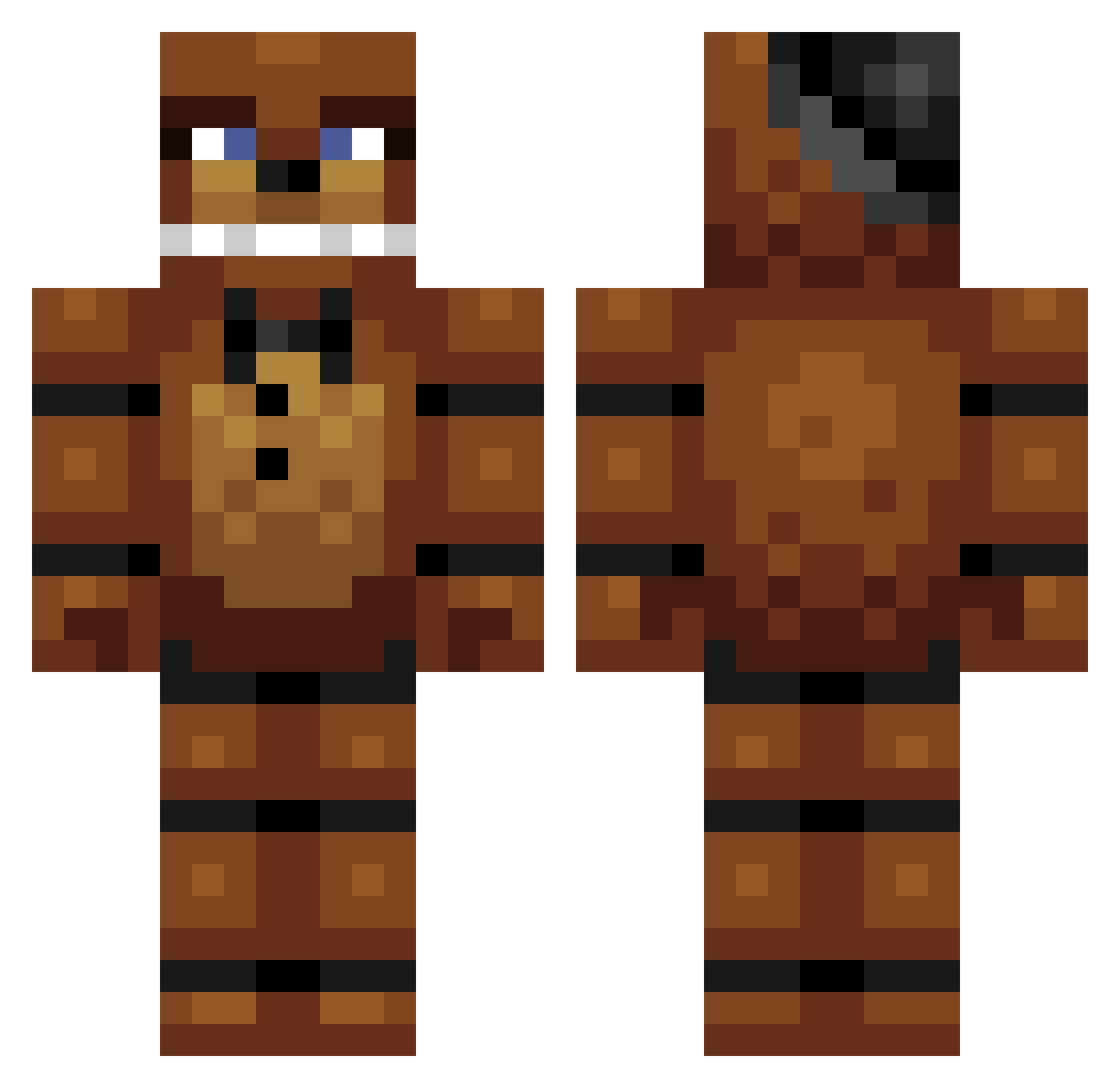
Other players with this skin (303)
kyky3002 was the 250th player we have seen with this skin, first spotted on 14.10.2026. The same skin was seen on these players. Open a nickname to see their current skin and skin history.
 ninjalegozach Rainbow_Hash sid245 gin647l lilman180000 RallyZebran toxictian70 cyborg_panda56 QBCUTE squid_slayer124 kt023 PancakeWarrior12 PugaWar 2408Finn GuIIe OrangeSodaLover thunderer17 Obiwannabe92 GnoeKoe TerritoryMC MrBurn251 flynnspav22 TJL204 Freddiespizza LouisB2002 JonnyLo skybound101 annooie OSCARDANIEL Neusfluit Tonylikespizza TheImmortalOne bryae0614 seikobcn pausmi23 MartinTheBoy MellowSweater blastland nailer43 Vinniedepooh71 RonnieLee04 thikling Gustav_Hanssen ewalt1974 Austinbuy BizzKid robosaur327 Curlyface50 SHO227 guillermo_10 Tiger6677 Isac05 Panda556766 jackboy1661 TeddHD Freddy_fazbear11 freddyfazbaer lordtensai420 Bravewarrior25 mattong111
More Freddy Fazbear Minecraft skins
See all 240 Freddy Fazbear skins
How to install the kyky3002 skin
- Press the Download button above to save the skin as a PNG file.
- Minecraft: Bedrock Edition (PE): open the Dressing Room from the main menu (or tap your character → Edit Character), go to Classic Skins → Owned, press the + (new skin) button, choose the downloaded PNG and pick the Classic (Steve) model. Works on PC and mobile; consoles cannot import custom skins.
- Minecraft: Java Edition: open the Minecraft Launcher, go to the Skins tab, click New Skin, load the PNG, pick the Classic (Steve) model and press Save & Use. You can also upload it at minecraft.net → Profile → Change Skin.
The skin does not show up after import - what should I do?
Restart Minecraft and open the Dressing Room again - imported skins sometimes appear only after a restart. Also make sure you selected the imported skin and picked the Classic (Steve) model.
Which model should I choose, Classic or Slim?
This skin is designed for the Classic (Steve) model. If you pick the wrong model, the arms of the skin will look stretched or squeezed.
Is the skin of kyky3002 free to download?
Yes. Press Download, save the PNG file and use it in Minecraft: Bedrock Edition or Java Edition - no payment or registration needed. The skin also works on multiplayer servers and Realms.
More skins
Looking for more? Go back to all Minecraft skins and check the top skins of the week, month and all time, or find any player's skin by nickname.