
kuhlfun - Minecraft Skins & Skin History
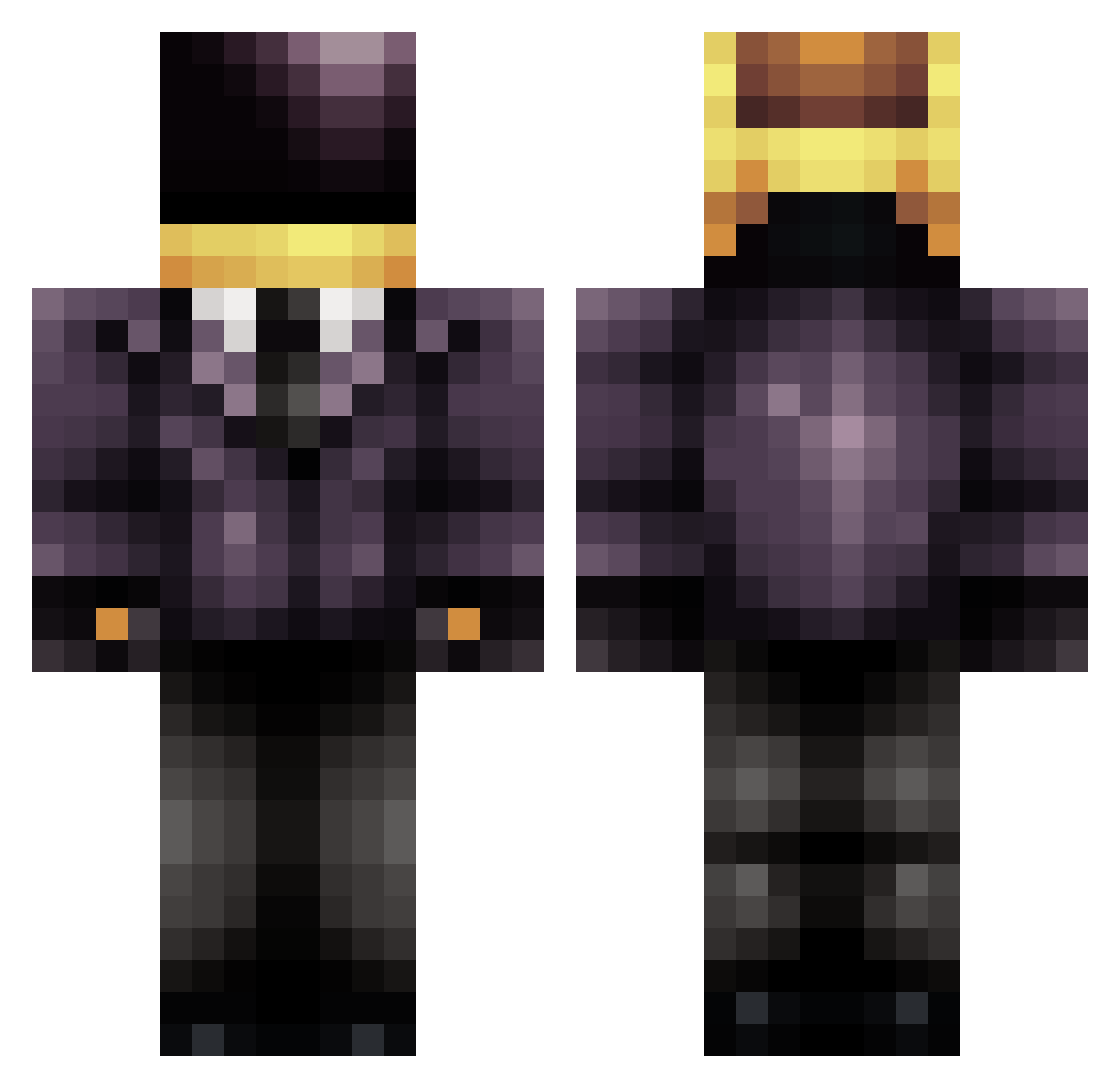
Current Minecraft skin of the player kuhlfun, loaded from the official Mojang API. Rotate the 3D model with your mouse or finger, then download the skin as a PNG file and use it in Minecraft: Bedrock Edition or Java Edition for free. When kuhlfun changes their skin, this page updates automatically and the old skin stays in the history below.
Other players with this skin (709)
kuhlfun was the 397th player we have seen with this skin, first spotted on 28.09.2026. The same skin was seen on these players. Open a nickname to see their current skin and skin history.
 8bit_Architect GamingBarlow Griff_TE newtobuild cho_cho ISteex sven00 Kromitaaa WishingMoon Freddie_Gibbs Burny87 Masvo MARCMURPHY Iksmi Joa772 delihonte177 Uhh_Joey omarbuuren BlkMagix XxPartyDudexX MuppMaister UnderArmour227 helmansio blorch82 Frawtarius KarateArdvark ForeignVeteran Ruutzy DaimonTrig trentdotcom jimmythefly12 BusinessCasual Alonsoelpr0 DeJaze DadTrool ImAgent GlobalRegent HaktanSenses guyabadi1221 Lethamyr tpalomo Lightening5558 Cailloupi 7854123 MadMan21779 IAMR_Alt Nickygrisen Ninja_2004_ Hutchini TurtleSquad1 TheIllegalAmigo ThorZHansen Missilll GRAFFITZ In_Depth SaxophoneofTime Arturolml666 xXBigBangBroXx CapsSonz Un1c0rN0fSp4d3s
More Daft Punk Minecraft skins
How to install the kuhlfun skin
- Press the Download button above to save the skin as a PNG file.
- Minecraft: Bedrock Edition (PE): open the Dressing Room from the main menu (or tap your character → Edit Character), go to Classic Skins → Owned, press the + (new skin) button, choose the downloaded PNG and pick the Classic (Steve) model. Works on PC and mobile; consoles cannot import custom skins.
- Minecraft: Java Edition: open the Minecraft Launcher, go to the Skins tab, click New Skin, load the PNG, pick the Classic (Steve) model and press Save & Use. You can also upload it at minecraft.net → Profile → Change Skin.
The skin does not show up after import - what should I do?
Restart Minecraft and open the Dressing Room again - imported skins sometimes appear only after a restart. Also make sure you selected the imported skin and picked the Classic (Steve) model.
Which model should I choose, Classic or Slim?
This skin is designed for the Classic (Steve) model. If you pick the wrong model, the arms of the skin will look stretched or squeezed.
Is the skin of kuhlfun free to download?
Yes. Press Download, save the PNG file and use it in Minecraft: Bedrock Edition or Java Edition - no payment or registration needed. The skin also works on multiplayer servers and Realms.
More skins
Looking for more? Go back to all Minecraft skins and check the top skins of the week, month and all time, or find any player's skin by nickname.