
kjnbldsf - Minecraft Skins & Skin History
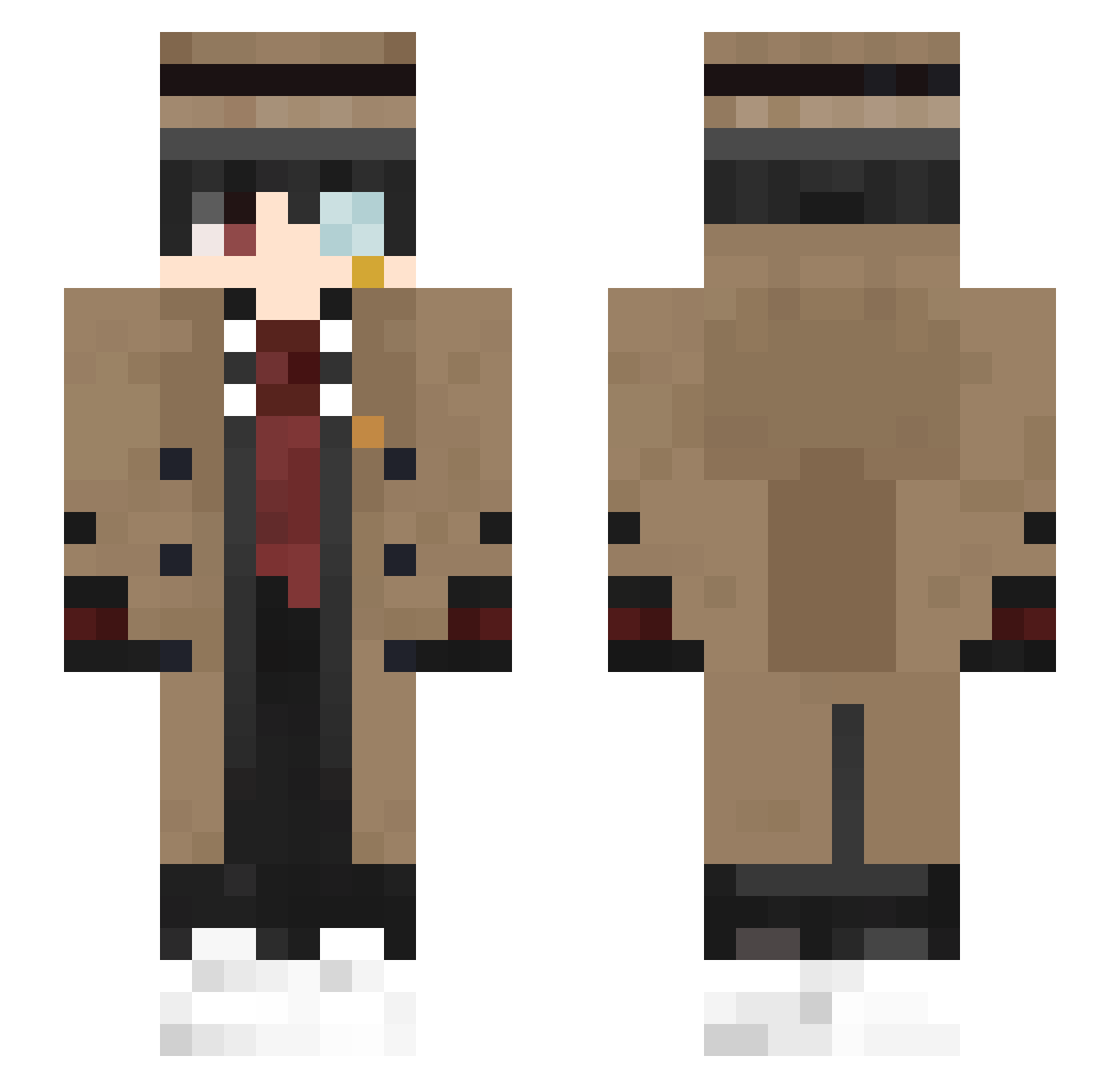
Current Minecraft skin of the player kjnbldsf, loaded from the official Mojang API. Rotate the 3D model with your mouse or finger, then download the skin as a PNG file and use it in Minecraft: Bedrock Edition or Java Edition for free. When kjnbldsf changes their skin, this page updates automatically and the old skin stays in the history below.
Other players with this skin (363)
kjnbldsf was the 86th player we have seen with this skin, first spotted on 22.08.2026. The same skin was seen on these players. Open a nickname to see their current skin and skin history.
 yObsessed_ holmesdoyle777 CrystalTri SlowMan002 VADMTV 754AR StarsLin Jin727 Michettin Fastdark jerry_sang next_1234fdhgfhk NodeJs7c uzishift Jorch738 Achioner Danielkscx DayBRR dionbro3 _1ife nieumiemwt0 Fatih_Mehmet Halinas __Eternity___ Haeru_Guy Veseeeee stoneking1 debbub Kolahorse Mr__Boxs Daka8737 ManualZero50073 _Ruzo
 LulLil DTWK peru0ver DamperPamper Spartan320 Vetrifyed Igrgf benny728 Epsilon_QAQ KKILICASLAN Zorro1227 Rifazz23 sazeron xianrz Xsairo_the_topX Tink1kss cream969 Water_Sunny MrUnique_ gulugulu855 hypanty Wiz45 itz_topaz oldfreefish JoJoFoxMen Moonlighter132 Stefan_eu
More Yugi Amane Minecraft skins
How to install the kjnbldsf skin
- Press the Download button above to save the skin as a PNG file.
- Minecraft: Bedrock Edition (PE): open the Dressing Room from the main menu (or tap your character → Edit Character), go to Classic Skins → Owned, press the + (new skin) button, choose the downloaded PNG and pick the Slim (Alex) model. Works on PC and mobile; consoles cannot import custom skins.
- Minecraft: Java Edition: open the Minecraft Launcher, go to the Skins tab, click New Skin, load the PNG, pick the Slim (Alex) model and press Save & Use. You can also upload it at minecraft.net → Profile → Change Skin.
The skin does not show up after import - what should I do?
Restart Minecraft and open the Dressing Room again - imported skins sometimes appear only after a restart. Also make sure you selected the imported skin and picked the Slim (Alex) model.
Which model should I choose, Classic or Slim?
This skin is designed for the Slim (Alex) model. If you pick the wrong model, the arms of the skin will look stretched or squeezed.
Is the skin of kjnbldsf free to download?
Yes. Press Download, save the PNG file and use it in Minecraft: Bedrock Edition or Java Edition - no payment or registration needed. The skin also works on multiplayer servers and Realms.
More skins
Looking for more? Go back to all Minecraft skins and check the top skins of the week, month and all time, or find any player's skin by nickname.