
karenco12 - Minecraft Skins & Skin History
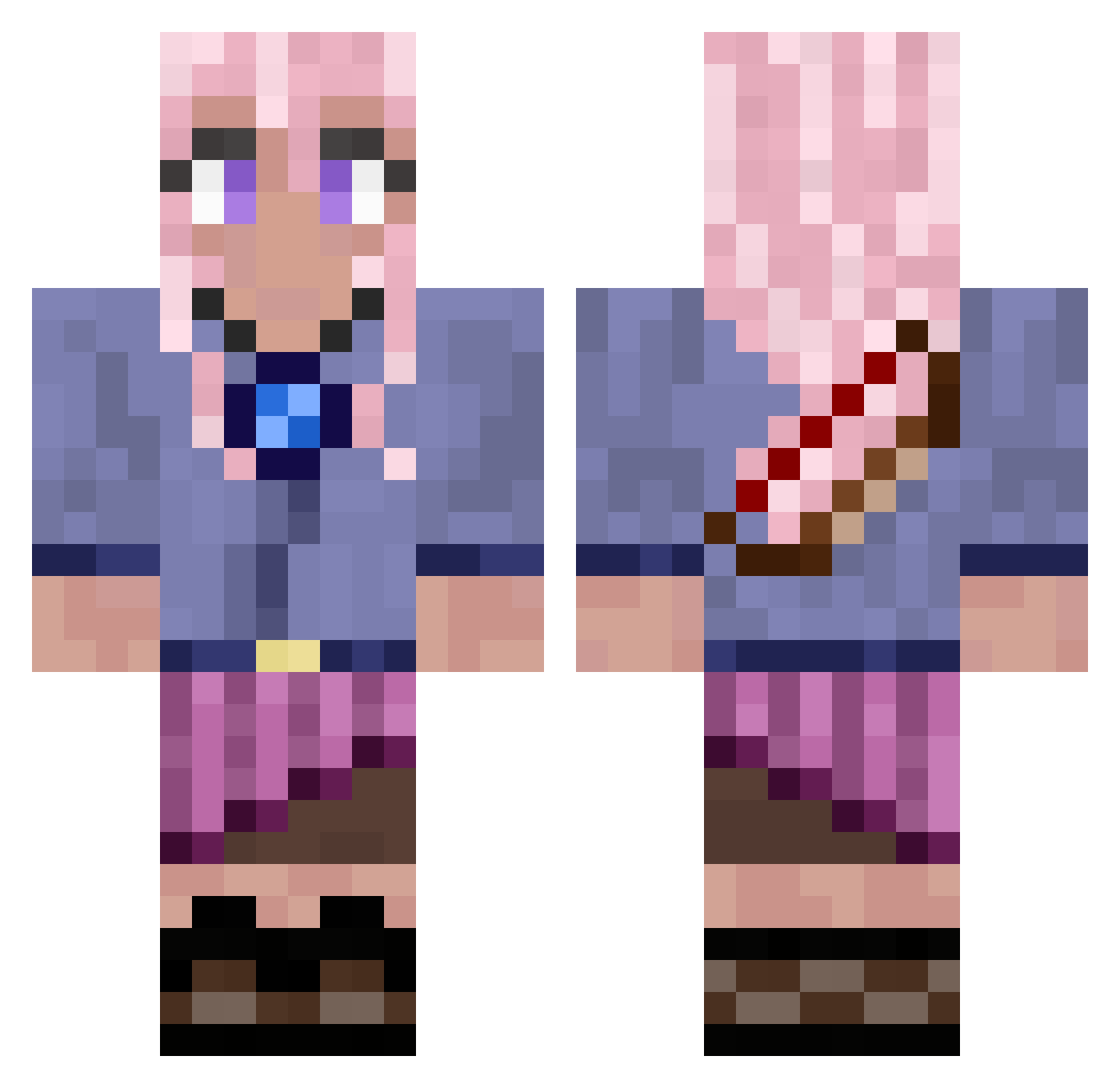
Current Minecraft skin of the player karenco12, loaded from the official Mojang API. Rotate the 3D model with your mouse or finger, then download the skin as a PNG file and use it in Minecraft: Bedrock Edition or Java Edition for free. When karenco12 changes their skin, this page updates automatically and the old skin stays in the history below.
Other players with this skin (680)
karenco12 was the 348th player we have seen with this skin, first spotted on 10.09.2026. The same skin was seen on these players. Open a nickname to see their current skin and skin history.
 Darkwitch476 AnointedLion FurtaCor seihen7 siMona12345678 shige_tor PumpkinNuts RoseQueen50 Darkluna1988 PhobetorZ toniiiblue kris_s42 cafeconlecheypan Chisco_chan Tentakrool2 Lady_Mystika CaveDweller56 MinecraftCoin scubagts KarmonIAS hellenwinata OmkeSan beepyboppers yastub Aehoem VaLiFy_EB paooooooooooo
 Celine0906 Tob_Z itsHENRYQ _showteK Akminha
 Sparklekittia FreeAntarctica Kerkske aeririyel bellae800 jennamg4920 Anja_Tell jacob_loks Bia163 isamariasan beth199372 Veriq0 A190701 Liluus21 ICameToDiddle Lil_Lily2018 EllesTbh French_Bellow_2 nxcstry CreeperHunter735 moagusen RaulSDLC Einhornlotte chloehope YourWeener smough506
 SlinkChannel380
 Gunwoo_
More Kyoko Kirigiri Minecraft skins
See all 55 Kyoko Kirigiri skins
How to install the karenco12 skin
- Press the Download button above to save the skin as a PNG file.
- Minecraft: Bedrock Edition (PE): open the Dressing Room from the main menu (or tap your character → Edit Character), go to Classic Skins → Owned, press the + (new skin) button, choose the downloaded PNG and pick the Classic (Steve) model. Works on PC and mobile; consoles cannot import custom skins.
- Minecraft: Java Edition: open the Minecraft Launcher, go to the Skins tab, click New Skin, load the PNG, pick the Classic (Steve) model and press Save & Use. You can also upload it at minecraft.net → Profile → Change Skin.
The skin does not show up after import - what should I do?
Restart Minecraft and open the Dressing Room again - imported skins sometimes appear only after a restart. Also make sure you selected the imported skin and picked the Classic (Steve) model.
Which model should I choose, Classic or Slim?
This skin is designed for the Classic (Steve) model. If you pick the wrong model, the arms of the skin will look stretched or squeezed.
Is the skin of karenco12 free to download?
Yes. Press Download, save the PNG file and use it in Minecraft: Bedrock Edition or Java Edition - no payment or registration needed. The skin also works on multiplayer servers and Realms.
More skins
Looking for more? Go back to all Minecraft skins and check the top skins of the week, month and all time, or find any player's skin by nickname.