
juttovski - Minecraft Skins & Skin History
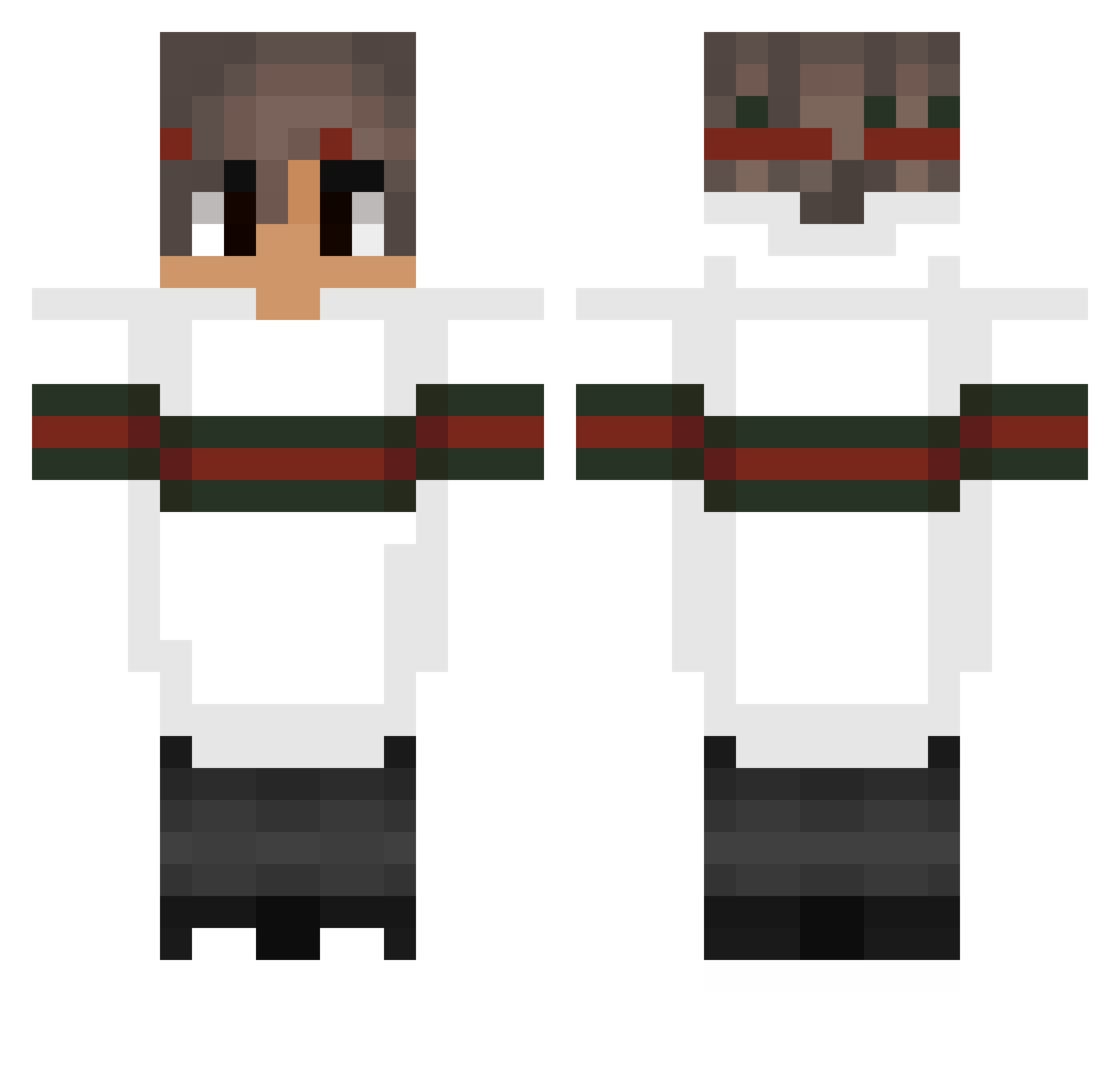
Current Minecraft skin of the player juttovski, loaded from the official Mojang API. Rotate the 3D model with your mouse or finger, then download the skin as a PNG file and use it in Minecraft: Bedrock Edition or Java Edition for free. When juttovski changes their skin, this page updates automatically and the old skin stays in the history below.
Other players with this skin (152)
juttovski was the 78th player we have seen with this skin, first spotted on 11.09.2026. The same skin was seen on these players. Open a nickname to see their current skin and skin history.
 _VeV_ Renait973 __synth__ M4ci_86 _KamieX_ Caallee shaszy_0 yuusan83 Sahaij Menshchikov ElSantYago PitxitaCorta AlwaeZ_btw MilonToZiomal Gabriel_53J R3dYn OrianHD Ariuak TheWiseCrab Czehh extrafast Barosanu13 Banklaud xUnLeAsHx Lyrasiaa cz_smug Scopez115 Viper_xDxD Nakurwieci KingUNEYKA UncleDirtNapper Delected adrockusss Taboosemain Shadow1Deluxe x_zkz_x Lakels Rubenknc Abduskan karlolegioncro CraftIcer yoelpikoparao Estcolmart MicroCruZZer qDracula Santiagotheking cjwk93 ToastL3o Changed_FM Danukw CheaterDude ByCzEx TheBeefySupreme BluntStat curiousBasmati2 Quantvms izgir Siyoonryan JiggoAllerJiggos Snox2k
More Striped Sleeves Minecraft skins
See all 1064 Striped Sleeves skins
How to install the juttovski skin
- Press the Download button above to save the skin as a PNG file.
- Minecraft: Bedrock Edition (PE): open the Dressing Room from the main menu (or tap your character → Edit Character), go to Classic Skins → Owned, press the + (new skin) button, choose the downloaded PNG and pick the Classic (Steve) model. Works on PC and mobile; consoles cannot import custom skins.
- Minecraft: Java Edition: open the Minecraft Launcher, go to the Skins tab, click New Skin, load the PNG, pick the Classic (Steve) model and press Save & Use. You can also upload it at minecraft.net → Profile → Change Skin.
The skin does not show up after import - what should I do?
Restart Minecraft and open the Dressing Room again - imported skins sometimes appear only after a restart. Also make sure you selected the imported skin and picked the Classic (Steve) model.
Which model should I choose, Classic or Slim?
This skin is designed for the Classic (Steve) model. If you pick the wrong model, the arms of the skin will look stretched or squeezed.
Is the skin of juttovski free to download?
Yes. Press Download, save the PNG file and use it in Minecraft: Bedrock Edition or Java Edition - no payment or registration needed. The skin also works on multiplayer servers and Realms.
More skins
Looking for more? Go back to all Minecraft skins and check the top skins of the week, month and all time, or find any player's skin by nickname.