
junli12138 - Minecraft Skins & Skin History
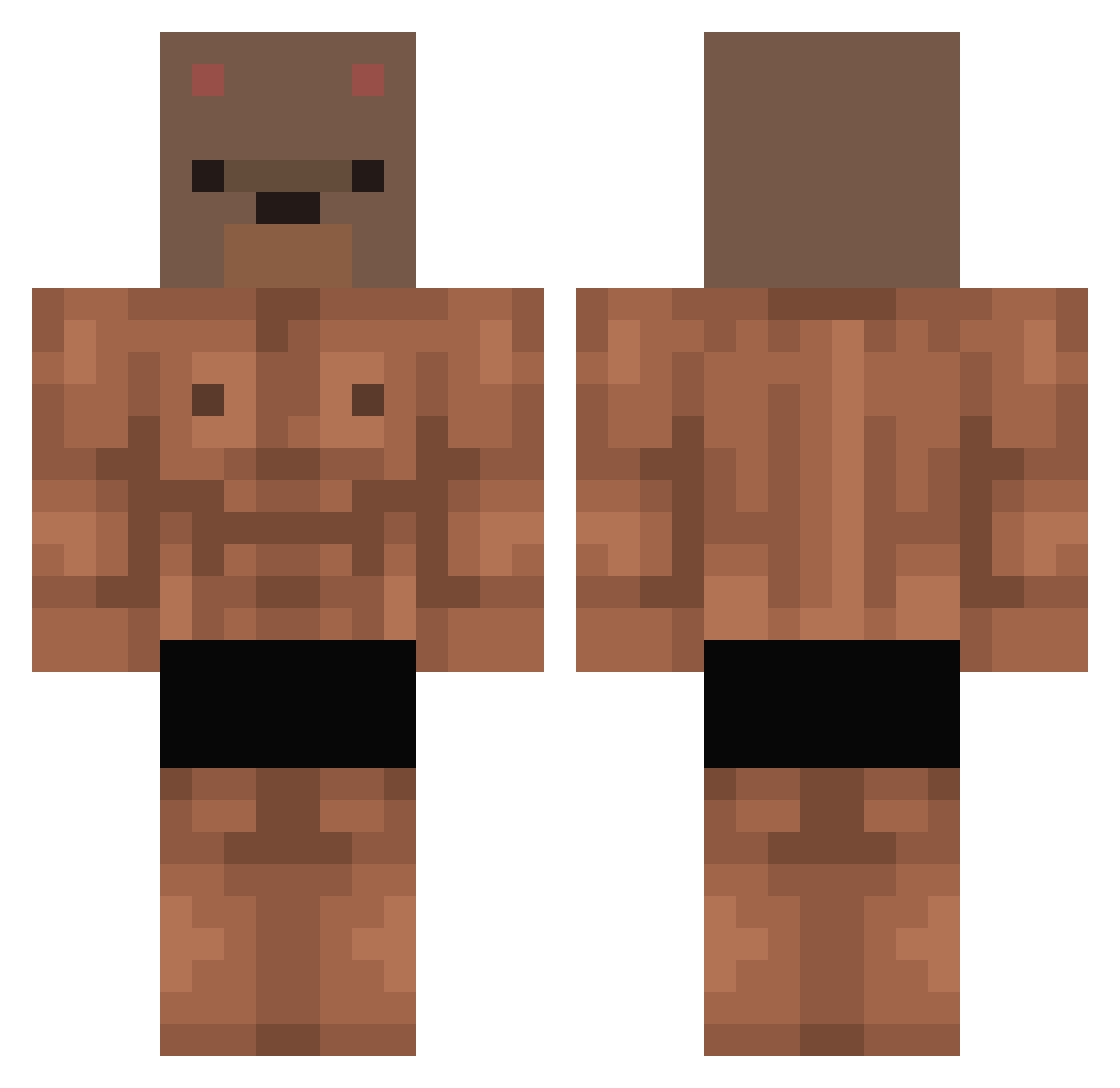
Current Minecraft skin of the player junli12138, loaded from the official Mojang API. Rotate the 3D model with your mouse or finger, then download the skin as a PNG file and use it in Minecraft: Bedrock Edition or Java Edition for free. When junli12138 changes their skin, this page updates automatically and the old skin stays in the history below.
Other players with this skin (497)
junli12138 was the 472nd player we have seen with this skin, first spotted on 13.11.2026. The same skin was seen on these players. Open a nickname to see their current skin and skin history.
 VIRUS2121 ccofi_ Jesh3313 JustBeingBear zcl203011 mettyasamui Griff_Keni lukas_616 aid3n765 highkinglol Spielzeugmaus crunch_cronch s_w0O0n Davyprz ffkssr Incriminates dongdading UrStupid LeeCool29 MarasiTheBoss jieun_pr1ncess JIMMYBOY2002 martatack FrostyDog_05 nounours31 juju0822 DucksAreStupid pppastion Wicrolasz forbiddenskills Firulaii xTexnik mingun0532 KasliUmut31 tinuww VovaGota JongTer67 JoanTheCreator beijingdashiung MrFlexEc ymd07 CR_Nivek DOKIS02 Syunsuke7277 S1234OS SystemAddict969 whats_a_tyler KAMIKAZEMODEX Adder_Tu DimsXD yan0106 TEKNiiQUA ssild ityebo1 Yinfir Wide_300ZX Baltito3007 Dodwort Andrew88997 matphjoes
More Bear Mask Minecraft skins
How to install the junli12138 skin
- Press the Download button above to save the skin as a PNG file.
- Minecraft: Bedrock Edition (PE): open the Dressing Room from the main menu (or tap your character → Edit Character), go to Classic Skins → Owned, press the + (new skin) button, choose the downloaded PNG and pick the Classic (Steve) model. Works on PC and mobile; consoles cannot import custom skins.
- Minecraft: Java Edition: open the Minecraft Launcher, go to the Skins tab, click New Skin, load the PNG, pick the Classic (Steve) model and press Save & Use. You can also upload it at minecraft.net → Profile → Change Skin.
The skin does not show up after import - what should I do?
Restart Minecraft and open the Dressing Room again - imported skins sometimes appear only after a restart. Also make sure you selected the imported skin and picked the Classic (Steve) model.
Which model should I choose, Classic or Slim?
This skin is designed for the Classic (Steve) model. If you pick the wrong model, the arms of the skin will look stretched or squeezed.
Is the skin of junli12138 free to download?
Yes. Press Download, save the PNG file and use it in Minecraft: Bedrock Edition or Java Edition - no payment or registration needed. The skin also works on multiplayer servers and Realms.
More skins
Looking for more? Go back to all Minecraft skins and check the top skins of the week, month and all time, or find any player's skin by nickname.