
johncena108 - Minecraft Skins & Skin History
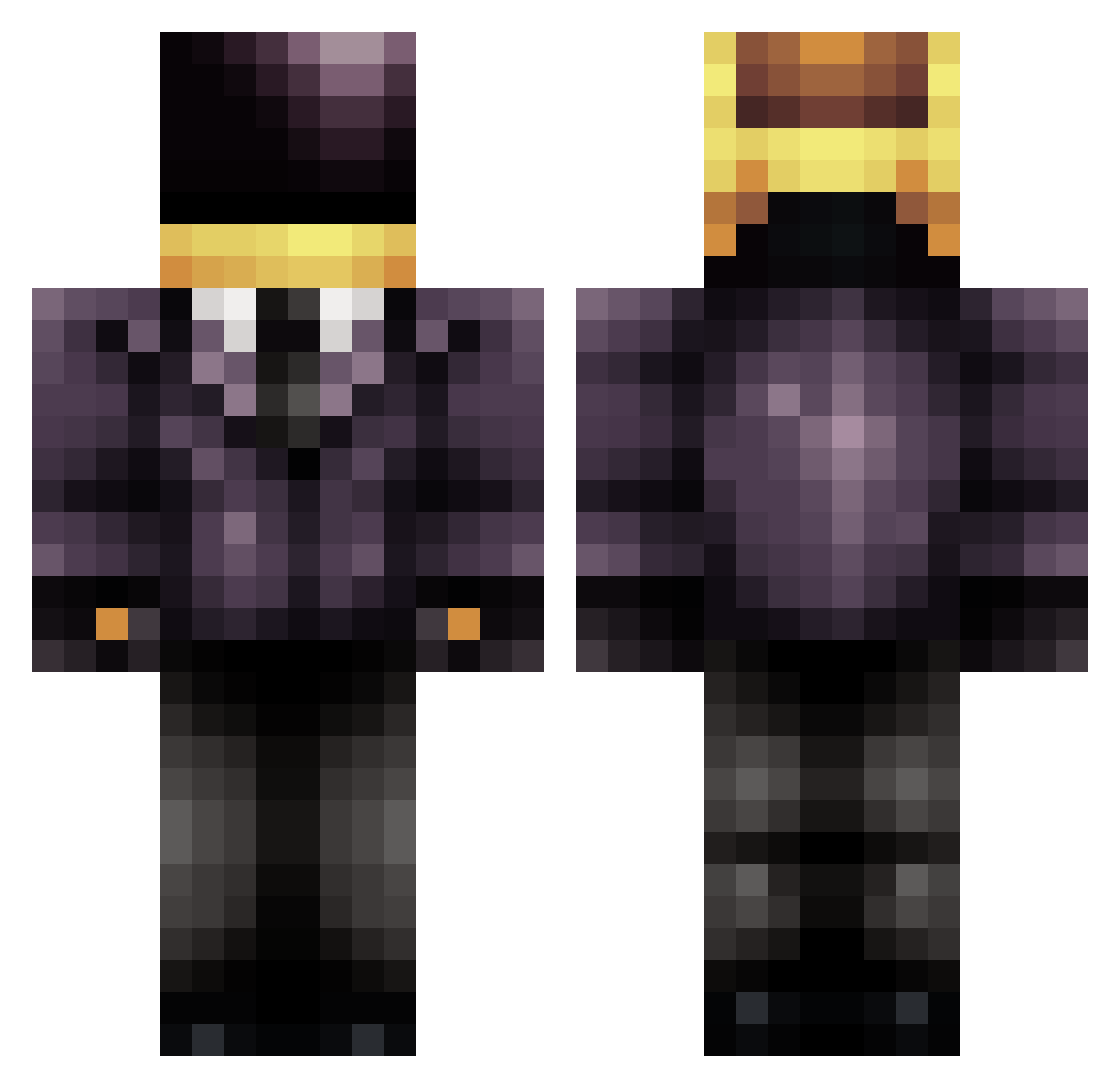
Current Minecraft skin of the player johncena108, loaded from the official Mojang API. Rotate the 3D model with your mouse or finger, then download the skin as a PNG file and use it in Minecraft: Bedrock Edition or Java Edition for free. When johncena108 changes their skin, this page updates automatically and the old skin stays in the history below.
Other players with this skin (709)
johncena108 was the 187th player we have seen with this skin, first spotted on 27.08.2026. The same skin was seen on these players. Open a nickname to see their current skin and skin history.
 Army_Ranger48 DakotaBP TommyTea Mirandareddo ethankjfan rocomax123 About69Ninjas DCela1 snaevar101 GHR4321 Nielsdepro diegoju wolf18899 Bubba102 Cakeman89 ngyn PayableUpnDeath gladiastorm ryo90000 Grather Yelpy Ozmadus Faze_Harambe2323 LetatorQQ subtlewolf tntgoesfatoosh kyler17 Kinest KingPriam wanerzatver colbster77 VjekoSC Avengeus TonyNarayan WasabeMustard VICIOUS_pudding Heldaeus Brett_925 BassAndStuff killerklix LeisureLex LazerMoose420 _Knotty Vincentkcraft eriktheshadow Demonstrated tangyboi tyo34 Hemlock1 CREATESF dcStarman Sr_Urano bobtheninja123 SnowManZ Oogladius NockaRocka bunny343 fred_nrnj KumiLife Admiral10011
More Daft Punk Minecraft skins
How to install the johncena108 skin
- Press the Download button above to save the skin as a PNG file.
- Minecraft: Bedrock Edition (PE): open the Dressing Room from the main menu (or tap your character → Edit Character), go to Classic Skins → Owned, press the + (new skin) button, choose the downloaded PNG and pick the Classic (Steve) model. Works on PC and mobile; consoles cannot import custom skins.
- Minecraft: Java Edition: open the Minecraft Launcher, go to the Skins tab, click New Skin, load the PNG, pick the Classic (Steve) model and press Save & Use. You can also upload it at minecraft.net → Profile → Change Skin.
The skin does not show up after import - what should I do?
Restart Minecraft and open the Dressing Room again - imported skins sometimes appear only after a restart. Also make sure you selected the imported skin and picked the Classic (Steve) model.
Which model should I choose, Classic or Slim?
This skin is designed for the Classic (Steve) model. If you pick the wrong model, the arms of the skin will look stretched or squeezed.
Is the skin of johncena108 free to download?
Yes. Press Download, save the PNG file and use it in Minecraft: Bedrock Edition or Java Edition - no payment or registration needed. The skin also works on multiplayer servers and Realms.
More skins
Looking for more? Go back to all Minecraft skins and check the top skins of the week, month and all time, or find any player's skin by nickname.