
jinyoging - Minecraft Skins & Skin History
Current Minecraft skin of the player jinyoging, loaded from the official Mojang API. Rotate the 3D model with your mouse or finger, then download the skin as a PNG file and use it in Minecraft: Bedrock Edition or Java Edition for free. When jinyoging changes their skin, this page updates automatically and the old skin stays in the history below.
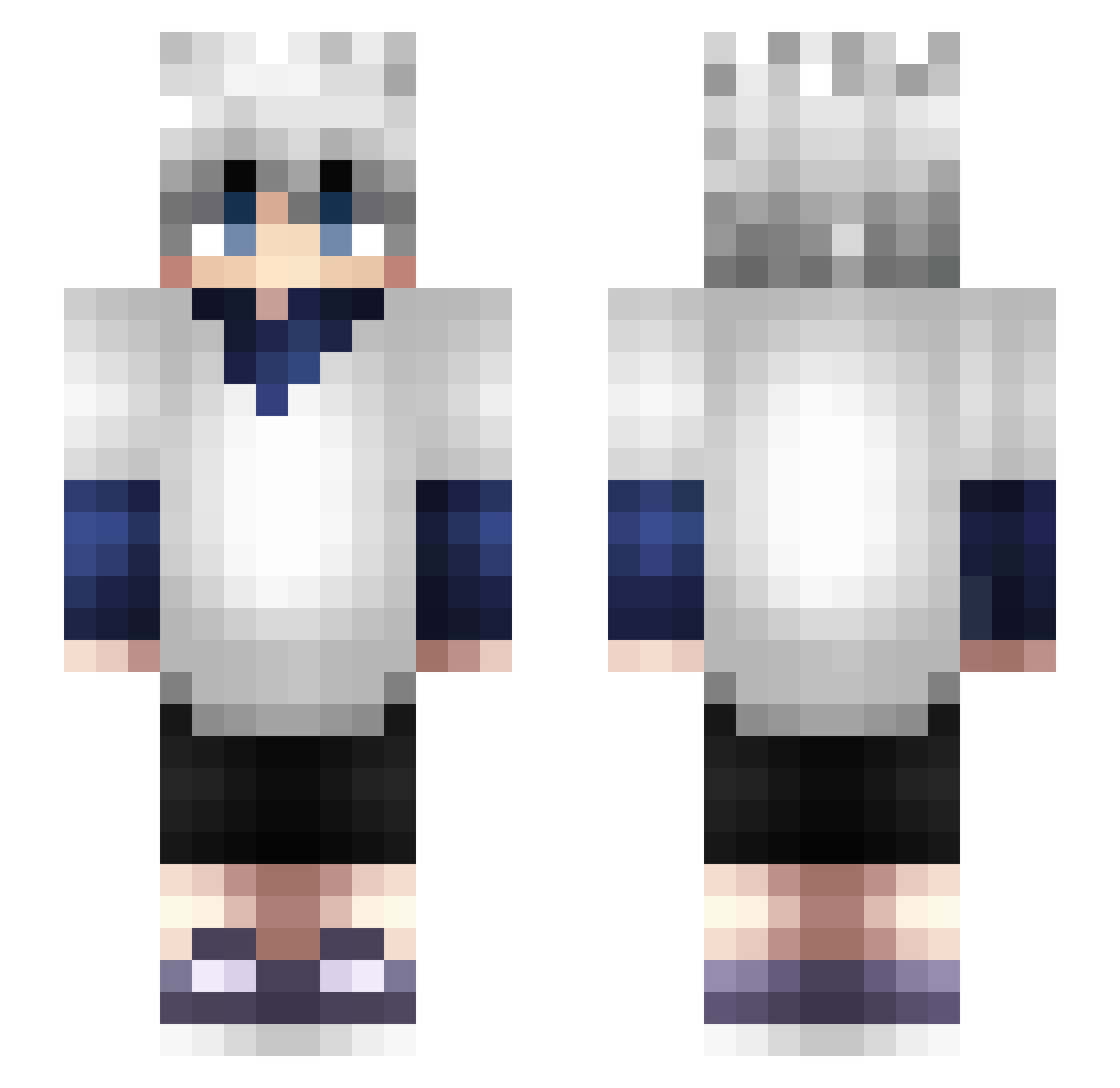
Other players with this skin (366)
jinyoging was the 59th player we have seen with this skin, first spotted on 12.08.2026. The same skin was seen on these players. Open a nickname to see their current skin and skin history.
 TRXq8 LittleKrog hochelaga kotelojr Tageza eXoAsh94 Tyro2304 Reachdj Maricon18 Trp4skill NiChanxD Daichi3333 swshin3 Kero988 KilluaXi TheresFaith Evilcat13 FLEXSIN123 PalmTreeJuice Akroy AppleJuuice17 GabsCabs Killua200813 Wally3D Tido_22 ryugje mihal997 fargaN_ Yin_Yong yuwoor Kynamox xuqez
 lCaptainPricel Ayakooow drindaddy BrenzoTheEndo VetoToxic Zeqxr Red_Nax Sol0Player jakurrr Biggerbaby Bobfish04 kuro_cafe CaptainElbarto
 Coolspiderpig01 spee_d02 knedl809 PatiVier roblus Beelauer28 Killua2534 Invalide54 DC_GON shadowscy Sawaf_ AzMadixx13 Ledr0ver Hammerr Zwei06
More Killua Zoldyck Minecraft skins
See all 181 Killua Zoldyck skins
How to install the jinyoging skin
- Press the Download button above to save the skin as a PNG file.
- Minecraft: Bedrock Edition (PE): open the Dressing Room from the main menu (or tap your character → Edit Character), go to Classic Skins → Owned, press the + (new skin) button, choose the downloaded PNG and pick the Slim (Alex) model. Works on PC and mobile; consoles cannot import custom skins.
- Minecraft: Java Edition: open the Minecraft Launcher, go to the Skins tab, click New Skin, load the PNG, pick the Slim (Alex) model and press Save & Use. You can also upload it at minecraft.net → Profile → Change Skin.
The skin does not show up after import - what should I do?
Restart Minecraft and open the Dressing Room again - imported skins sometimes appear only after a restart. Also make sure you selected the imported skin and picked the Slim (Alex) model.
Which model should I choose, Classic or Slim?
This skin is designed for the Slim (Alex) model. If you pick the wrong model, the arms of the skin will look stretched or squeezed.
Is the skin of jinyoging free to download?
Yes. Press Download, save the PNG file and use it in Minecraft: Bedrock Edition or Java Edition - no payment or registration needed. The skin also works on multiplayer servers and Realms.
More skins
Looking for more? Go back to all Minecraft skins and check the top skins of the week, month and all time, or find any player's skin by nickname.