
iksDe2e - Minecraft Skins & Skin History
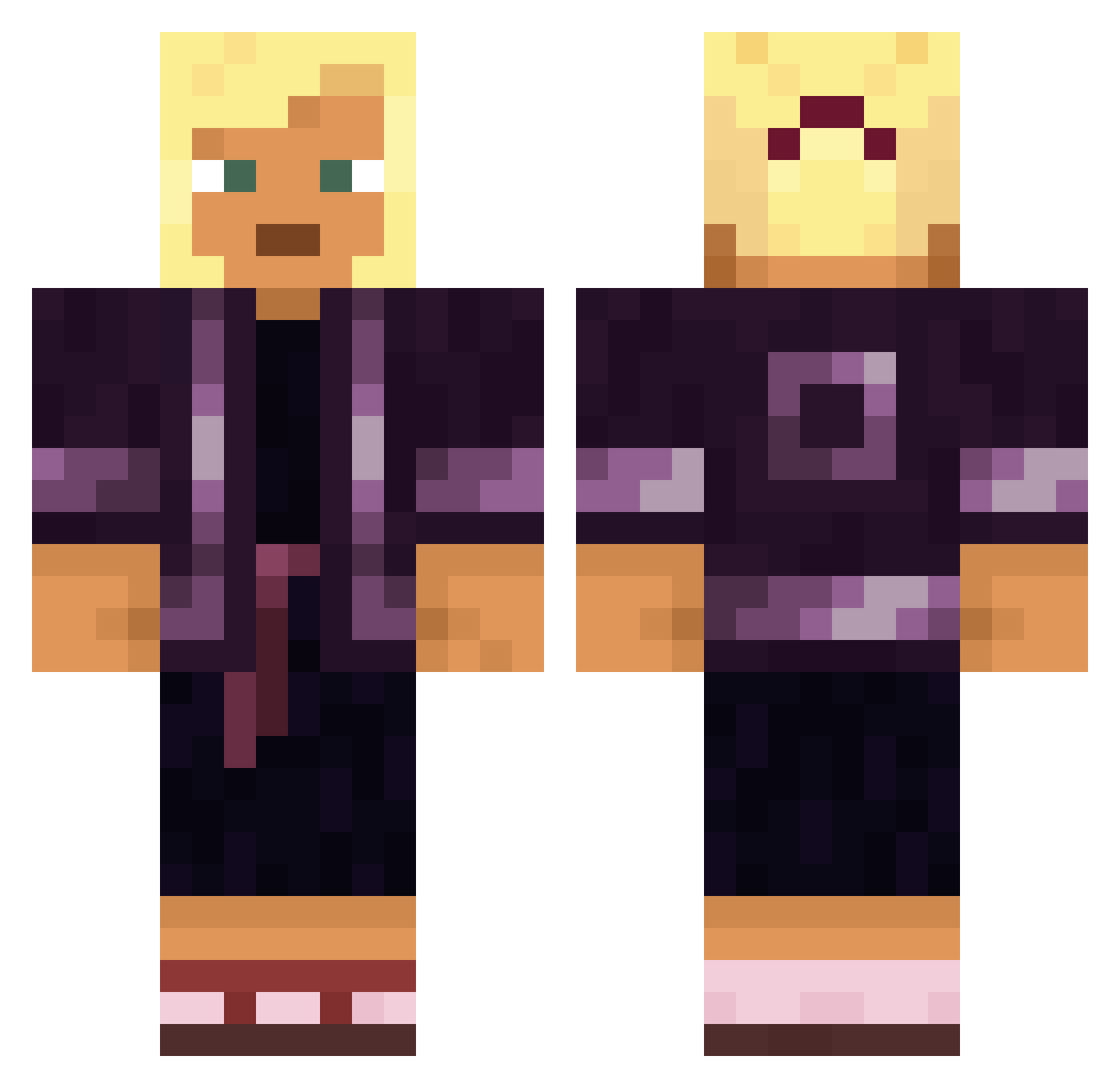
Current Minecraft skin of the player iksDe2e, loaded from the official Mojang API. Rotate the 3D model with your mouse or finger, then download the skin as a PNG file and use it in Minecraft: Bedrock Edition or Java Edition for free. When iksDe2e changes their skin, this page updates automatically and the old skin stays in the history below.
Other players with this skin (1357)
iksDe2e was the 141st player we have seen with this skin, first spotted on 03.08.2026. The same skin was seen on these players. Open a nickname to see their current skin and skin history.
 Khun_tid DumbleBumble lndesirable Szymek_126 AranhA TheXentriK Phoen1kxx v3natus Lucki_IV mannan LucasLiebtGilfs JBanks94 Falterer MetaTin001 matcraftzz
 iRoG24 ThreezZ PReSF Nahle HUTAOSBOYFRIEND
 Heduard Miojinho housy
 RageApex Padmasana zimin Trustworthy BumpkinBoi sebal_ er7ck MOBFY MertGrcx Bekiss Shutary
 AntonioBA23 ItzMexihulkBruh SAKSAL NetherNachoGamer Scytale Hohnya Cablob62 Appealable
 N0va_1220 leeinsuh Astronom15478 BigSheepFTW junhynx104 senpiespider KANDOL AlexSun145 YukkuriGame notinekiii SoLaNuMS savikovski OeLown123 pareus kamias Straphanger DownturnED Bouchette
More Kimono Minecraft skins
How to install the iksDe2e skin
- Press the Download button above to save the skin as a PNG file.
- Minecraft: Bedrock Edition (PE): open the Dressing Room from the main menu (or tap your character → Edit Character), go to Classic Skins → Owned, press the + (new skin) button, choose the downloaded PNG and pick the Classic (Steve) model. Works on PC and mobile; consoles cannot import custom skins.
- Minecraft: Java Edition: open the Minecraft Launcher, go to the Skins tab, click New Skin, load the PNG, pick the Classic (Steve) model and press Save & Use. You can also upload it at minecraft.net → Profile → Change Skin.
The skin does not show up after import - what should I do?
Restart Minecraft and open the Dressing Room again - imported skins sometimes appear only after a restart. Also make sure you selected the imported skin and picked the Classic (Steve) model.
Which model should I choose, Classic or Slim?
This skin is designed for the Classic (Steve) model. If you pick the wrong model, the arms of the skin will look stretched or squeezed.
Is the skin of iksDe2e free to download?
Yes. Press Download, save the PNG file and use it in Minecraft: Bedrock Edition or Java Edition - no payment or registration needed. The skin also works on multiplayer servers and Realms.
More skins
Looking for more? Go back to all Minecraft skins and check the top skins of the week, month and all time, or find any player's skin by nickname.