
idkhu - Minecraft Skins & Skin History
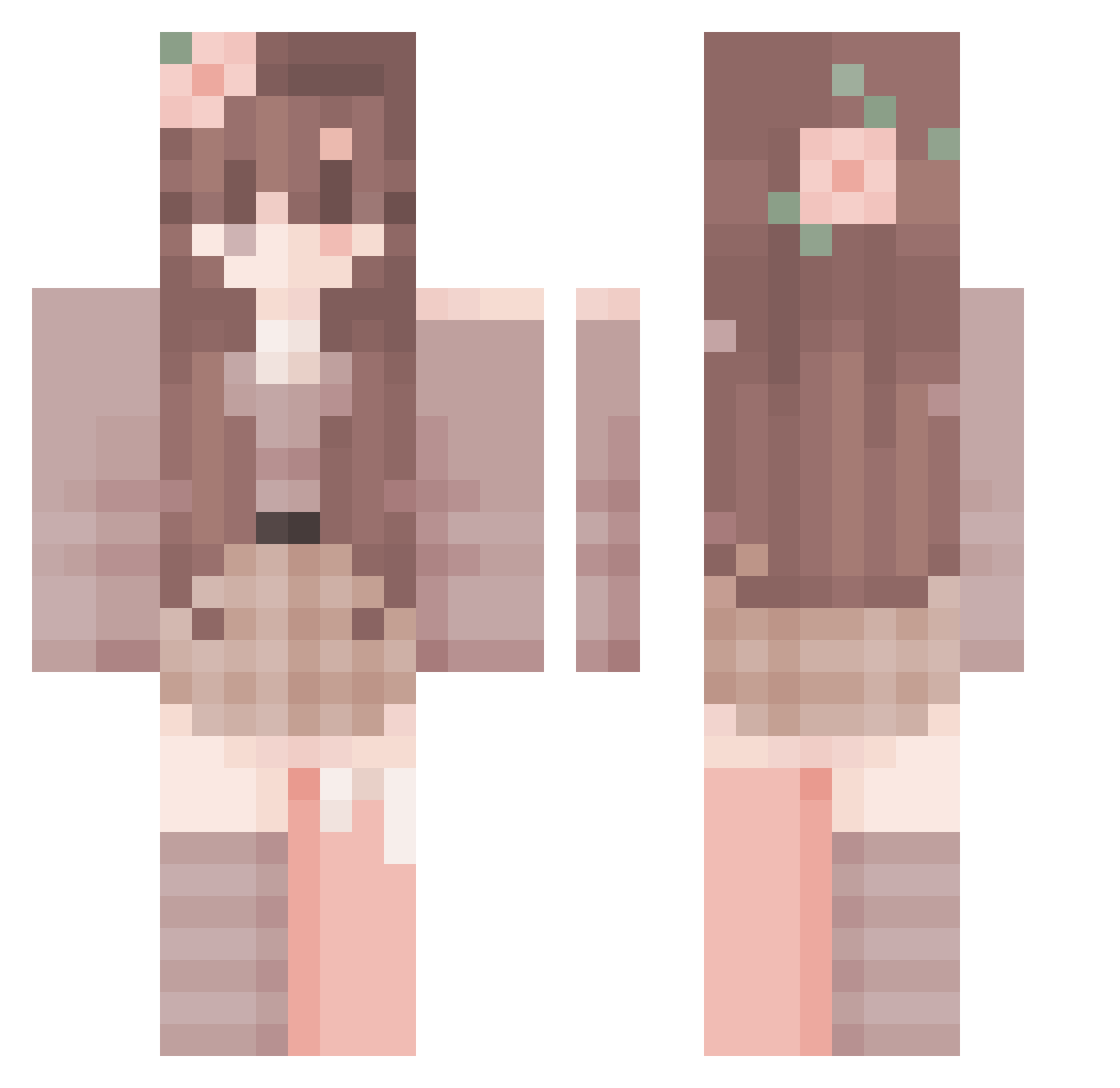
Current Minecraft skin of the player idkhu, loaded from the official Mojang API. Rotate the 3D model with your mouse or finger, then download the skin as a PNG file and use it in Minecraft: Bedrock Edition or Java Edition for free. When idkhu changes their skin, this page updates automatically and the old skin stays in the history below.
Other players with this skin (287)
idkhu was the 134th player we have seen with this skin, first spotted on 08.09.2026. The same skin was seen on these players. Open a nickname to see their current skin and skin history.
 Velaaro AmiyaSora GabrielM2001 Himmari
 EsNezinu Ichnichtttt tbdkitsune Jimvq BDM_ RubyIsLove AriC2010 Emira_Longfire hyemin515 zzxicq Faluzx p0tetil MERSEUS2 prodluccii Larpspear grejd_ QinZishuo TheBestNanNiang Belladi02 LYLSpongeBob SmartieFace jerryan99
 Deadgirlie velpro6881 nvxiia_ yoyoyoyouo lavviska swen2314 Neshinotu ambercaitlin arsksp Luohy666 Xsiu_ abichoo iKaru_LW Roqyy36
 Bligglehickfish Aliciapink llz3r rllmog MottledSet LandedOwl900 Ubingg jess_1427 Granola271 CodedUser
 yurelli HighAgency kittykithes ChiukoMc JerFlo aaana2409 Randomperson2434 GerPanos mythiqq_ bella13
More Flower Crown Minecraft skins
See all 3467 Flower Crown skins
How to install the idkhu skin
- Press the Download button above to save the skin as a PNG file.
- Minecraft: Bedrock Edition (PE): open the Dressing Room from the main menu (or tap your character → Edit Character), go to Classic Skins → Owned, press the + (new skin) button, choose the downloaded PNG and pick the Classic (Steve) model. Works on PC and mobile; consoles cannot import custom skins.
- Minecraft: Java Edition: open the Minecraft Launcher, go to the Skins tab, click New Skin, load the PNG, pick the Classic (Steve) model and press Save & Use. You can also upload it at minecraft.net → Profile → Change Skin.
The skin does not show up after import - what should I do?
Restart Minecraft and open the Dressing Room again - imported skins sometimes appear only after a restart. Also make sure you selected the imported skin and picked the Classic (Steve) model.
Which model should I choose, Classic or Slim?
This skin is designed for the Classic (Steve) model. If you pick the wrong model, the arms of the skin will look stretched or squeezed.
Is the skin of idkhu free to download?
Yes. Press Download, save the PNG file and use it in Minecraft: Bedrock Edition or Java Edition - no payment or registration needed. The skin also works on multiplayer servers and Realms.
More skins
Looking for more? Go back to all Minecraft skins and check the top skins of the week, month and all time, or find any player's skin by nickname.