
hannahmae03 - Minecraft Skins & Skin History
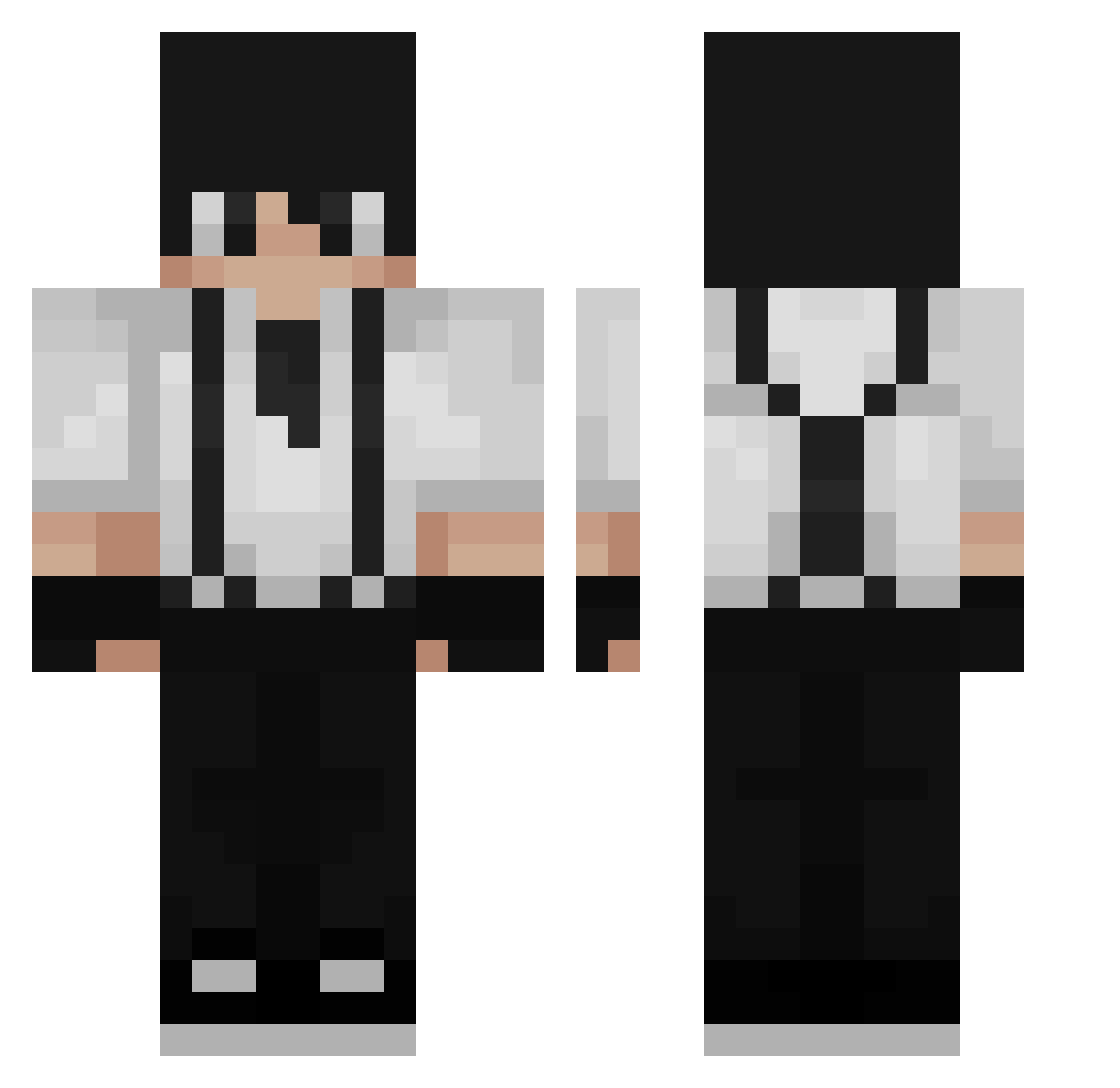
Current Minecraft skin of the player hannahmae03, loaded from the official Mojang API. Rotate the 3D model with your mouse or finger, then download the skin as a PNG file and use it in Minecraft: Bedrock Edition or Java Edition for free. When hannahmae03 changes their skin, this page updates automatically and the old skin stays in the history below.
Other players with this skin (281)
hannahmae03 was the 231st player we have seen with this skin, first spotted on 31.10.2026. The same skin was seen on these players. Open a nickname to see their current skin and skin history.
 AleRrz CordisDie10 shxichi Higex SK_Akino Hearless2 black7master Opgesnoven_ 1ndiancurry44444 AQHB PaceLikePeayz WayneLiu27 Akuu_ xRAQ STAVISKA Chollonde neptunesky Hermes221 KhaueFox JayFrizzle159 Karl_So bickleboy NoahM1806 Psuado Dedaliq xDSergioDx Godfather204 MR_LonelY1 raykayz Jbugl Bluefire663_ Crello Athyyys ddingeun_ potatois oliwierkox12 LuminaryFriend 01mo _zAngel KolegaZawieja __NoSok_ AdriGamma AlexandraR BoTax75 CallMeBack Bielziin10 thepieniek mantacuerpos BluryMcFlurry _KlauS_G2_ RefrianOWO Maximussmal iTzBKS UnknownMidnite Yauto TryHardden Nasenhut jUdge_0 bcruz7 rlaehwls404
How to install the hannahmae03 skin
- Press the Download button above to save the skin as a PNG file.
- Minecraft: Bedrock Edition (PE): open the Dressing Room from the main menu (or tap your character → Edit Character), go to Classic Skins → Owned, press the + (new skin) button, choose the downloaded PNG and pick the Classic (Steve) model. Works on PC and mobile; consoles cannot import custom skins.
- Minecraft: Java Edition: open the Minecraft Launcher, go to the Skins tab, click New Skin, load the PNG, pick the Classic (Steve) model and press Save & Use. You can also upload it at minecraft.net → Profile → Change Skin.
The skin does not show up after import - what should I do?
Restart Minecraft and open the Dressing Room again - imported skins sometimes appear only after a restart. Also make sure you selected the imported skin and picked the Classic (Steve) model.
Which model should I choose, Classic or Slim?
This skin is designed for the Classic (Steve) model. If you pick the wrong model, the arms of the skin will look stretched or squeezed.
Is the skin of hannahmae03 free to download?
Yes. Press Download, save the PNG file and use it in Minecraft: Bedrock Edition or Java Edition - no payment or registration needed. The skin also works on multiplayer servers and Realms.
More skins
Looking for more? Go back to all Minecraft skins and check the top skins of the week, month and all time, or find any player's skin by nickname.