
grass_patch_79 - Minecraft Skins & Skin History
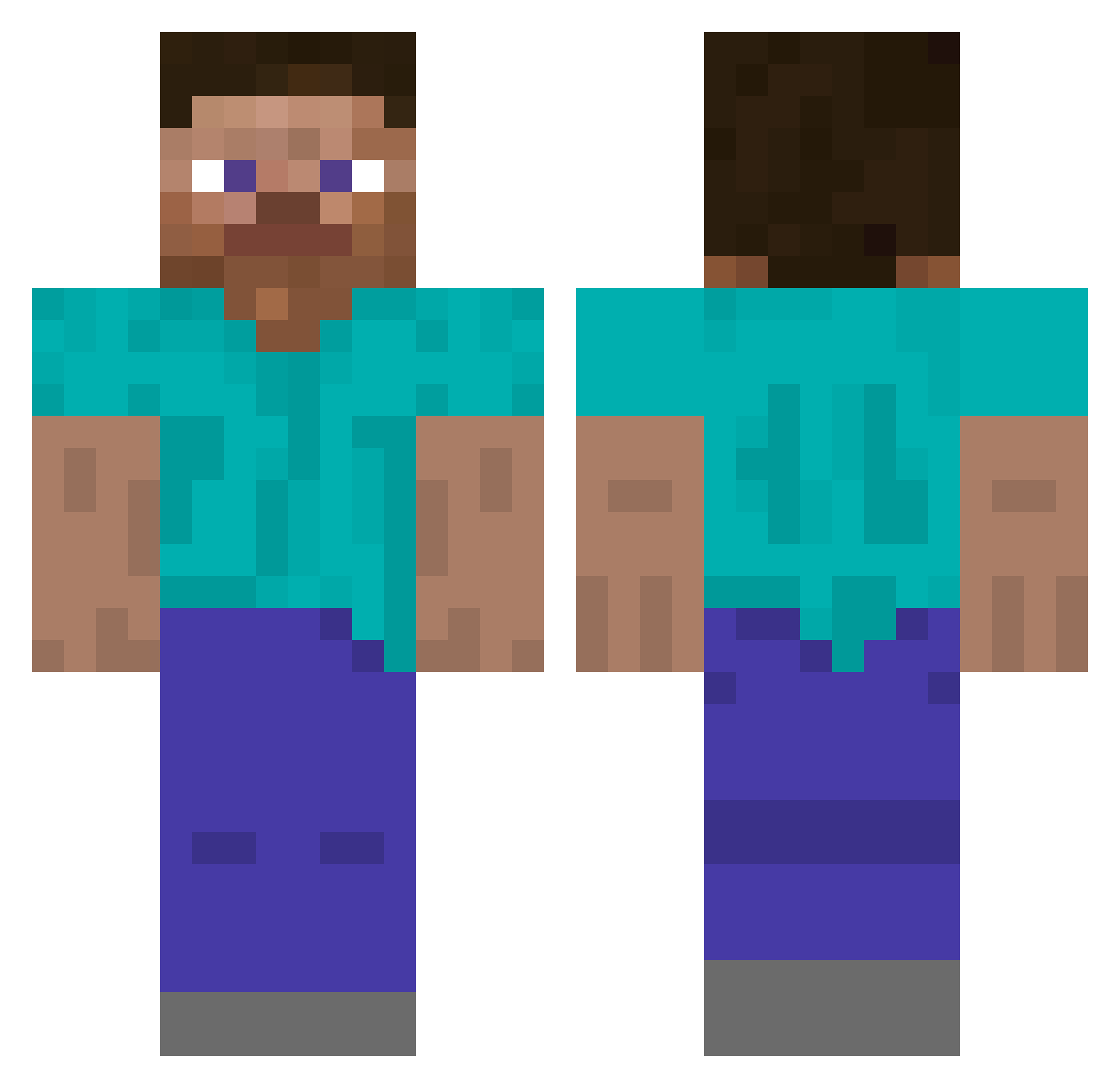
Current Minecraft skin of the player grass_patch_79, loaded from the official Mojang API. Rotate the 3D model with your mouse or finger, then download the skin as a PNG file and use it in Minecraft: Bedrock Edition or Java Edition for free. When grass_patch_79 changes their skin, this page updates automatically and the old skin stays in the history below.
Other players with this skin (5791)
grass_patch_79 was the 5525th player we have seen with this skin, first spotted on 14.11.2026. The same skin was seen on these players. Open a nickname to see their current skin and skin history.
 ForestCreeper Maikan Y25_SHUN Ziotic NishaNougatEis valnark lakman__ bibi2011 xXSabuxx PaintedHeptagon Glebur Mucker zirboman Wiselike TheNeuraProject Cahuita kiler50 Kraters isaias_sanchez WeMove luckpen Adam_OW B0M_B0NES MrBerat Antimonium shotogot Wontedpro evilsvenne1337 ferrins33 FEMMAN BombBullet Heang IGNisChris Capt_Casual Chowder7116 AEIACADEMY sami_the_real _Butterflyzz joaobw_ Yohimbine omchitlangia 0775 attackgoat instill dribbleinmymouth HugiesLaMasse EmperorMidas Mr_Eoghan HugeBigBiceps HORSECOKC Gwello Verstappen __POP_ Fuddles Spoksie117 Rickenharp RivalRebel12 laureano_26 Lucienne xKasura
How to install the grass_patch_79 skin
- Press the Download button above to save the skin as a PNG file.
- Minecraft: Bedrock Edition (PE): open the Dressing Room from the main menu (or tap your character → Edit Character), go to Classic Skins → Owned, press the + (new skin) button, choose the downloaded PNG and pick the Classic (Steve) model. Works on PC and mobile; consoles cannot import custom skins.
- Minecraft: Java Edition: open the Minecraft Launcher, go to the Skins tab, click New Skin, load the PNG, pick the Classic (Steve) model and press Save & Use. You can also upload it at minecraft.net → Profile → Change Skin.
The skin does not show up after import - what should I do?
Restart Minecraft and open the Dressing Room again - imported skins sometimes appear only after a restart. Also make sure you selected the imported skin and picked the Classic (Steve) model.
Which model should I choose, Classic or Slim?
This skin is designed for the Classic (Steve) model. If you pick the wrong model, the arms of the skin will look stretched or squeezed.
Is the skin of grass_patch_79 free to download?
Yes. Press Download, save the PNG file and use it in Minecraft: Bedrock Edition or Java Edition - no payment or registration needed. The skin also works on multiplayer servers and Realms.
More skins
Looking for more? Go back to all Minecraft skins and check the top skins of the week, month and all time, or find any player's skin by nickname.