
funkyfuturedia - Minecraft Skins & Skin History
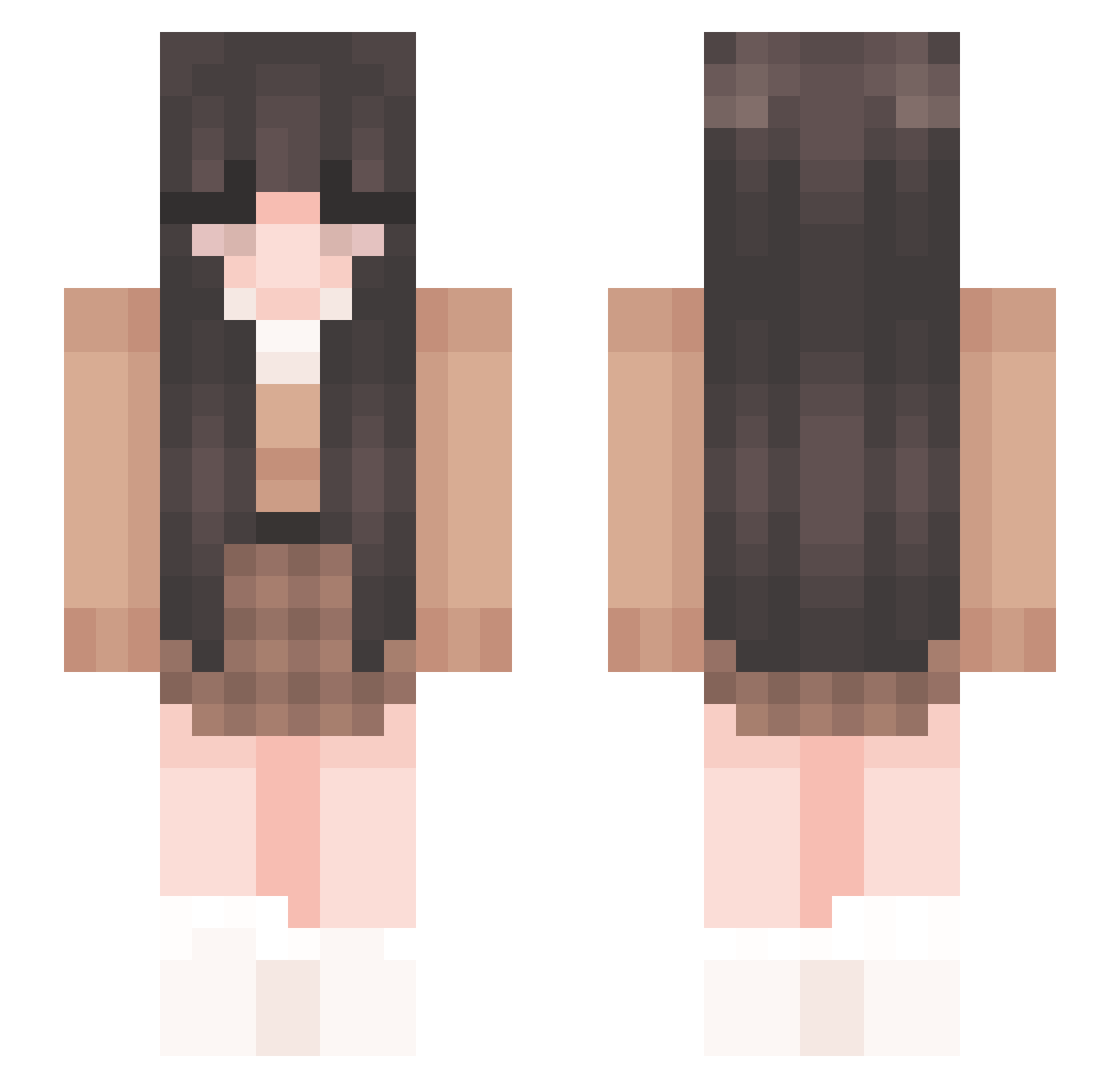
Current Minecraft skin of the player funkyfuturedia, loaded from the official Mojang API. Rotate the 3D model with your mouse or finger, then download the skin as a PNG file and use it in Minecraft: Bedrock Edition or Java Edition for free. When funkyfuturedia changes their skin, this page updates automatically and the old skin stays in the history below.
Other players with this skin (331)
funkyfuturedia was the 307th player we have seen with this skin, first spotted on 13.11.2026. The same skin was seen on these players. Open a nickname to see their current skin and skin history.
 fordesker Airiza Terroristx X_Sannehh AgnesPrincess iliilillili AsuraShira GamerOM13 DogShun_20060831 AriaLuvv Veidukistrukiss striingbean n0emi RosieHo choccyymiilk meiyyah D3vir Moonlistico tigi102 _solvely_ Purkimoo Foxy_live Ploukosse YellowMoon1124 Xyrisinnit Gabby25 teeodoraa luhvteja Bumbleli rrera Stefikaa ebru07 Klodhya Patrix49 anniebeumer TanyaMichelle 444ols Tar0Bob0 Gorylia7 astaliquid SodaLee3 junjier xxadryxx featmedusa Au1nmu iSoftHoney kvxnqu maddie_html DinoNuggets33333 DivineBun Yukielele victoria3lise _DriXs_ noa2020 MiggyTheMonster Jazzy816 CoughingBlood MushyPeaz535 maggiemaxwell stonemblack
More Cozy Minecraft skins
How to install the funkyfuturedia skin
- Press the Download button above to save the skin as a PNG file.
- Minecraft: Bedrock Edition (PE): open the Dressing Room from the main menu (or tap your character → Edit Character), go to Classic Skins → Owned, press the + (new skin) button, choose the downloaded PNG and pick the Slim (Alex) model. Works on PC and mobile; consoles cannot import custom skins.
- Minecraft: Java Edition: open the Minecraft Launcher, go to the Skins tab, click New Skin, load the PNG, pick the Slim (Alex) model and press Save & Use. You can also upload it at minecraft.net → Profile → Change Skin.
The skin does not show up after import - what should I do?
Restart Minecraft and open the Dressing Room again - imported skins sometimes appear only after a restart. Also make sure you selected the imported skin and picked the Slim (Alex) model.
Which model should I choose, Classic or Slim?
This skin is designed for the Slim (Alex) model. If you pick the wrong model, the arms of the skin will look stretched or squeezed.
Is the skin of funkyfuturedia free to download?
Yes. Press Download, save the PNG file and use it in Minecraft: Bedrock Edition or Java Edition - no payment or registration needed. The skin also works on multiplayer servers and Realms.
More skins
Looking for more? Go back to all Minecraft skins and check the top skins of the week, month and all time, or find any player's skin by nickname.