
freya_3105 - Minecraft Skins & Skin History
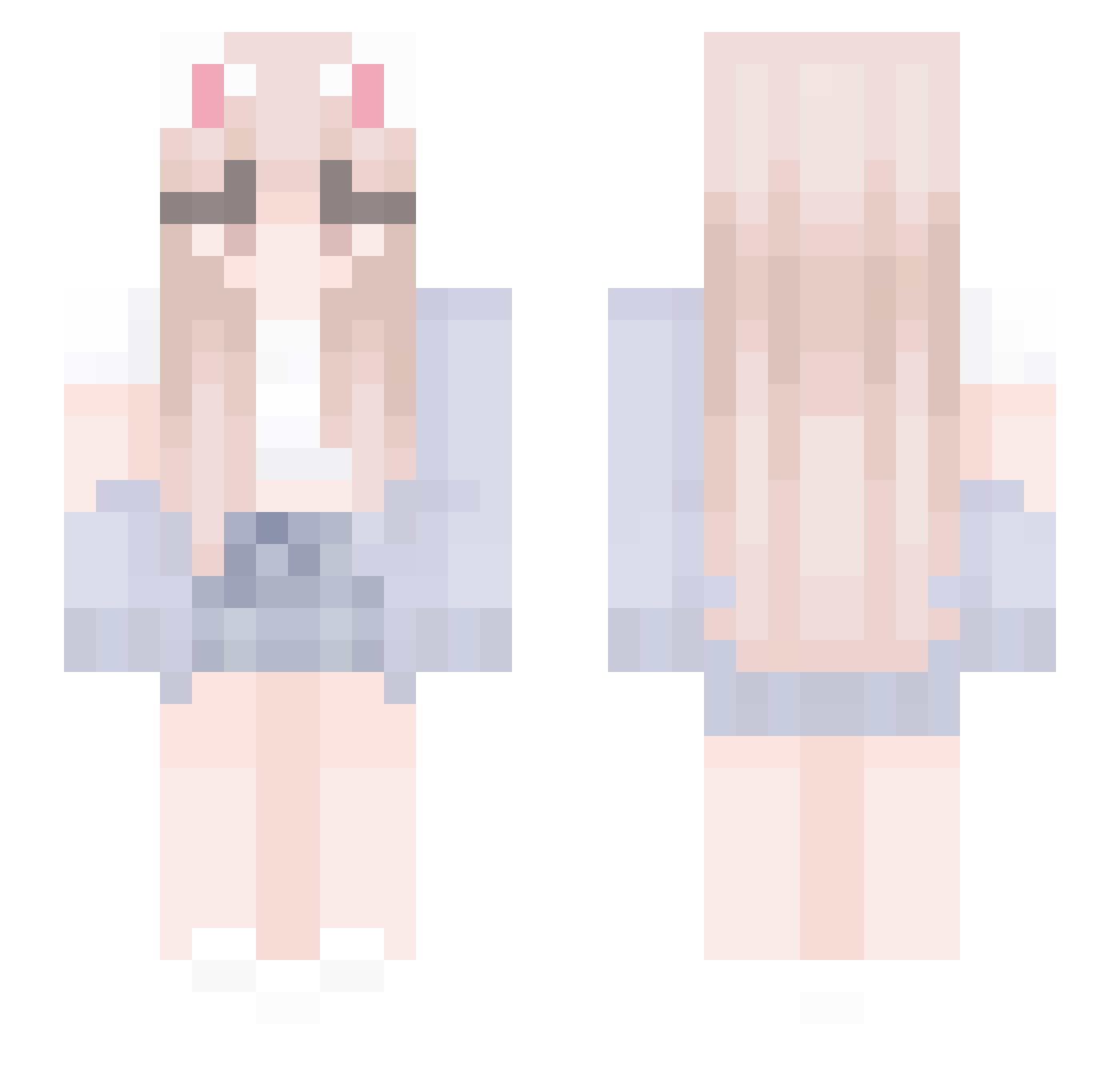
Current Minecraft skin of the player freya_3105, loaded from the official Mojang API. Rotate the 3D model with your mouse or finger, then download the skin as a PNG file and use it in Minecraft: Bedrock Edition or Java Edition for free. When freya_3105 changes their skin, this page updates automatically and the old skin stays in the history below.
Other players with this skin (438)
freya_3105 was the 180th player we have seen with this skin, first spotted on 05.09.2026. The same skin was seen on these players. Open a nickname to see their current skin and skin history.
 ThermalKn
 wvyiii tysia5 Lauttyy StellaTbh Klarinka17 CaptainNamii hye_lm ElCheffee FRANCHU_14_ tubao33 Vivian_ow gu_xin_ya_ Schneeball1001 zuzu3090 Ariiii8 TheKathy heijeun gng98 eboybagger Neumark_ MAL_kKaGYV Cra_ek ILVUV Underscore_Dev Diego02264 Sarah080408 yukiyo_____ CYJ125 dasniperz HannaO_O xBeyzanur_Durmaz DenixMar Grajmy Hodongg SIAO_KEAI ch0314 YouziMaster The_flowers_fall Cheese_nph_why yes_bang toxzan1tyy skttle__chan Finixly ny_0 lihsiyung ciru RemMajiTenshi xnekosuki RANGi_615 HYEEEEC LynxFrost monstercraft117 sweety_Ann itsamag1c_ Broccoli_Ry0 Fu__Rong Apeiria_01 bellus_ Gargantua0508
More Cardigan Minecraft skins
How to install the freya_3105 skin
- Press the Download button above to save the skin as a PNG file.
- Minecraft: Bedrock Edition (PE): open the Dressing Room from the main menu (or tap your character → Edit Character), go to Classic Skins → Owned, press the + (new skin) button, choose the downloaded PNG and pick the Slim (Alex) model. Works on PC and mobile; consoles cannot import custom skins.
- Minecraft: Java Edition: open the Minecraft Launcher, go to the Skins tab, click New Skin, load the PNG, pick the Slim (Alex) model and press Save & Use. You can also upload it at minecraft.net → Profile → Change Skin.
The skin does not show up after import - what should I do?
Restart Minecraft and open the Dressing Room again - imported skins sometimes appear only after a restart. Also make sure you selected the imported skin and picked the Slim (Alex) model.
Which model should I choose, Classic or Slim?
This skin is designed for the Slim (Alex) model. If you pick the wrong model, the arms of the skin will look stretched or squeezed.
Is the skin of freya_3105 free to download?
Yes. Press Download, save the PNG file and use it in Minecraft: Bedrock Edition or Java Edition - no payment or registration needed. The skin also works on multiplayer servers and Realms.
More skins
Looking for more? Go back to all Minecraft skins and check the top skins of the week, month and all time, or find any player's skin by nickname.