
ericsww05 - Minecraft Skins & Skin History
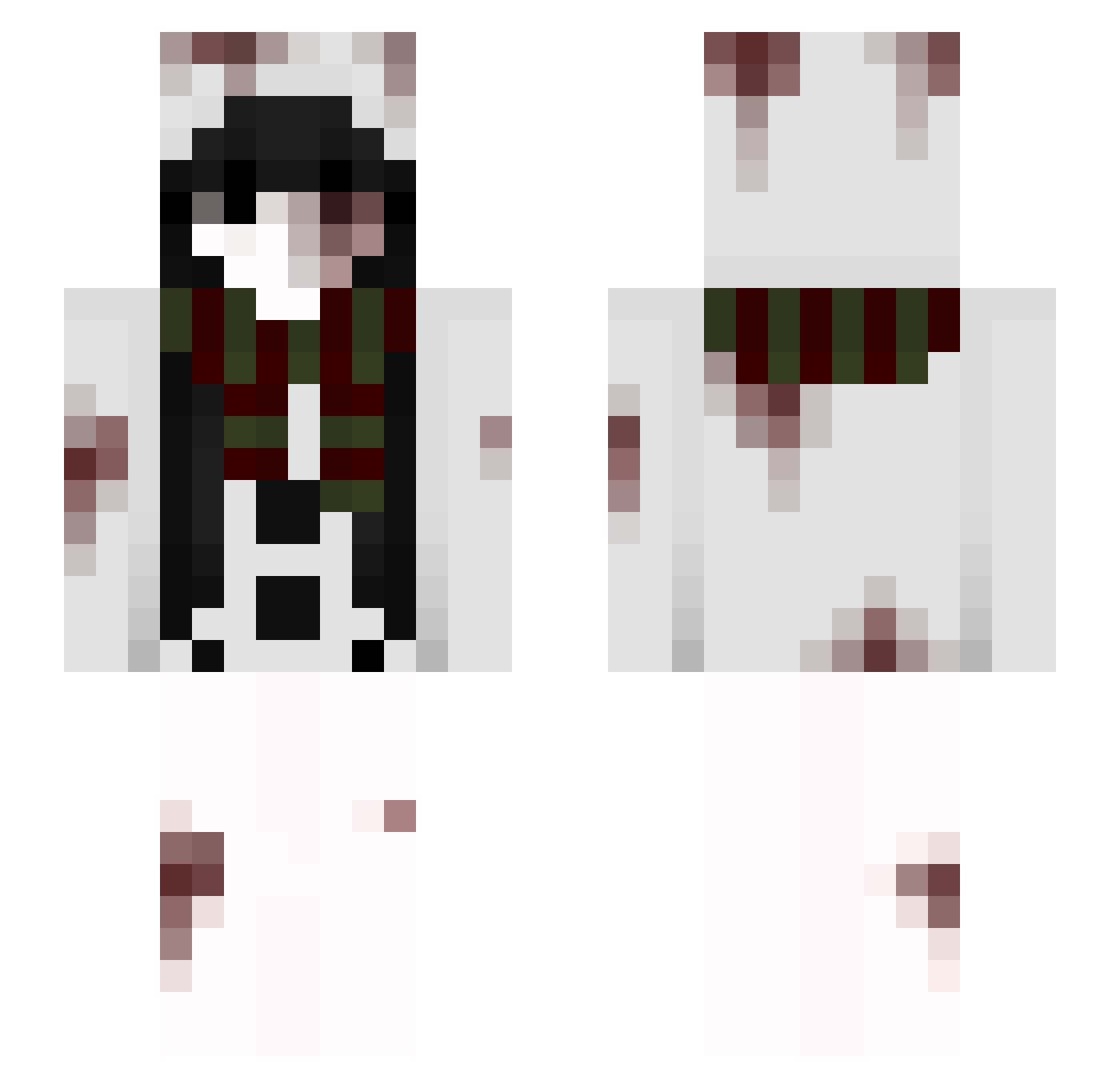
Current Minecraft skin of the player ericsww05, loaded from the official Mojang API. Rotate the 3D model with your mouse or finger, then download the skin as a PNG file and use it in Minecraft: Bedrock Edition or Java Edition for free. When ericsww05 changes their skin, this page updates automatically and the old skin stays in the history below.
Other players with this skin (47)
ericsww05 was the 10th player we have seen with this skin, first spotted on 15.08.2026. The same skin was seen on these players. Open a nickname to see their current skin and skin history.
 sakunoh_79pN Jubaid Mino_Mvp L0w0ng_Void_gz2 Kzip_YVBXn_06_14 1q23t kidneystompersgf 2odycm BlazeKid00 Dark_Gir100 XiterDeSorocaba sakunoh_5LK3y75V sakunoh_2EyjYDhC sakunoh_8wR Kzip_AorPG_06_14 sakunoh_tHx PrimalAnt55 liloishere51r DREG1NG_DEEZ sakunoh_NCB6tZBC Kzip_ituZG_06_14 sakunoh_ehXR6 sakunoh_Tnp7 sakunoh_LDD1 sakunoh_YLlrGLZ sakunoh_zZEAddJ sakunoh_YG4bu EwMuslims hunter_Sederwall Ezio_dv DelMop mogalts_35blm sakunoh_QHhPjLO cJriousguiltles Monkey9tV376 sakunoh_GBlTPef sakunoh_NxMdUU Qh1235 sakunoh_pimVanp KiercnAteD1kNig sakunoh_nP945FN sakunoh_50hDHVt Sv2Corew07 lededpatade4U opportunisticAm lotcuumshot Batman_night_
More Blood Minecraft skins
How to install the ericsww05 skin
- Press the Download button above to save the skin as a PNG file.
- Minecraft: Bedrock Edition (PE): open the Dressing Room from the main menu (or tap your character → Edit Character), go to Classic Skins → Owned, press the + (new skin) button, choose the downloaded PNG and pick the Slim (Alex) model. Works on PC and mobile; consoles cannot import custom skins.
- Minecraft: Java Edition: open the Minecraft Launcher, go to the Skins tab, click New Skin, load the PNG, pick the Slim (Alex) model and press Save & Use. You can also upload it at minecraft.net → Profile → Change Skin.
The skin does not show up after import - what should I do?
Restart Minecraft and open the Dressing Room again - imported skins sometimes appear only after a restart. Also make sure you selected the imported skin and picked the Slim (Alex) model.
Which model should I choose, Classic or Slim?
This skin is designed for the Slim (Alex) model. If you pick the wrong model, the arms of the skin will look stretched or squeezed.
Is the skin of ericsww05 free to download?
Yes. Press Download, save the PNG file and use it in Minecraft: Bedrock Edition or Java Edition - no payment or registration needed. The skin also works on multiplayer servers and Realms.
More skins
Looking for more? Go back to all Minecraft skins and check the top skins of the week, month and all time, or find any player's skin by nickname.