
er00altruistic98 - Minecraft Skins & Skin History
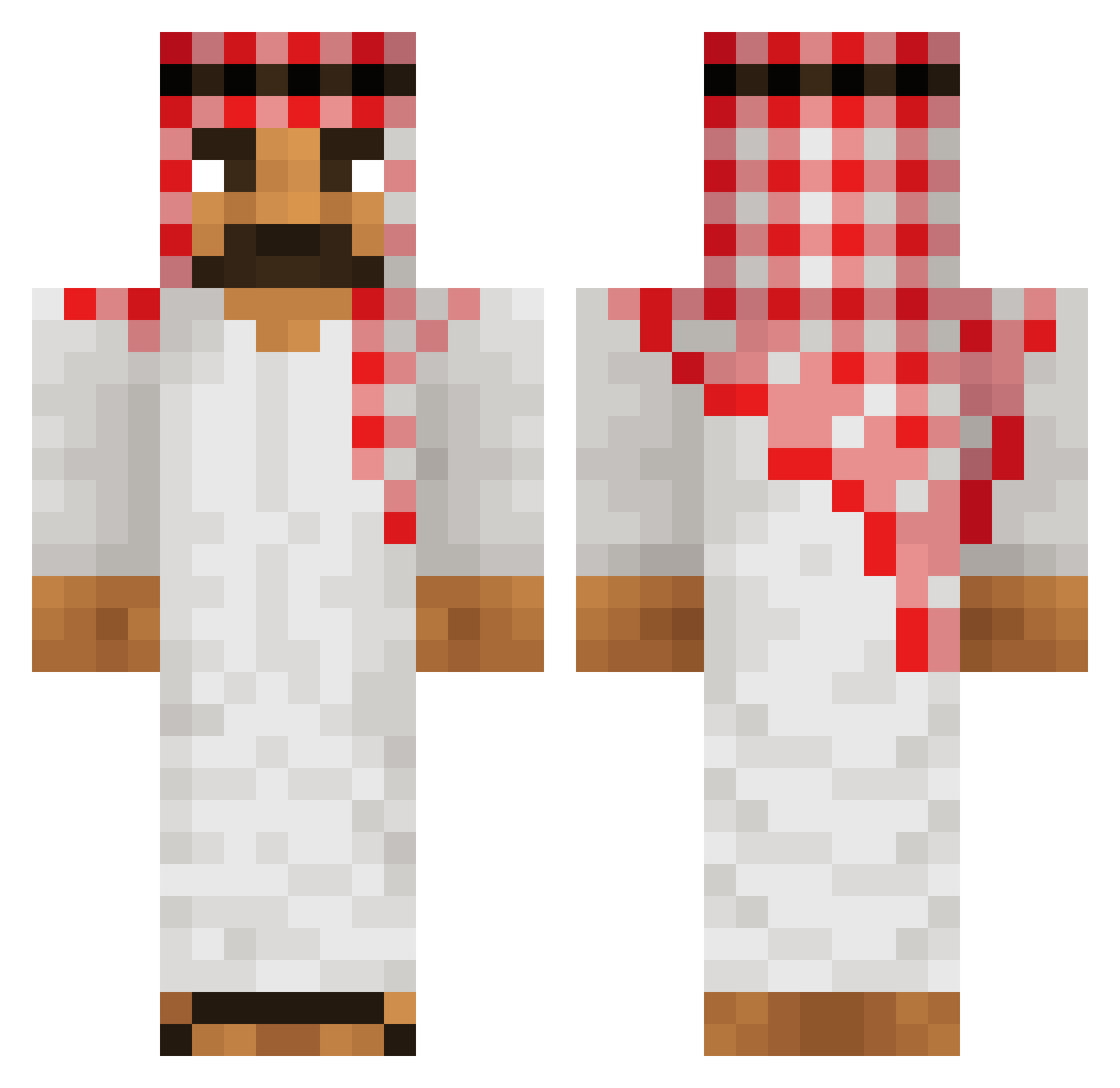
Current Minecraft skin of the player er00altruistic98, loaded from the official Mojang API. Rotate the 3D model with your mouse or finger, then download the skin as a PNG file and use it in Minecraft: Bedrock Edition or Java Edition for free. When er00altruistic98 changes their skin, this page updates automatically and the old skin stays in the history below.
Other players with this skin (218)
er00altruistic98 was the 186th player we have seen with this skin, first spotted on 31.10.2026. The same skin was seen on these players. Open a nickname to see their current skin and skin history.
 roman2012 sant1rg_sb SeriouslyStop tarnerekpl Dorea kandeeraksa koen2212 Ali65681 Ahmagh Alphaaleader gjioo Heavycoin42 talha09 lypsyladdict lulufrds Elias_02_2023 BoerenkoolBaas RVPLAY123 ymw1002 cashcarti56 Kiewgod 3LataZaKratami21 SadamHussepstein Th3_L1ghtn1ng_xD dish_washer12 xRiku_ Nachiyosi twojtata1 ___xzx___ Sam_lpe Pepe321lol LEWQN Fliper924 YxNG_KALeN BorinxPolcaert Tommyboy18 IIISalem Simbaaaaaa __deto Gunnie21 Steponik NoToxic_23 OficialBlur palmwine Vader1245 Arcex0 Karism_atique bebrik999 rybsox Machitun Smuglr erdemmsimsekk Kirikouxx DraftsmanSimon Foxylog skeeret Yherall sicus8 inlaww MKing9383
More Sheikh Minecraft skins
How to install the er00altruistic98 skin
- Press the Download button above to save the skin as a PNG file.
- Minecraft: Bedrock Edition (PE): open the Dressing Room from the main menu (or tap your character → Edit Character), go to Classic Skins → Owned, press the + (new skin) button, choose the downloaded PNG and pick the Classic (Steve) model. Works on PC and mobile; consoles cannot import custom skins.
- Minecraft: Java Edition: open the Minecraft Launcher, go to the Skins tab, click New Skin, load the PNG, pick the Classic (Steve) model and press Save & Use. You can also upload it at minecraft.net → Profile → Change Skin.
The skin does not show up after import - what should I do?
Restart Minecraft and open the Dressing Room again - imported skins sometimes appear only after a restart. Also make sure you selected the imported skin and picked the Classic (Steve) model.
Which model should I choose, Classic or Slim?
This skin is designed for the Classic (Steve) model. If you pick the wrong model, the arms of the skin will look stretched or squeezed.
Is the skin of er00altruistic98 free to download?
Yes. Press Download, save the PNG file and use it in Minecraft: Bedrock Edition or Java Edition - no payment or registration needed. The skin also works on multiplayer servers and Realms.
More skins
Looking for more? Go back to all Minecraft skins and check the top skins of the week, month and all time, or find any player's skin by nickname.