
eLPope06 - Minecraft Skins & Skin History
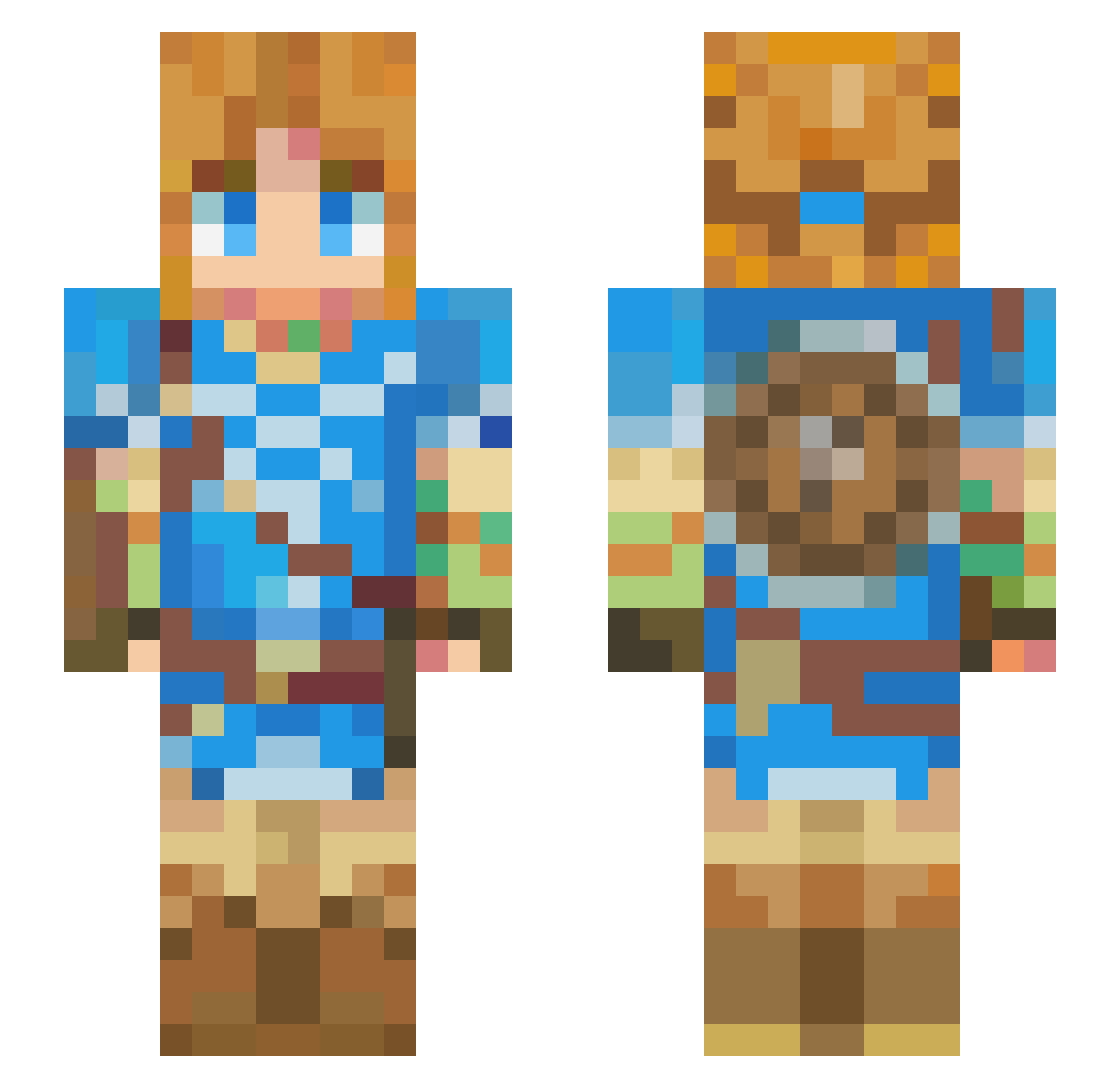
Current Minecraft skin of the player eLPope06, loaded from the official Mojang API. Rotate the 3D model with your mouse or finger, then download the skin as a PNG file and use it in Minecraft: Bedrock Edition or Java Edition for free. When eLPope06 changes their skin, this page updates automatically and the old skin stays in the history below.
Other players with this skin (426)
eLPope06 was the 324th player we have seen with this skin, first spotted on 13.10.2026. The same skin was seen on these players. Open a nickname to see their current skin and skin history.
 Tommy4217 Fxrina_9akgn79 Opencowa CoreExpro PaulCowDio_19 Capri0000 SpGamer57100 marcus_daze Azerole_ UriArk Luck5001 Phonix_35 DRAGONTANK27 Jerrynton XxsantiagoxX20 Speedy_AnimZ Cicillo yV1niciuss Kimhohyun7320 _meety Celestial_sphere NoahAdelhof MyLittleCucco alejo_0_0 SilverGrizzly PH00090 D4ndano deadzone869 Panicked_Skillet Catis3cool Sonic192000 echoesofwisdom Valentin5446L pamostella Brunfh Opaopa0808 rewrweq CosmosEGX Y1pt elevenelxven Rewanta Purpyie chick0204 RabbitHabiby HypnoMonkey Squidster24 Dynazom BirdManYeehaw Ninazux NotBigHeader kayammayaa CQuall Diamond___King Olioreo lDarienl Xiaoris1403 ludita22 Wasabypwp cacaozero PlayingNice101
More Breath Of The Wild Minecraft skins
See all 155 Breath Of The Wild skins
How to install the eLPope06 skin
- Press the Download button above to save the skin as a PNG file.
- Minecraft: Bedrock Edition (PE): open the Dressing Room from the main menu (or tap your character → Edit Character), go to Classic Skins → Owned, press the + (new skin) button, choose the downloaded PNG and pick the Slim (Alex) model. Works on PC and mobile; consoles cannot import custom skins.
- Minecraft: Java Edition: open the Minecraft Launcher, go to the Skins tab, click New Skin, load the PNG, pick the Slim (Alex) model and press Save & Use. You can also upload it at minecraft.net → Profile → Change Skin.
The skin does not show up after import - what should I do?
Restart Minecraft and open the Dressing Room again - imported skins sometimes appear only after a restart. Also make sure you selected the imported skin and picked the Slim (Alex) model.
Which model should I choose, Classic or Slim?
This skin is designed for the Slim (Alex) model. If you pick the wrong model, the arms of the skin will look stretched or squeezed.
Is the skin of eLPope06 free to download?
Yes. Press Download, save the PNG file and use it in Minecraft: Bedrock Edition or Java Edition - no payment or registration needed. The skin also works on multiplayer servers and Realms.
More skins
Looking for more? Go back to all Minecraft skins and check the top skins of the week, month and all time, or find any player's skin by nickname.