
dovah49 - Minecraft Skins & Skin History
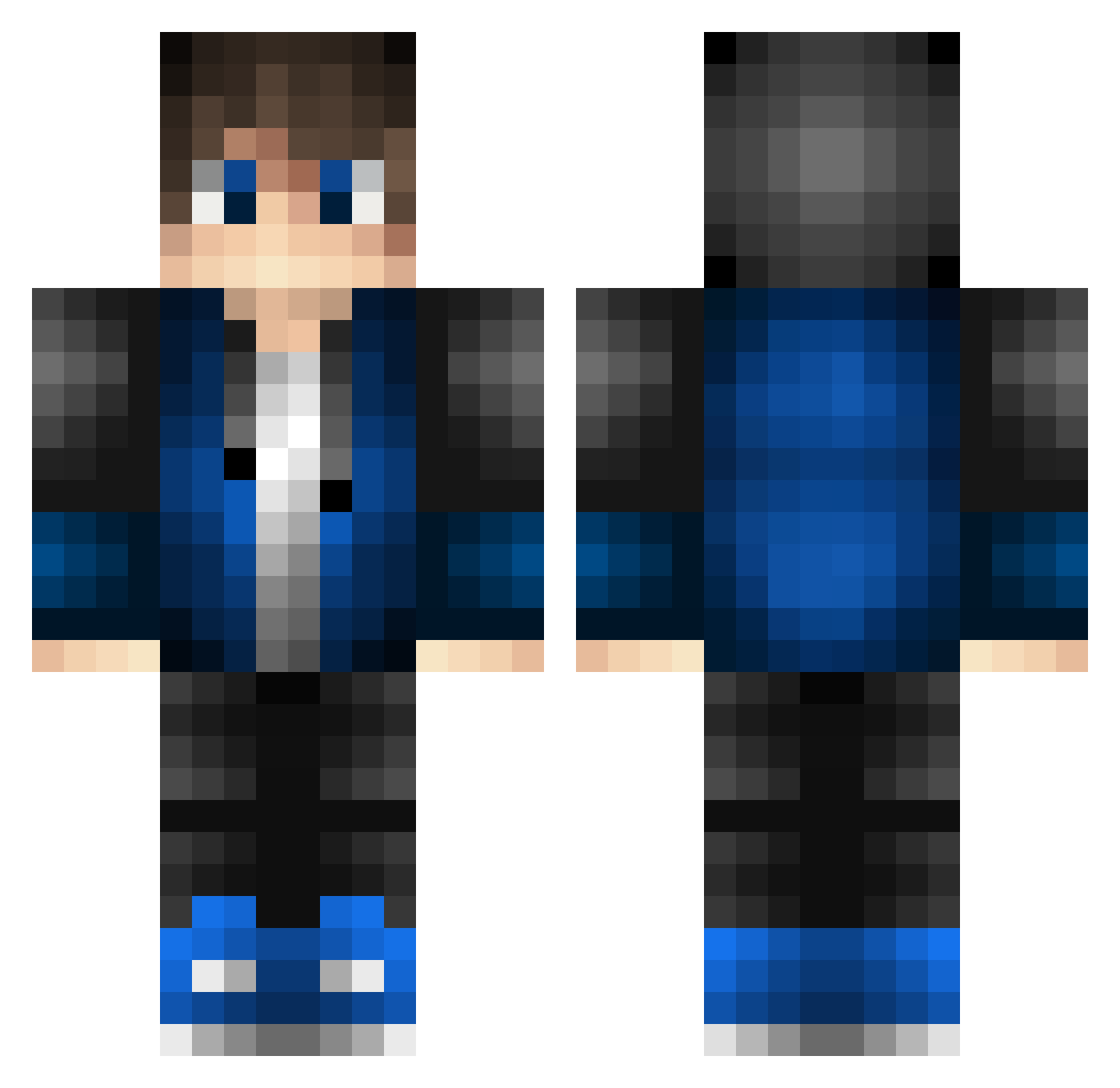
Current Minecraft skin of the player dovah49, loaded from the official Mojang API. Rotate the 3D model with your mouse or finger, then download the skin as a PNG file and use it in Minecraft: Bedrock Edition or Java Edition for free. When dovah49 changes their skin, this page updates automatically and the old skin stays in the history below.
Other players with this skin (639)
dovah49 was the 608th player we have seen with this skin, first spotted on 14.11.2026. The same skin was seen on these players. Open a nickname to see their current skin and skin history.
 Blue_Surge That_One_Native dragondaniel8 LukiGra1520 LOWKEYHOO LockHartVII JWGOPLAY dk9GX5dn33QK zernokjvkl darkwhitedragon Dravai handymanof2b yuuri08 Spr2te Ne3Xt Angu1aR kucho26 kalied29 Godzillla2014 brad28304 ThyHoly_mop mabifield scottchesh Dziki_Maciej LittleTortoise GDteacher Sonaldo11 Dustin22 Jarl_Ragnar89 aleksadj3 shimu17 Siono7 AliveGage MI5TY_ Starashi Nwoore unlonelytimia kislakv2 freeowl JVzinBR12 K_GAMER007 HackerFX dai_ym Christensenasus Fzr117 Voloww ciociok Promowave XCSKEX SlightAce VossenKresreb Gerrie40 Yalonn USA1BOUND1 PackagedSoap957 LuMpY_JoNeS Jlopez97 aKhT_oknw lakeboys11 ytysummer
How to install the dovah49 skin
- Press the Download button above to save the skin as a PNG file.
- Minecraft: Bedrock Edition (PE): open the Dressing Room from the main menu (or tap your character → Edit Character), go to Classic Skins → Owned, press the + (new skin) button, choose the downloaded PNG and pick the Classic (Steve) model. Works on PC and mobile; consoles cannot import custom skins.
- Minecraft: Java Edition: open the Minecraft Launcher, go to the Skins tab, click New Skin, load the PNG, pick the Classic (Steve) model and press Save & Use. You can also upload it at minecraft.net → Profile → Change Skin.
The skin does not show up after import - what should I do?
Restart Minecraft and open the Dressing Room again - imported skins sometimes appear only after a restart. Also make sure you selected the imported skin and picked the Classic (Steve) model.
Which model should I choose, Classic or Slim?
This skin is designed for the Classic (Steve) model. If you pick the wrong model, the arms of the skin will look stretched or squeezed.
Is the skin of dovah49 free to download?
Yes. Press Download, save the PNG file and use it in Minecraft: Bedrock Edition or Java Edition - no payment or registration needed. The skin also works on multiplayer servers and Realms.
More skins
Looking for more? Go back to all Minecraft skins and check the top skins of the week, month and all time, or find any player's skin by nickname.