
djdonki - Minecraft Skins & Skin History
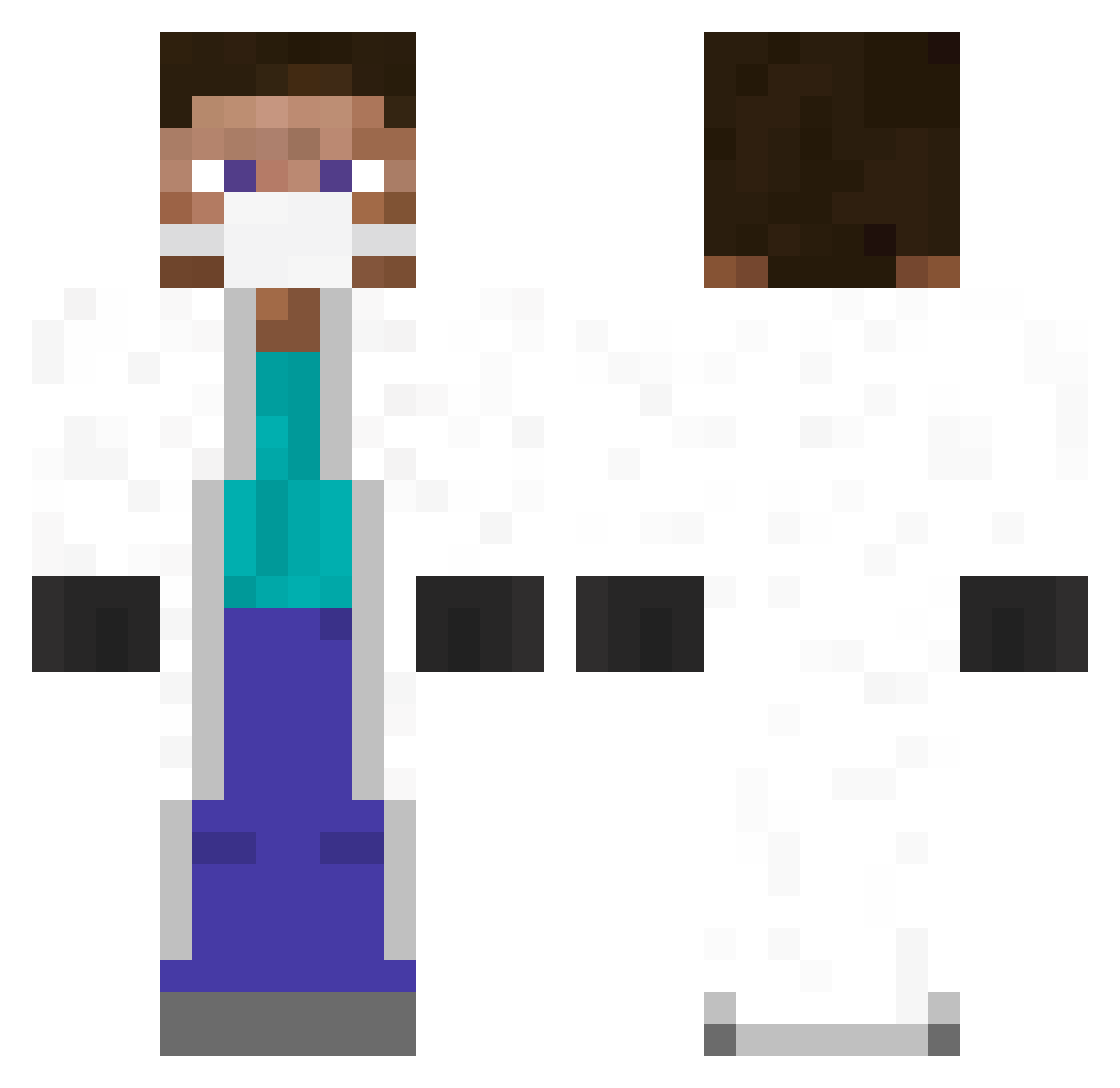
Current Minecraft skin of the player djdonki, loaded from the official Mojang API. Rotate the 3D model with your mouse or finger, then download the skin as a PNG file and use it in Minecraft: Bedrock Edition or Java Edition for free. When djdonki changes their skin, this page updates automatically and the old skin stays in the history below.
Other players with this skin (345)
djdonki was the 31st player we have seen with this skin, first spotted on 02.08.2026. The same skin was seen on these players. Open a nickname to see their current skin and skin history.
 yf4 Ani529 GaminMaster ArthurHolm Kangses hsson joan1029 erorggy jeffdai SIDEPRoO projarsniper Coheninon Pinogris __Tmoney__ gialupinski Hunter1196 Jalappy MrLop David28990 mapia2013 SaltySensei bob743 lipelc MaloMartin Wybuchajacy schaefersk Aleksandar625 Schweinberger Tiboujee lilloco310 JackMehoffMD 8670min woutvanbruggen Shauvenz Reddy24 XushBMC proustinho Arabgunner Hellucid panwq Ardrin teogagliardo 0junkbot065 EzeSilvaUY QuakeMakita Peacemaxer C_Train_ jonasicher ahas90 Mounir22 G59Mika hauany Rubikz7 TangoYankee14 PVqJn Drinz _seward_ DerS4mir jaimelma Cakealdo
More Medical Mask Minecraft skins
How to install the djdonki skin
- Press the Download button above to save the skin as a PNG file.
- Minecraft: Bedrock Edition (PE): open the Dressing Room from the main menu (or tap your character → Edit Character), go to Classic Skins → Owned, press the + (new skin) button, choose the downloaded PNG and pick the Classic (Steve) model. Works on PC and mobile; consoles cannot import custom skins.
- Minecraft: Java Edition: open the Minecraft Launcher, go to the Skins tab, click New Skin, load the PNG, pick the Classic (Steve) model and press Save & Use. You can also upload it at minecraft.net → Profile → Change Skin.
The skin does not show up after import - what should I do?
Restart Minecraft and open the Dressing Room again - imported skins sometimes appear only after a restart. Also make sure you selected the imported skin and picked the Classic (Steve) model.
Which model should I choose, Classic or Slim?
This skin is designed for the Classic (Steve) model. If you pick the wrong model, the arms of the skin will look stretched or squeezed.
Is the skin of djdonki free to download?
Yes. Press Download, save the PNG file and use it in Minecraft: Bedrock Edition or Java Edition - no payment or registration needed. The skin also works on multiplayer servers and Realms.
More skins
Looking for more? Go back to all Minecraft skins and check the top skins of the week, month and all time, or find any player's skin by nickname.