
dada988 - Minecraft Skins & Skin History
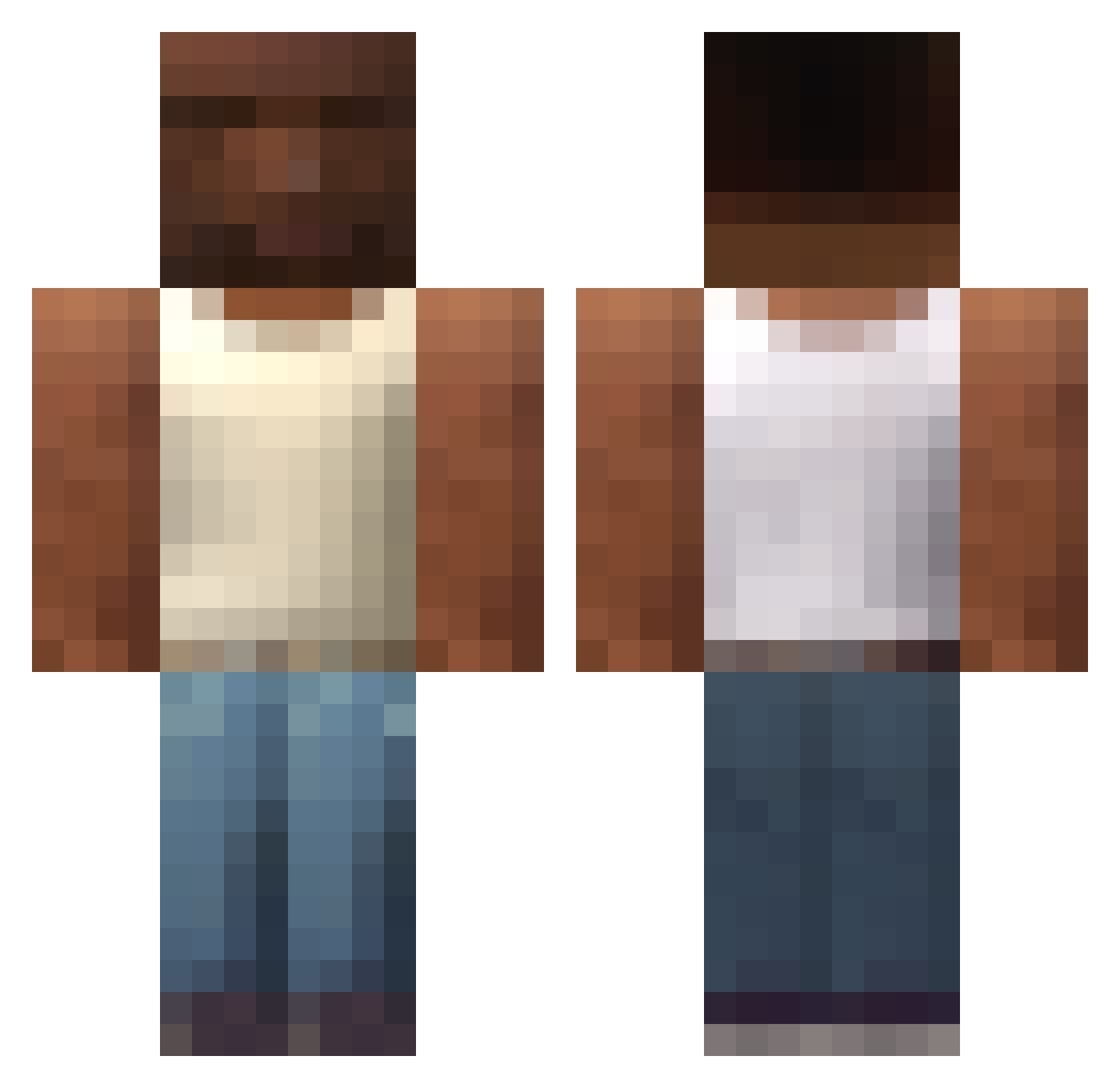
Current Minecraft skin of the player dada988, loaded from the official Mojang API. Rotate the 3D model with your mouse or finger, then download the skin as a PNG file and use it in Minecraft: Bedrock Edition or Java Edition for free. When dada988 changes their skin, this page updates automatically and the old skin stays in the history below.
Other players with this skin (607)
dada988 was the 316th player we have seen with this skin, first spotted on 18.09.2026. The same skin was seen on these players. Open a nickname to see their current skin and skin history.
 mcmz0 XaXaaaa vinicius4242 MM369 TRAZZEON JrLokotee Shakedembones TakoName fatcuck mAAkIcHUT BoombaYeh JOELXSKULLHAHAHA MigNtzl SheSaidItsBig _its__tiago_ nedixzjeeh 6ax_la bixiaxia114514 Nacred444 Segretao Maiky_1023 cisxk RazorCraft123 OwlCortes nacho__n Maderin_ AustinTheGYAT Cionnnnn TweakinTogether ShadowN00dles MAXSATORU HoraryEvening98 Mee_Keao Richie2234 elpelado Harlexzehippo11 SAD_33 ID4N73 NzBill Steub er4yzx Stesix Schust4 ChetosDeQueso s731 Motomoto244 Homtomyu SIRHuntsman826 akoeiro big_nibor ABU3ABD3 mfhbe Blazefordayzs EminMacit Papapu_O_Sabio wafflekingdom maurito_totote yannik_679 szakal192pl Mirstein
More San Andreas Minecraft skins
How to install the dada988 skin
- Press the Download button above to save the skin as a PNG file.
- Minecraft: Bedrock Edition (PE): open the Dressing Room from the main menu (or tap your character → Edit Character), go to Classic Skins → Owned, press the + (new skin) button, choose the downloaded PNG and pick the Classic (Steve) model. Works on PC and mobile; consoles cannot import custom skins.
- Minecraft: Java Edition: open the Minecraft Launcher, go to the Skins tab, click New Skin, load the PNG, pick the Classic (Steve) model and press Save & Use. You can also upload it at minecraft.net → Profile → Change Skin.
The skin does not show up after import - what should I do?
Restart Minecraft and open the Dressing Room again - imported skins sometimes appear only after a restart. Also make sure you selected the imported skin and picked the Classic (Steve) model.
Which model should I choose, Classic or Slim?
This skin is designed for the Classic (Steve) model. If you pick the wrong model, the arms of the skin will look stretched or squeezed.
Is the skin of dada988 free to download?
Yes. Press Download, save the PNG file and use it in Minecraft: Bedrock Edition or Java Edition - no payment or registration needed. The skin also works on multiplayer servers and Realms.
More skins
Looking for more? Go back to all Minecraft skins and check the top skins of the week, month and all time, or find any player's skin by nickname.