
czin4 - Minecraft Skins & Skin History
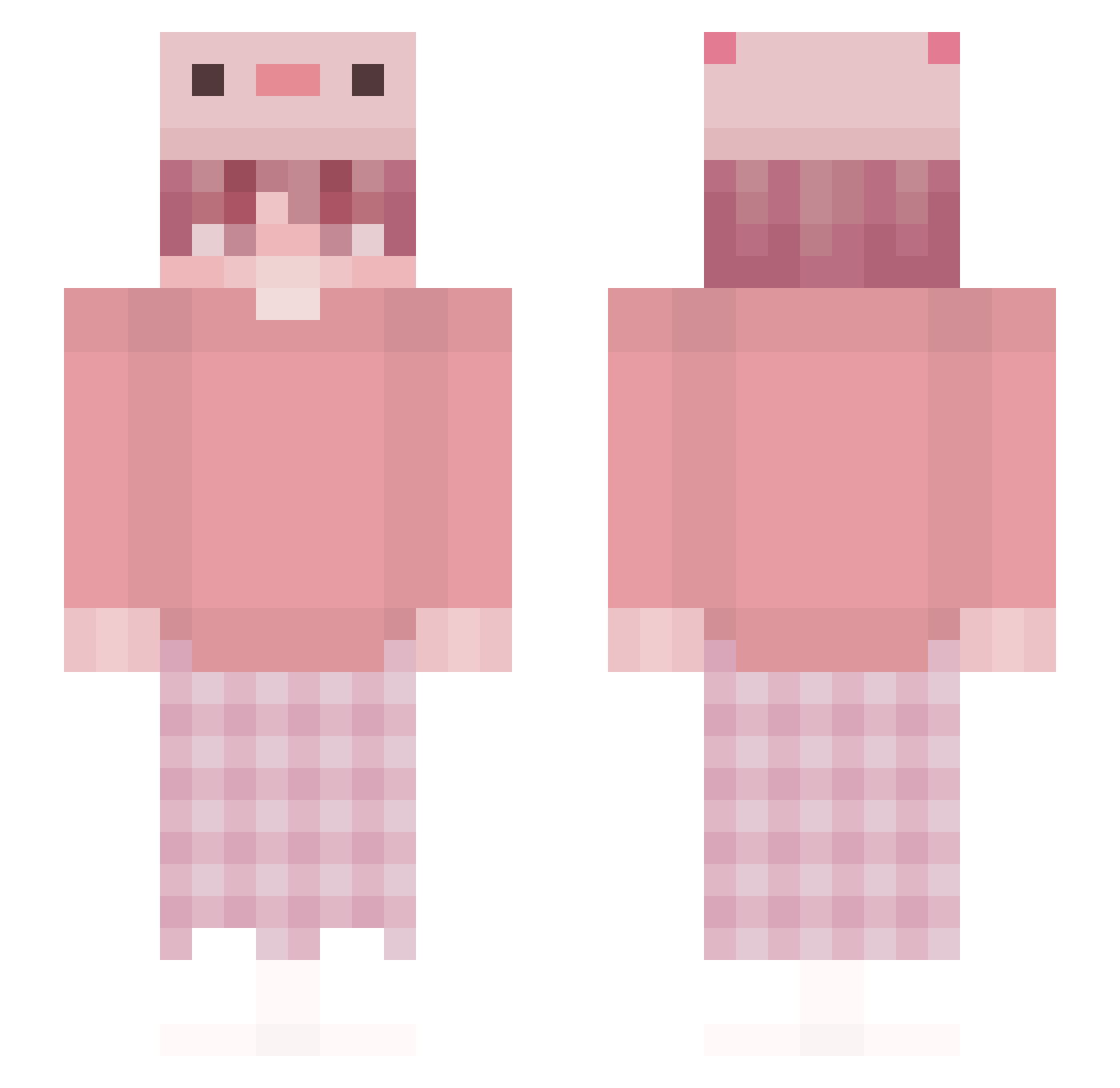
Current Minecraft skin of the player czin4, loaded from the official Mojang API. Rotate the 3D model with your mouse or finger, then download the skin as a PNG file and use it in Minecraft: Bedrock Edition or Java Edition for free. When czin4 changes their skin, this page updates automatically and the old skin stays in the history below.
Other players with this skin (316)
czin4 was the 265th player we have seen with this skin, first spotted on 27.10.2026. The same skin was seen on these players. Open a nickname to see their current skin and skin history.
 SakutaX OldGenToy nefintosik Archiiking vehls Squitong_Baby bibimbxp Reveriebox Bubsonik BEJITANOTEN mikipoop uKailey Hamburgerzz Qsssi _Fewcxz_ V1RE_YT Nakubaku nancci connor_yuh Chelato_Gamer Nak1ro dokundokun lizia1108 IWantToStayHome YoziEG6 luce_exe unekmike jaak14 DerRight Mtuon Dxnnmm Whiteand17 Linsouwu Andrelrx MuzigaeDeak Jamespark00 gdzie__opor CrackedAtBridge khawani ImSmileyX Midnite1972 Yurezx syaperon SarahFinite Valekdonovan Rainerr2803 leocantus0 oAprilo Hawkdl MagNiki122 LegendaryPunch Bleh69 Floralites NxMGGEz zEduuu_ JoshinShackles Alisneti YourDadddy zhuxianzi 123468aa
More Axolotl Hat Minecraft skins
How to install the czin4 skin
- Press the Download button above to save the skin as a PNG file.
- Minecraft: Bedrock Edition (PE): open the Dressing Room from the main menu (or tap your character → Edit Character), go to Classic Skins → Owned, press the + (new skin) button, choose the downloaded PNG and pick the Slim (Alex) model. Works on PC and mobile; consoles cannot import custom skins.
- Minecraft: Java Edition: open the Minecraft Launcher, go to the Skins tab, click New Skin, load the PNG, pick the Slim (Alex) model and press Save & Use. You can also upload it at minecraft.net → Profile → Change Skin.
The skin does not show up after import - what should I do?
Restart Minecraft and open the Dressing Room again - imported skins sometimes appear only after a restart. Also make sure you selected the imported skin and picked the Slim (Alex) model.
Which model should I choose, Classic or Slim?
This skin is designed for the Slim (Alex) model. If you pick the wrong model, the arms of the skin will look stretched or squeezed.
Is the skin of czin4 free to download?
Yes. Press Download, save the PNG file and use it in Minecraft: Bedrock Edition or Java Edition - no payment or registration needed. The skin also works on multiplayer servers and Realms.
More skins
Looking for more? Go back to all Minecraft skins and check the top skins of the week, month and all time, or find any player's skin by nickname.