
clauuchi - Minecraft Skins & Skin History
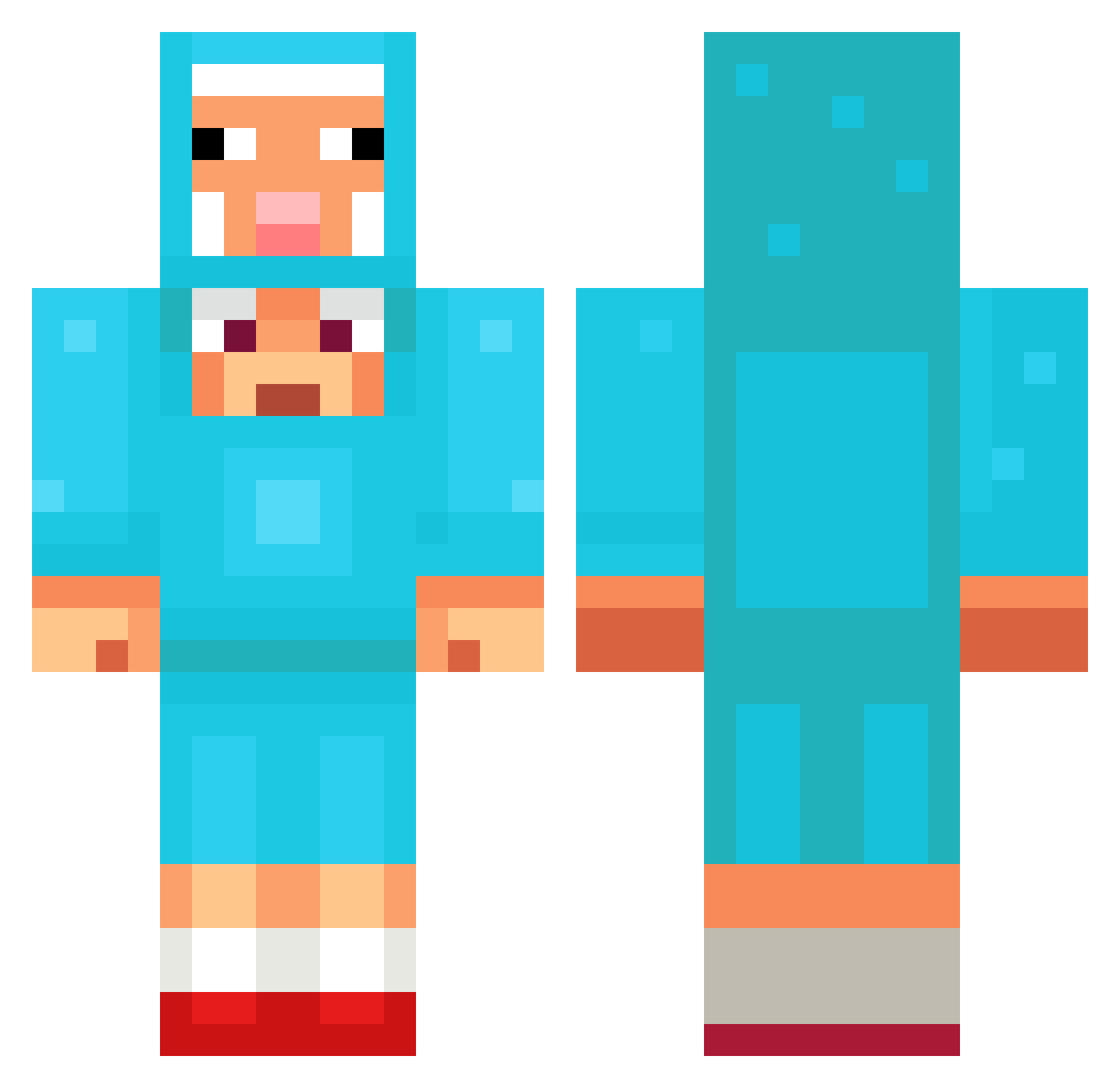
Current Minecraft skin of the player clauuchi, loaded from the official Mojang API. Rotate the 3D model with your mouse or finger, then download the skin as a PNG file and use it in Minecraft: Bedrock Edition or Java Edition for free. When clauuchi changes their skin, this page updates automatically and the old skin stays in the history below.
Other players with this skin (1093)
clauuchi was the 34th player we have seen with this skin, first spotted on 26.07.2026. The same skin was seen on these players. Open a nickname to see their current skin and skin history.
 FarisA123 3656323 AlmightyBhudda sarahdz iMazigh Zekelo water912 Sanmii98 AirplaneLover69 XWTRR dzvine Hylight874 HNGJITA DesperadoDEATH Hurti333 DaciaLogan3000 yagizcan2012 kkdfg einherjar02 nicorodriguezz Biggie_GuyZ Biteom finn1c nenera Leonmaxx Vcubik Mika7188
 sigmaB123
 Lukeh207 136248 valiever xrayaster CharlieE_010 tuchqizaza
 yatesboys Rhd9E1 BedsideBooklof jjunjjun1304 SaureGurke8009 Marowa_ ZeewElias Meiryooo Best_KuNoo TOMMYHUGHESY
 minicrafter60 Vinnyla007 dnl_21 heyhiman311 DARQ02 nlnl100 Pigrou CR4ZEDx2 lilyleon Andrushkaka jimmy2010sb Tongkhocbd Ronin479909 BlueDarkness011 Beef_Stew69 CreamyBrain
More Sheep Minecraft skins
How to install the clauuchi skin
- Press the Download button above to save the skin as a PNG file.
- Minecraft: Bedrock Edition (PE): open the Dressing Room from the main menu (or tap your character → Edit Character), go to Classic Skins → Owned, press the + (new skin) button, choose the downloaded PNG and pick the Classic (Steve) model. Works on PC and mobile; consoles cannot import custom skins.
- Minecraft: Java Edition: open the Minecraft Launcher, go to the Skins tab, click New Skin, load the PNG, pick the Classic (Steve) model and press Save & Use. You can also upload it at minecraft.net → Profile → Change Skin.
The skin does not show up after import - what should I do?
Restart Minecraft and open the Dressing Room again - imported skins sometimes appear only after a restart. Also make sure you selected the imported skin and picked the Classic (Steve) model.
Which model should I choose, Classic or Slim?
This skin is designed for the Classic (Steve) model. If you pick the wrong model, the arms of the skin will look stretched or squeezed.
Is the skin of clauuchi free to download?
Yes. Press Download, save the PNG file and use it in Minecraft: Bedrock Edition or Java Edition - no payment or registration needed. The skin also works on multiplayer servers and Realms.
More skins
Looking for more? Go back to all Minecraft skins and check the top skins of the week, month and all time, or find any player's skin by nickname.