
clarkebenja - Minecraft Skins & Skin History
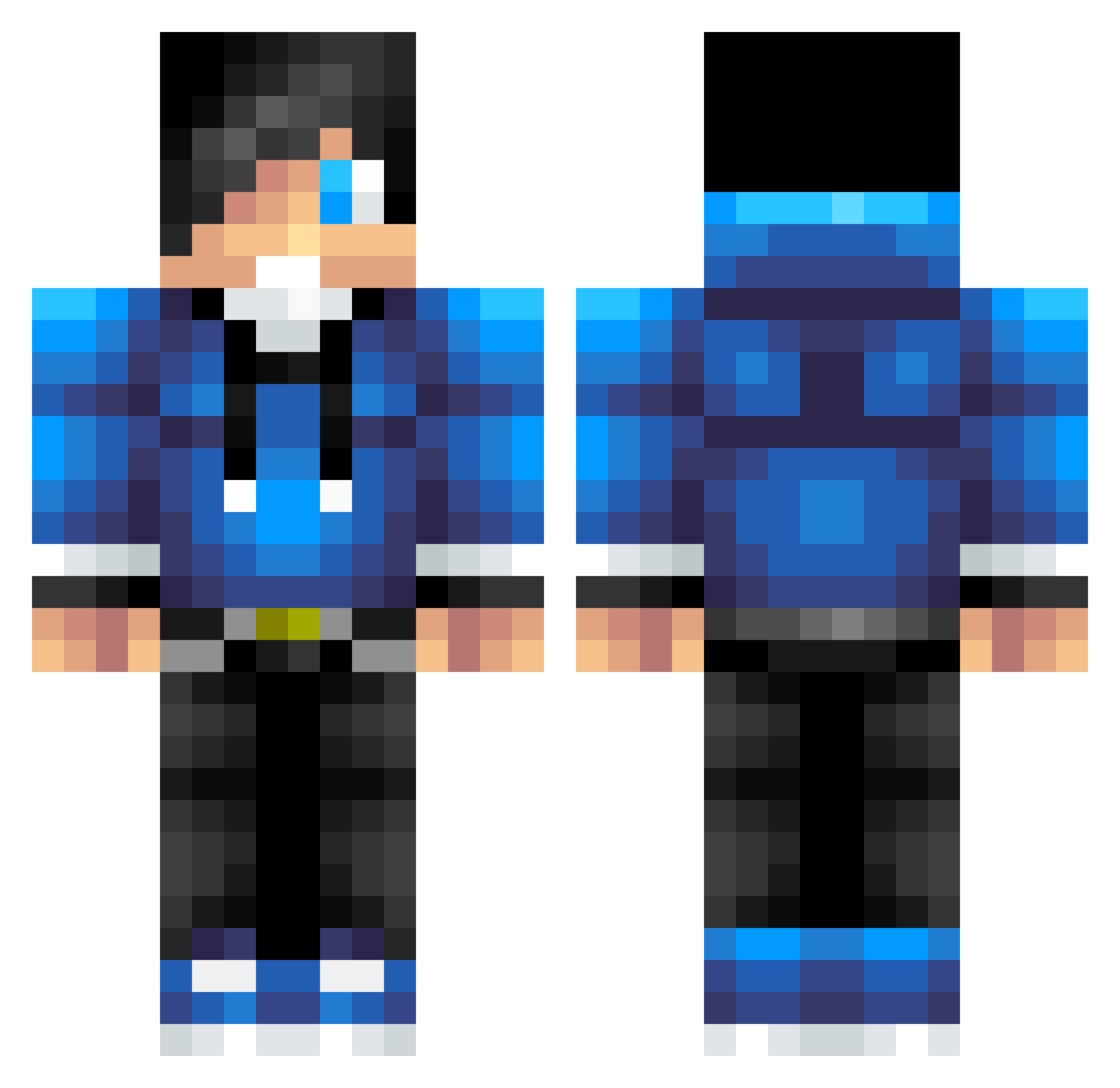
Current Minecraft skin of the player clarkebenja, loaded from the official Mojang API. Rotate the 3D model with your mouse or finger, then download the skin as a PNG file and use it in Minecraft: Bedrock Edition or Java Edition for free. When clarkebenja changes their skin, this page updates automatically and the old skin stays in the history below.
Other players with this skin (623)
clarkebenja was the 441st player we have seen with this skin, first spotted on 03.10.2026. The same skin was seen on these players. Open a nickname to see their current skin and skin history.
 Fred960n Josedefreitas Chrish316 stipo1 cooldrago12348 keighan513 masonator617 _KUGA_ JariMeersman code_breaker2002 Pucky84 lyniminecraft Louk44 AthrunM aussie_thunder TheBeastMax1 Victor_Ting MP501st HoBoonPin beemovie333 ArickylovesBacon TheRecruitment skillaz223 sarge42 coolchris012 ashton1511 controller77 DrSocks18 Garrett_6 sebbe672 Marwin20003 xXCRiTiCksXx smallhit NormalGuyHA kaspeb Monaliesa BigDaddyBrian11 supermanlygamer tommy5902 2014_CRAFTER Djflocke97 Leb7187 tydell21 Talmond6 dustymonkey44 1Punch_BRAWLER Coopmann6972 MekkeBoy_ eliblalock Hawkeyes184 the_goldenlion samurajliam SinisterNeptune timcool2005 LauraVO steve3213 Jc4 ViksTheGamer Hunter7986 Joseph5964
How to install the clarkebenja skin
- Press the Download button above to save the skin as a PNG file.
- Minecraft: Bedrock Edition (PE): open the Dressing Room from the main menu (or tap your character → Edit Character), go to Classic Skins → Owned, press the + (new skin) button, choose the downloaded PNG and pick the Classic (Steve) model. Works on PC and mobile; consoles cannot import custom skins.
- Minecraft: Java Edition: open the Minecraft Launcher, go to the Skins tab, click New Skin, load the PNG, pick the Classic (Steve) model and press Save & Use. You can also upload it at minecraft.net → Profile → Change Skin.
The skin does not show up after import - what should I do?
Restart Minecraft and open the Dressing Room again - imported skins sometimes appear only after a restart. Also make sure you selected the imported skin and picked the Classic (Steve) model.
Which model should I choose, Classic or Slim?
This skin is designed for the Classic (Steve) model. If you pick the wrong model, the arms of the skin will look stretched or squeezed.
Is the skin of clarkebenja free to download?
Yes. Press Download, save the PNG file and use it in Minecraft: Bedrock Edition or Java Edition - no payment or registration needed. The skin also works on multiplayer servers and Realms.
More skins
Looking for more? Go back to all Minecraft skins and check the top skins of the week, month and all time, or find any player's skin by nickname.