
chomik98 - Minecraft Skins & Skin History
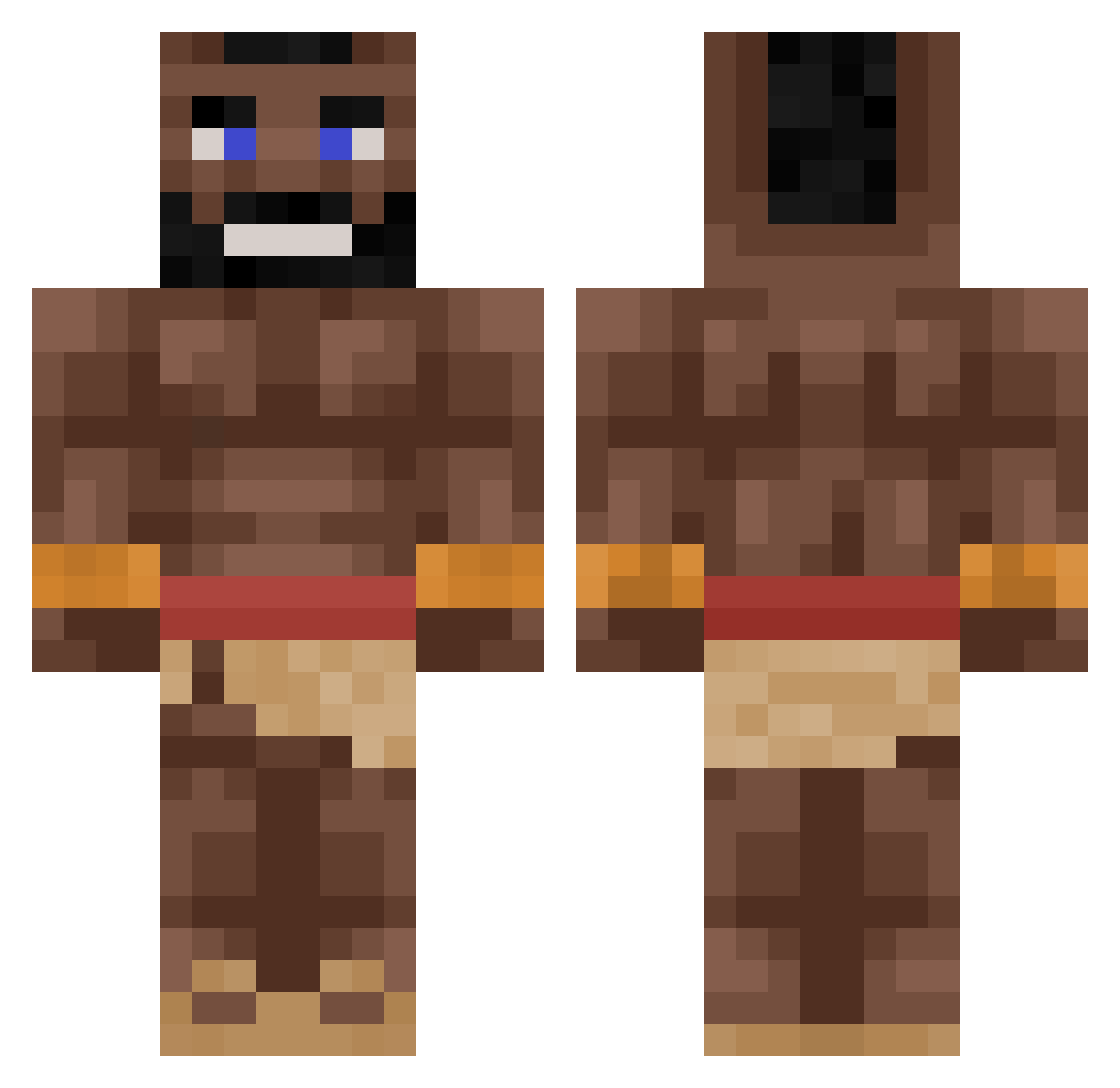
Current Minecraft skin of the player chomik98, loaded from the official Mojang API. Rotate the 3D model with your mouse or finger, then download the skin as a PNG file and use it in Minecraft: Bedrock Edition or Java Edition for free. When chomik98 changes their skin, this page updates automatically and the old skin stays in the history below.
Other players with this skin (264)
chomik98 was the 146th player we have seen with this skin, first spotted on 16.09.2026. The same skin was seen on these players. Open a nickname to see their current skin and skin history.
 B4b1c Waffster009 Crambinator RUDERA1337 Chotu zentish1374 Mabthera RisingAr06 Pikiner4 The_Nucleus Quantenmanten MrBean103111 Xyzo1 Hat_Junior ftMclovin zomcorelpro Blejzzz_ Full_Asian BananaJoe243 1337_toxik SkylarDaBozo gabrielgac wakai56 bumpergoose K1ng14234 Eguine skibidiGOAT F_0_R_G SuperPROMAN123 Pannemann27 qattar Ulvdiaz Fir3claw Punqy Obliterator_2000 Korkodila Husarz1683 Broraven MrHegy SkookNookem BedirhanDemircan IValks KlaraBluebeery DrNoisty wlif MrExecutor112211 taarush LinusAagaard eatthateat Cactussega Eclipsip WaccyTobaccy giannispent09 Koenoenoe Mafiaei PanBorysPL hbodd rileygamer32 MaSnY_Sokol AbuHDD
More Mohawk Minecraft skins
How to install the chomik98 skin
- Press the Download button above to save the skin as a PNG file.
- Minecraft: Bedrock Edition (PE): open the Dressing Room from the main menu (or tap your character → Edit Character), go to Classic Skins → Owned, press the + (new skin) button, choose the downloaded PNG and pick the Classic (Steve) model. Works on PC and mobile; consoles cannot import custom skins.
- Minecraft: Java Edition: open the Minecraft Launcher, go to the Skins tab, click New Skin, load the PNG, pick the Classic (Steve) model and press Save & Use. You can also upload it at minecraft.net → Profile → Change Skin.
The skin does not show up after import - what should I do?
Restart Minecraft and open the Dressing Room again - imported skins sometimes appear only after a restart. Also make sure you selected the imported skin and picked the Classic (Steve) model.
Which model should I choose, Classic or Slim?
This skin is designed for the Classic (Steve) model. If you pick the wrong model, the arms of the skin will look stretched or squeezed.
Is the skin of chomik98 free to download?
Yes. Press Download, save the PNG file and use it in Minecraft: Bedrock Edition or Java Edition - no payment or registration needed. The skin also works on multiplayer servers and Realms.
More skins
Looking for more? Go back to all Minecraft skins and check the top skins of the week, month and all time, or find any player's skin by nickname.