
bullracer939 - Minecraft Skins & Skin History
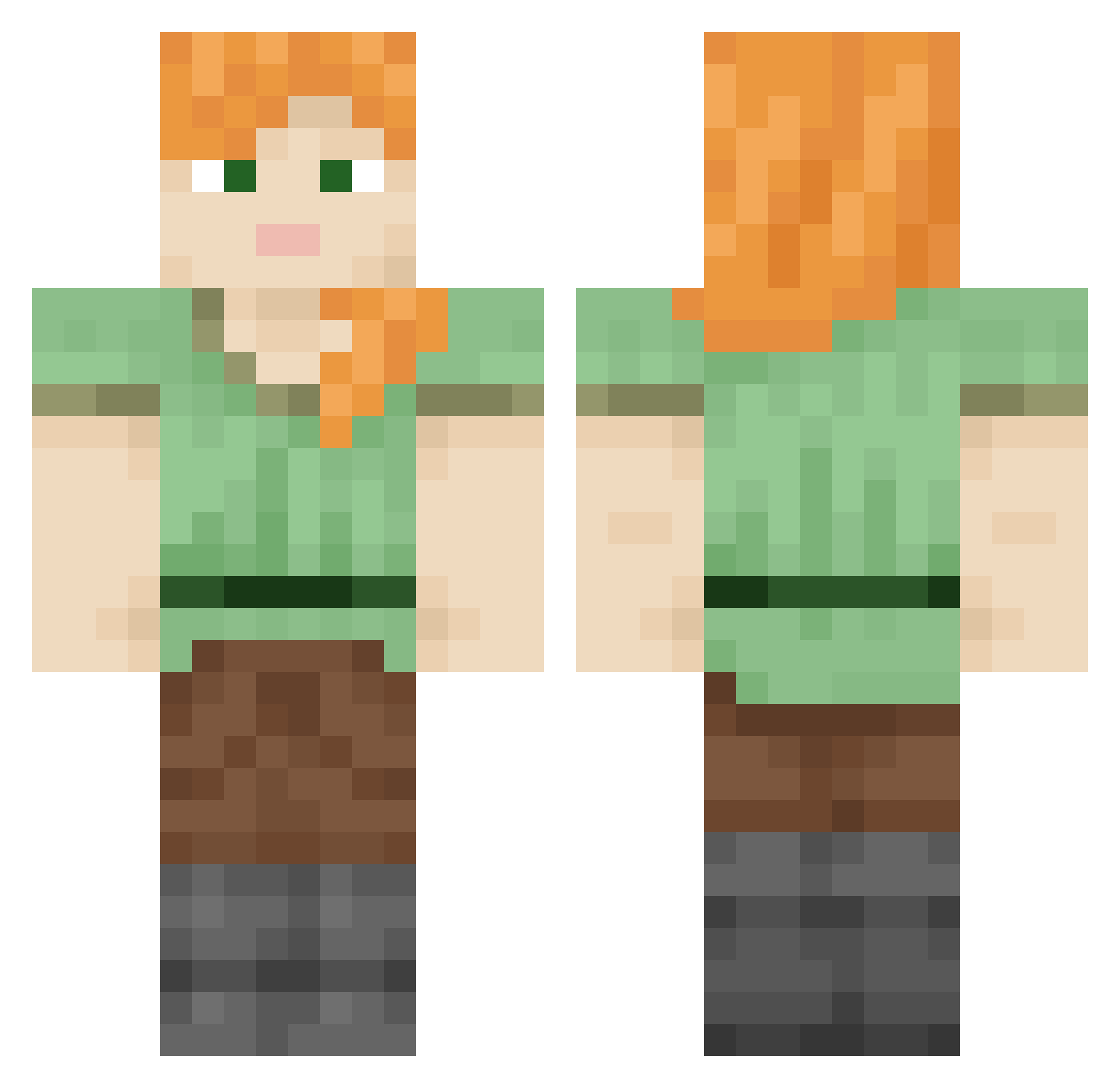
Current Minecraft skin of the player bullracer939, loaded from the official Mojang API. Rotate the 3D model with your mouse or finger, then download the skin as a PNG file and use it in Minecraft: Bedrock Edition or Java Edition for free. When bullracer939 changes their skin, this page updates automatically and the old skin stays in the history below.
Other players with this skin (740)
bullracer939 was the 98th player we have seen with this skin, first spotted on 09.08.2026. The same skin was seen on these players. Open a nickname to see their current skin and skin history.
 Mikael Seleucian muyoXcha_ Valqa smashmouth1998 BloMan Theblack0099 Disney_studio red77z TheGreekfreak06 sparkaha AUGE mottler HanselS HERALDESS woollybutt JebacPsy Photographed Grammatically Guacos Lenape Saeta
 MeinFuhrerSS snappiest Galvaniser M3GA_NEGA semiflex Rukopisi simon356 v31led5car5
 DennisDoo Braemar
 Blackelpro777 Twelfths
 uosv Grungy SimonDerStarke wuzzle Superciliously Kebabs Siu7777777 Spoonlike maarv259 uncoupled vincenzo DanielDontKillMe Remodeller Billa Councils Phainopepla maikalolka Bandido_ BrambleBush Benjook1 Bunraku fluoroborate travisk_plays misatok823 Rocko_1_2 Gies
How to install the bullracer939 skin
- Press the Download button above to save the skin as a PNG file.
- Minecraft: Bedrock Edition (PE): open the Dressing Room from the main menu (or tap your character → Edit Character), go to Classic Skins → Owned, press the + (new skin) button, choose the downloaded PNG and pick the Classic (Steve) model. Works on PC and mobile; consoles cannot import custom skins.
- Minecraft: Java Edition: open the Minecraft Launcher, go to the Skins tab, click New Skin, load the PNG, pick the Classic (Steve) model and press Save & Use. You can also upload it at minecraft.net → Profile → Change Skin.
The skin does not show up after import - what should I do?
Restart Minecraft and open the Dressing Room again - imported skins sometimes appear only after a restart. Also make sure you selected the imported skin and picked the Classic (Steve) model.
Which model should I choose, Classic or Slim?
This skin is designed for the Classic (Steve) model. If you pick the wrong model, the arms of the skin will look stretched or squeezed.
Is the skin of bullracer939 free to download?
Yes. Press Download, save the PNG file and use it in Minecraft: Bedrock Edition or Java Edition - no payment or registration needed. The skin also works on multiplayer servers and Realms.
More skins
Looking for more? Go back to all Minecraft skins and check the top skins of the week, month and all time, or find any player's skin by nickname.