
bigblockboy85 - Minecraft Skins & Skin History
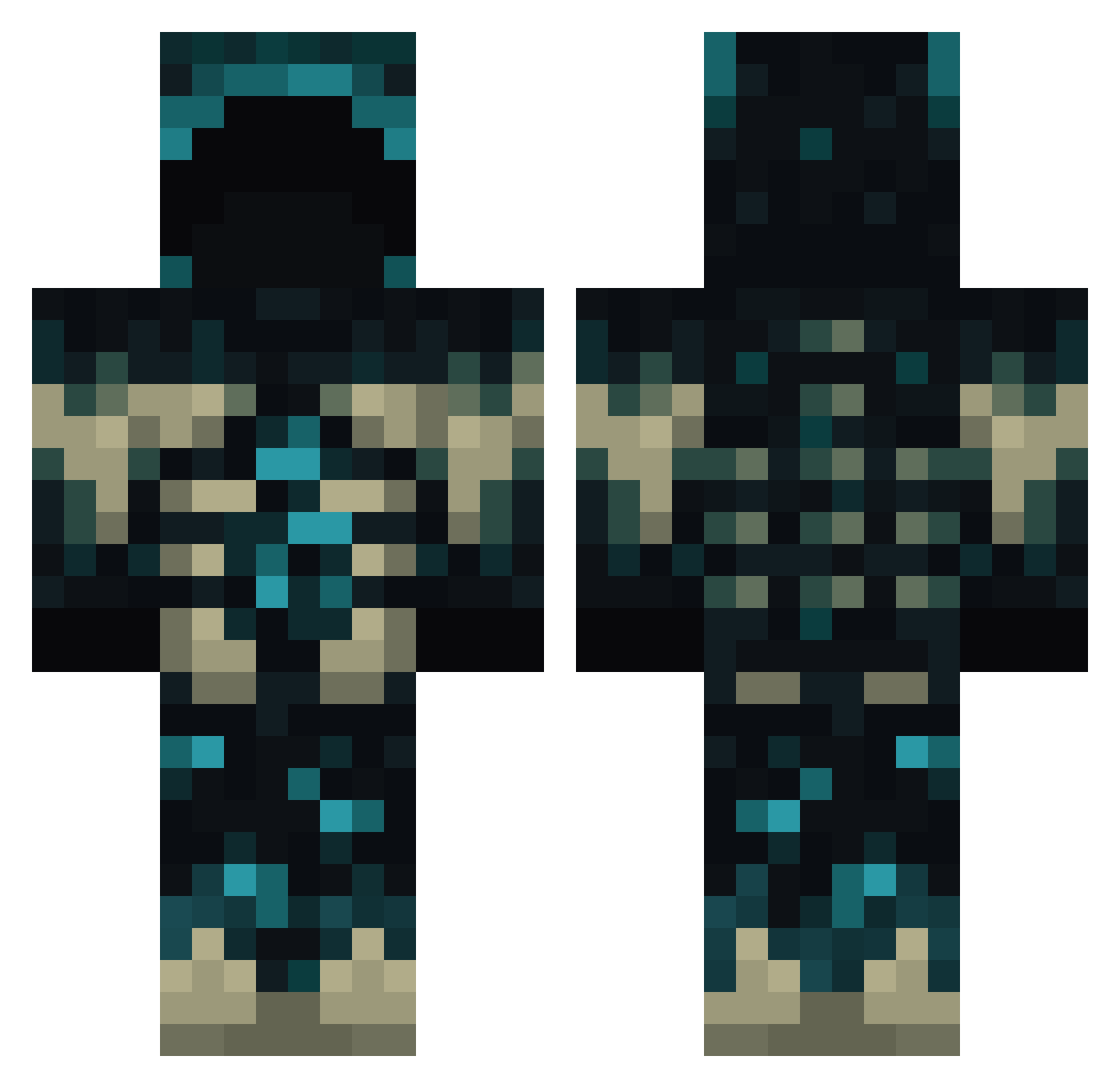
Current Minecraft skin of the player bigblockboy85, loaded from the official Mojang API. Rotate the 3D model with your mouse or finger, then download the skin as a PNG file and use it in Minecraft: Bedrock Edition or Java Edition for free. When bigblockboy85 changes their skin, this page updates automatically and the old skin stays in the history below.
Other players with this skin (771)
bigblockboy85 was the 83rd player we have seen with this skin, first spotted on 05.08.2026. The same skin was seen on these players. Open a nickname to see their current skin and skin history.
 Xlylm1999 Donabot Horizon5758 Hodrick SandoHira heiro_l clairedaisy78 AntonFeuerFuchs1 MINECRAFT_ALEX12 kayakira
 Awesomegame6532 Queshila DentalStick MC_DIEVAS L1m33 Dababy00030 hasankuzey100 THR465 FuzzyAchiever53 Cyber_Nex KH74 NotDiego fami7121 monstershadow8 jp_soares alvesandrei AFK_FayZ HomieShrexual TTmore SBSBSB114514SBSB Jayzone05 AlexTovias1 JulianJulian75 FaultierDoor949 EvilHbomb9951 Stas_30 Thugfastfox100 oSxgma BorisBoy Mistook1327 shadowninja2840 Laatikko007 JimJ0om Vibhuthi batman204045 J4wilson1066
 Clarimini Kybbe_SWE darkpapii Halo7645 mitzureii Ron1n911 GobbleTheButter seungho_7 David624717 NoTZiKK drugyy bazsalt davywong Linus1133
More Sculk Minecraft skins
How to install the bigblockboy85 skin
- Press the Download button above to save the skin as a PNG file.
- Minecraft: Bedrock Edition (PE): open the Dressing Room from the main menu (or tap your character → Edit Character), go to Classic Skins → Owned, press the + (new skin) button, choose the downloaded PNG and pick the Classic (Steve) model. Works on PC and mobile; consoles cannot import custom skins.
- Minecraft: Java Edition: open the Minecraft Launcher, go to the Skins tab, click New Skin, load the PNG, pick the Classic (Steve) model and press Save & Use. You can also upload it at minecraft.net → Profile → Change Skin.
The skin does not show up after import - what should I do?
Restart Minecraft and open the Dressing Room again - imported skins sometimes appear only after a restart. Also make sure you selected the imported skin and picked the Classic (Steve) model.
Which model should I choose, Classic or Slim?
This skin is designed for the Classic (Steve) model. If you pick the wrong model, the arms of the skin will look stretched or squeezed.
Is the skin of bigblockboy85 free to download?
Yes. Press Download, save the PNG file and use it in Minecraft: Bedrock Edition or Java Edition - no payment or registration needed. The skin also works on multiplayer servers and Realms.
More skins
Looking for more? Go back to all Minecraft skins and check the top skins of the week, month and all time, or find any player's skin by nickname.