
bernardo9889 - Minecraft Skins & Skin History
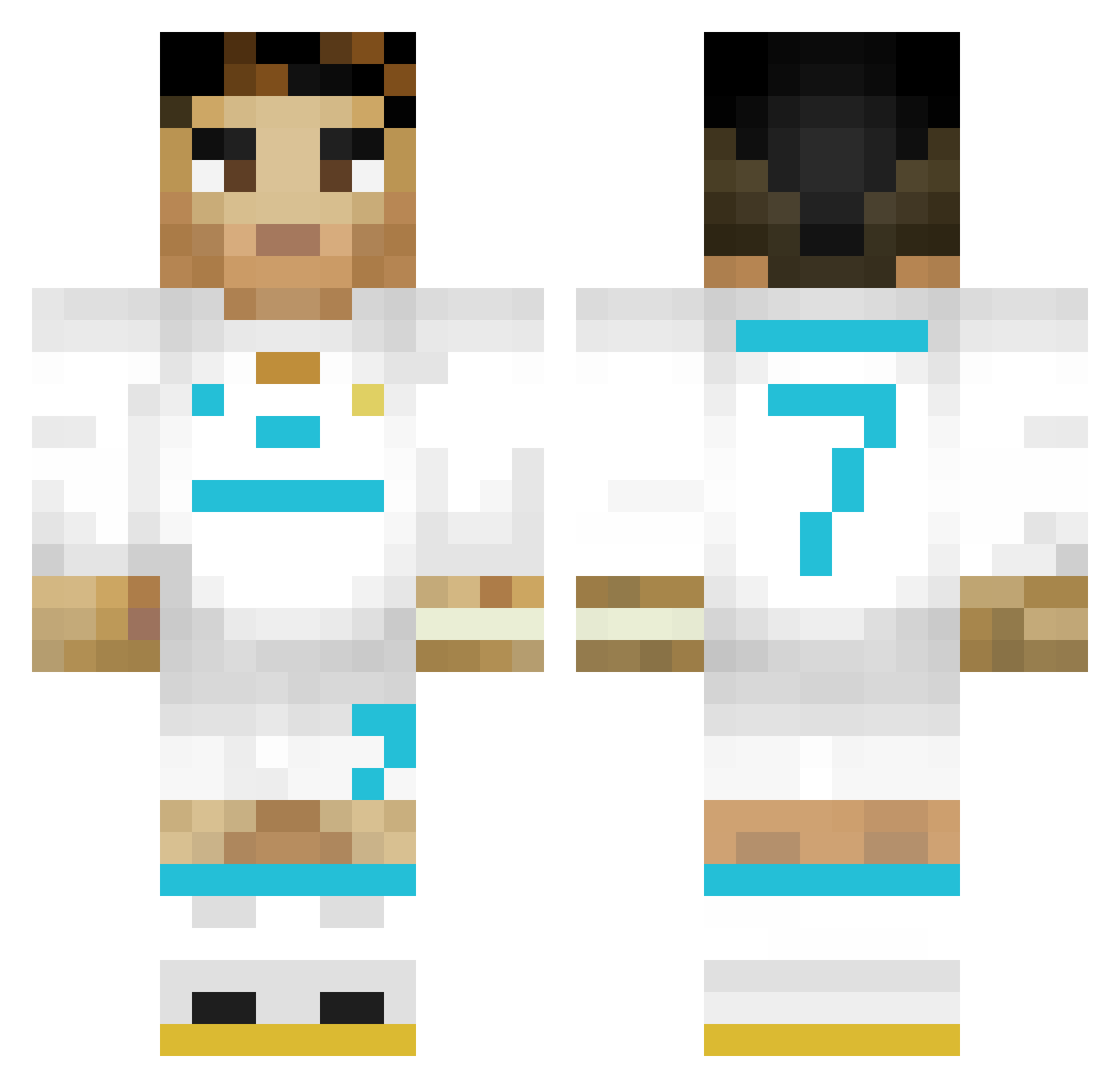
Current Minecraft skin of the player bernardo9889, loaded from the official Mojang API. Rotate the 3D model with your mouse or finger, then download the skin as a PNG file and use it in Minecraft: Bedrock Edition or Java Edition for free. When bernardo9889 changes their skin, this page updates automatically and the old skin stays in the history below.
Other players with this skin (353)
bernardo9889 was the 37th player we have seen with this skin, first spotted on 05.08.2026. The same skin was seen on these players. Open a nickname to see their current skin and skin history.
 baconsoda4L TenuousNickel34 scc2209 derjutzte bouncypig123 GenZu_M_ Johan745 Julp10 MadaCR7 CodoiuCatalin ManiacKill artudito64 BadanBOSS Carrera715 Yamah202 no_thrash _Ron_K PescaditoPro FreDelaxALpha CristianoPenald0 Gordeliciu MKazu0 SEIYADZN HEBERSIM lijiali Emirktsl Maple_Empanada Mr_Boom2016 TheRacistMan_ 78545 RodrigoLxKs VillageGiorgio foperus sorvete90 Lucaiwp12 knfot
 zaddyokis AlladyN612 MagicPedro14807 non_ho_elisir Radirerty_Victor vinijr0909 Welington2009 Cazador3333 XNDRA Chairo00 tlenii JLS012010 dldbsrb130 speedy201409 7Reign LMS1080 RonaldoGOAT GOJO907 Leo_Kochan MegaG9 Bru342 M1ddleEastBeast Asxab mushidana
More Cristiano Ronaldo Minecraft skins
See all 204 Cristiano Ronaldo skins
How to install the bernardo9889 skin
- Press the Download button above to save the skin as a PNG file.
- Minecraft: Bedrock Edition (PE): open the Dressing Room from the main menu (or tap your character → Edit Character), go to Classic Skins → Owned, press the + (new skin) button, choose the downloaded PNG and pick the Classic (Steve) model. Works on PC and mobile; consoles cannot import custom skins.
- Minecraft: Java Edition: open the Minecraft Launcher, go to the Skins tab, click New Skin, load the PNG, pick the Classic (Steve) model and press Save & Use. You can also upload it at minecraft.net → Profile → Change Skin.
The skin does not show up after import - what should I do?
Restart Minecraft and open the Dressing Room again - imported skins sometimes appear only after a restart. Also make sure you selected the imported skin and picked the Classic (Steve) model.
Which model should I choose, Classic or Slim?
This skin is designed for the Classic (Steve) model. If you pick the wrong model, the arms of the skin will look stretched or squeezed.
Is the skin of bernardo9889 free to download?
Yes. Press Download, save the PNG file and use it in Minecraft: Bedrock Edition or Java Edition - no payment or registration needed. The skin also works on multiplayer servers and Realms.
More skins
Looking for more? Go back to all Minecraft skins and check the top skins of the week, month and all time, or find any player's skin by nickname.