
benitoblu - Minecraft Skins & Skin History
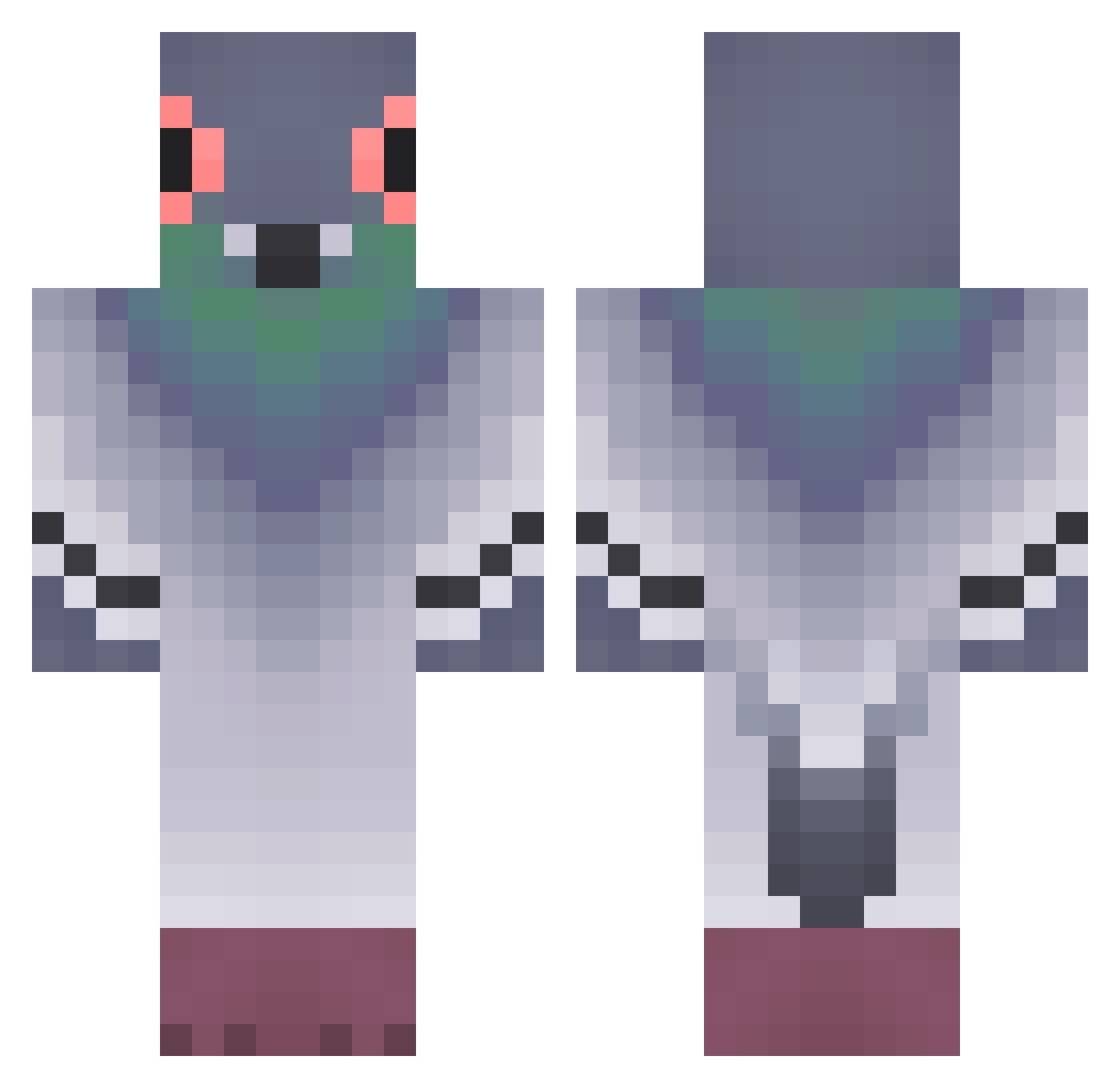
Current Minecraft skin of the player benitoblu, loaded from the official Mojang API. Rotate the 3D model with your mouse or finger, then download the skin as a PNG file and use it in Minecraft: Bedrock Edition or Java Edition for free. When benitoblu changes their skin, this page updates automatically and the old skin stays in the history below.
Other players with this skin (371)
benitoblu was the 82nd player we have seen with this skin, first spotted on 19.08.2026. The same skin was seen on these players. Open a nickname to see their current skin and skin history.
 grimesiguess NefariousPigeon PidgeonLicker fartmachine05 Hecoute ReindsR djalla_ seek_on Mr_Kurlik Bloundedd FR19_H0riz0n Anokxik Pigeon_Overlord0 jsy_0132 Mis12343 Hugoman590 LAW677 guneetsandhu HikarinoHolo Lexus_Alfa DoFra67 blazejswag22 Hu1102 Sir_CoW_X NoobanielPCK shimonn_1 tdawg6607 __YaoYao__ yaGolova AppelleLeSAMu openstone xChino21 ellalee2566 comefezes sabine420 szymon234 Krusla rivphri chenre Rodgers331 supra_niels Necklann SKEBOP polskijaden lolotwingo
 InfinitixWarrior xKristof3r SteakhouseChub dkssudgktpdy_XD Web_Rot Z0RAAOO Springform Fricho Sangress nickne72 inyenzi
 Lord_if009 Hontaz Drachomen FreshThunder
More Pigeon Minecraft skins
How to install the benitoblu skin
- Press the Download button above to save the skin as a PNG file.
- Minecraft: Bedrock Edition (PE): open the Dressing Room from the main menu (or tap your character → Edit Character), go to Classic Skins → Owned, press the + (new skin) button, choose the downloaded PNG and pick the Classic (Steve) model. Works on PC and mobile; consoles cannot import custom skins.
- Minecraft: Java Edition: open the Minecraft Launcher, go to the Skins tab, click New Skin, load the PNG, pick the Classic (Steve) model and press Save & Use. You can also upload it at minecraft.net → Profile → Change Skin.
The skin does not show up after import - what should I do?
Restart Minecraft and open the Dressing Room again - imported skins sometimes appear only after a restart. Also make sure you selected the imported skin and picked the Classic (Steve) model.
Which model should I choose, Classic or Slim?
This skin is designed for the Classic (Steve) model. If you pick the wrong model, the arms of the skin will look stretched or squeezed.
Is the skin of benitoblu free to download?
Yes. Press Download, save the PNG file and use it in Minecraft: Bedrock Edition or Java Edition - no payment or registration needed. The skin also works on multiplayer servers and Realms.
More skins
Looking for more? Go back to all Minecraft skins and check the top skins of the week, month and all time, or find any player's skin by nickname.