
bastiboybucks - Minecraft Skins & Skin History
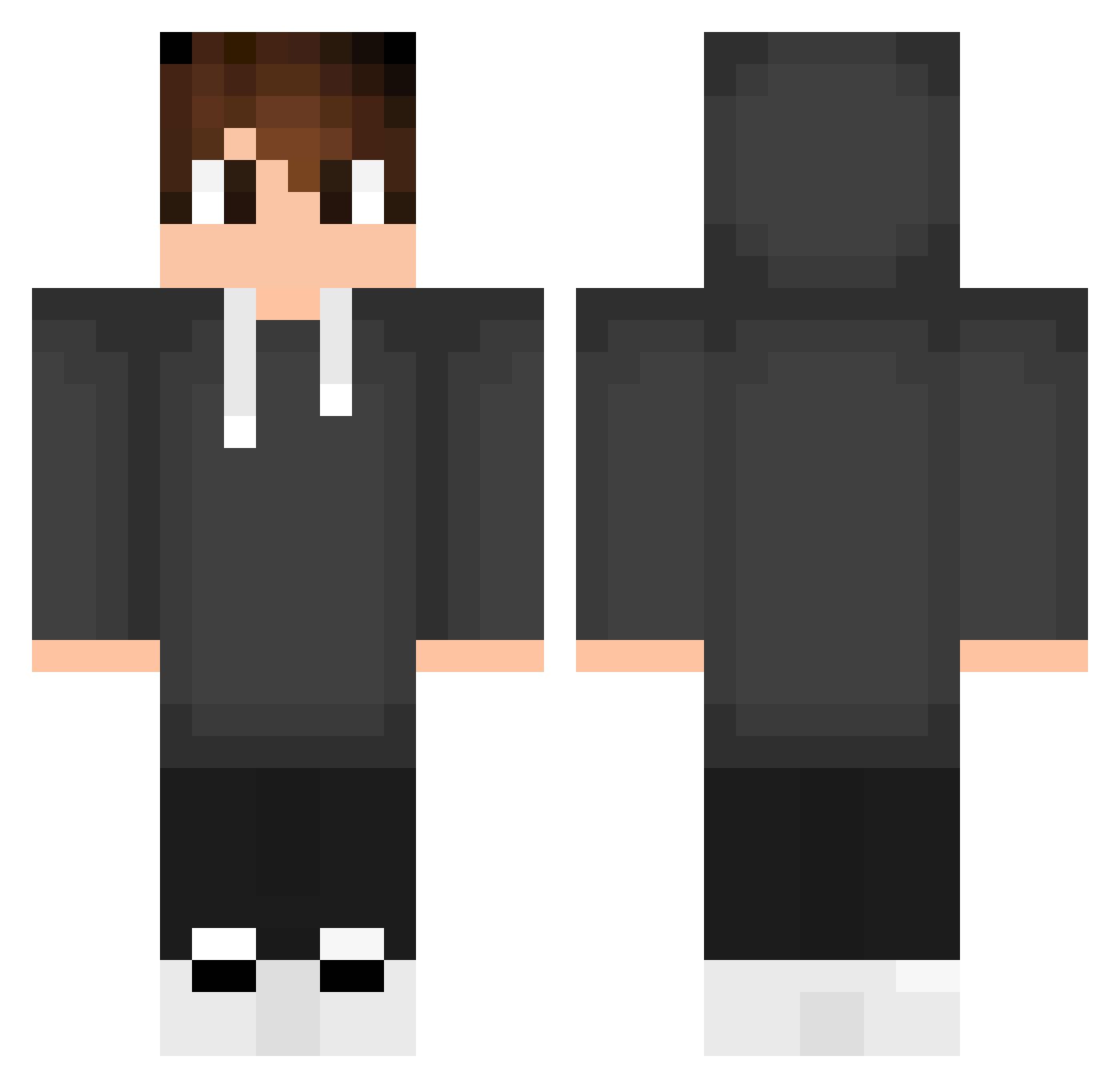
Current Minecraft skin of the player bastiboybucks, loaded from the official Mojang API. Rotate the 3D model with your mouse or finger, then download the skin as a PNG file and use it in Minecraft: Bedrock Edition or Java Edition for free. When bastiboybucks changes their skin, this page updates automatically and the old skin stays in the history below.
Other players with this skin (553)
bastiboybucks was the 382nd player we have seen with this skin, first spotted on 08.10.2026. The same skin was seen on these players. Open a nickname to see their current skin and skin history.
 Ordubadrayon GrabDragoner ilyalezhnev claudiu172 NonaStern MR10Rockhead TV_CRAFT360 peatekk MobyDick05 Wadd678 Mustaaaa Squwas ahmethel QualQuer_Coisa_ Soatoo vgvb Talhulha mkns2488 mustu1 Dojka34 LVDRKTR RageFrostXDD bilbo379 PalmerATK HunterHelg18 Vofy BreninYuri x_alex05 Grim_____ Heropai Gabino08 Eros1517 cordeirx Snapper1905 XxDarkKnight38xX LanTiannnn monkeybones1999 blaze9234 MaxiTheFarmer 1mn0t_gabr1el MRAlpha37 _Pati_H Bush2008 xoooni Simon123764 MyReal9000 cedgabs xMagisterSx HunterZT Iangamer144 Matty030815 poppy_df11 PBBENCE SoSaArAr LuckyBernard NorseGrizzlySSDD THEHereze05 oOUnNameOo EmanuelPC15 Kayper_
How to install the bastiboybucks skin
- Press the Download button above to save the skin as a PNG file.
- Minecraft: Bedrock Edition (PE): open the Dressing Room from the main menu (or tap your character → Edit Character), go to Classic Skins → Owned, press the + (new skin) button, choose the downloaded PNG and pick the Classic (Steve) model. Works on PC and mobile; consoles cannot import custom skins.
- Minecraft: Java Edition: open the Minecraft Launcher, go to the Skins tab, click New Skin, load the PNG, pick the Classic (Steve) model and press Save & Use. You can also upload it at minecraft.net → Profile → Change Skin.
The skin does not show up after import - what should I do?
Restart Minecraft and open the Dressing Room again - imported skins sometimes appear only after a restart. Also make sure you selected the imported skin and picked the Classic (Steve) model.
Which model should I choose, Classic or Slim?
This skin is designed for the Classic (Steve) model. If you pick the wrong model, the arms of the skin will look stretched or squeezed.
Is the skin of bastiboybucks free to download?
Yes. Press Download, save the PNG file and use it in Minecraft: Bedrock Edition or Java Edition - no payment or registration needed. The skin also works on multiplayer servers and Realms.
More skins
Looking for more? Go back to all Minecraft skins and check the top skins of the week, month and all time, or find any player's skin by nickname.