
aynencan - Minecraft Skins & Skin History
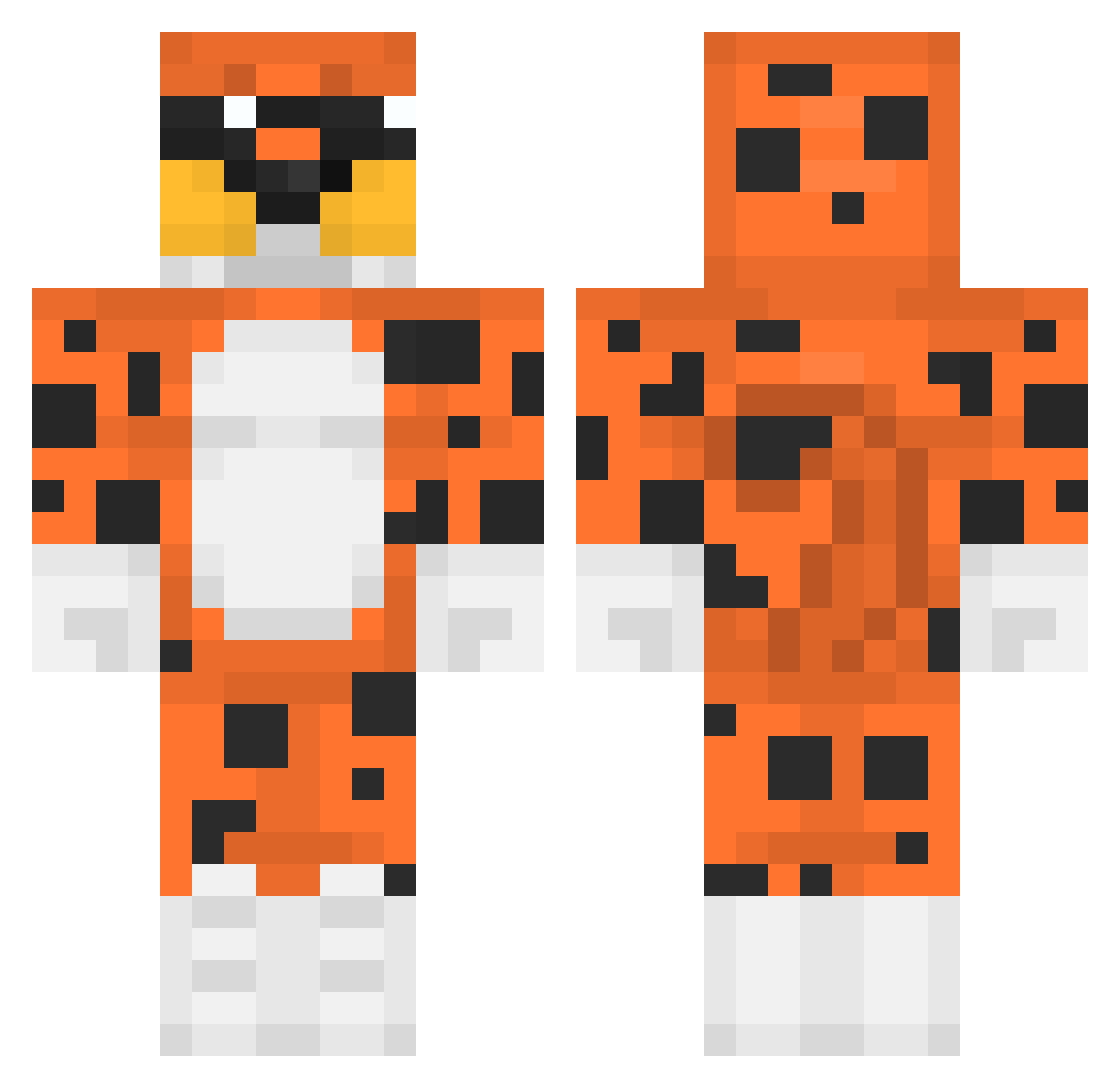
Current Minecraft skin of the player aynencan, loaded from the official Mojang API. Rotate the 3D model with your mouse or finger, then download the skin as a PNG file and use it in Minecraft: Bedrock Edition or Java Edition for free. When aynencan changes their skin, this page updates automatically and the old skin stays in the history below.
Other players with this skin (395)
aynencan was the 363rd player we have seen with this skin, first spotted on 24.10.2026. The same skin was seen on these players. Open a nickname to see their current skin and skin history.
 Shaneypooooooooo ly_IDUzc_0301 majuuuuuuuuuuu cris403 miguel10melo felpzzKINGZ SpanishElmo1933 kmurr25 HakkePaul_0221 tU_dOr Koriioto Dnym smukiii Gavera GrandeFoczka CooLBao FroppyFlop _agatti lksboina lukingo17 XsteeveX thelolpandax whuerrouw Noksi123 Kislyception AlbertiusTheIV xleb161 EBAYU Spust_wFrytku233 Dguti7 aBigmoist JJREKZ Chief_Preston Sagastizado Domin0_08 WithTheRebel kv2z cheeseball714 SableAble master263 lemoniardo iloveraving CaillouFeodal SpaceMollyy Hybrations yobaii Kawa455 DevoradorXElite Nikitoxikk bigsoares Impaulempirico EduuLoko MTZK4 Nemr0d Lawndry17 Nilsu54 nielubieplackow1 Trefl2115 SkyVision45 KKQUAIN
More Leopard Minecraft skins
How to install the aynencan skin
- Press the Download button above to save the skin as a PNG file.
- Minecraft: Bedrock Edition (PE): open the Dressing Room from the main menu (or tap your character → Edit Character), go to Classic Skins → Owned, press the + (new skin) button, choose the downloaded PNG and pick the Classic (Steve) model. Works on PC and mobile; consoles cannot import custom skins.
- Minecraft: Java Edition: open the Minecraft Launcher, go to the Skins tab, click New Skin, load the PNG, pick the Classic (Steve) model and press Save & Use. You can also upload it at minecraft.net → Profile → Change Skin.
The skin does not show up after import - what should I do?
Restart Minecraft and open the Dressing Room again - imported skins sometimes appear only after a restart. Also make sure you selected the imported skin and picked the Classic (Steve) model.
Which model should I choose, Classic or Slim?
This skin is designed for the Classic (Steve) model. If you pick the wrong model, the arms of the skin will look stretched or squeezed.
Is the skin of aynencan free to download?
Yes. Press Download, save the PNG file and use it in Minecraft: Bedrock Edition or Java Edition - no payment or registration needed. The skin also works on multiplayer servers and Realms.
More skins
Looking for more? Go back to all Minecraft skins and check the top skins of the week, month and all time, or find any player's skin by nickname.