
articolo5 - Minecraft Skins & Skin History
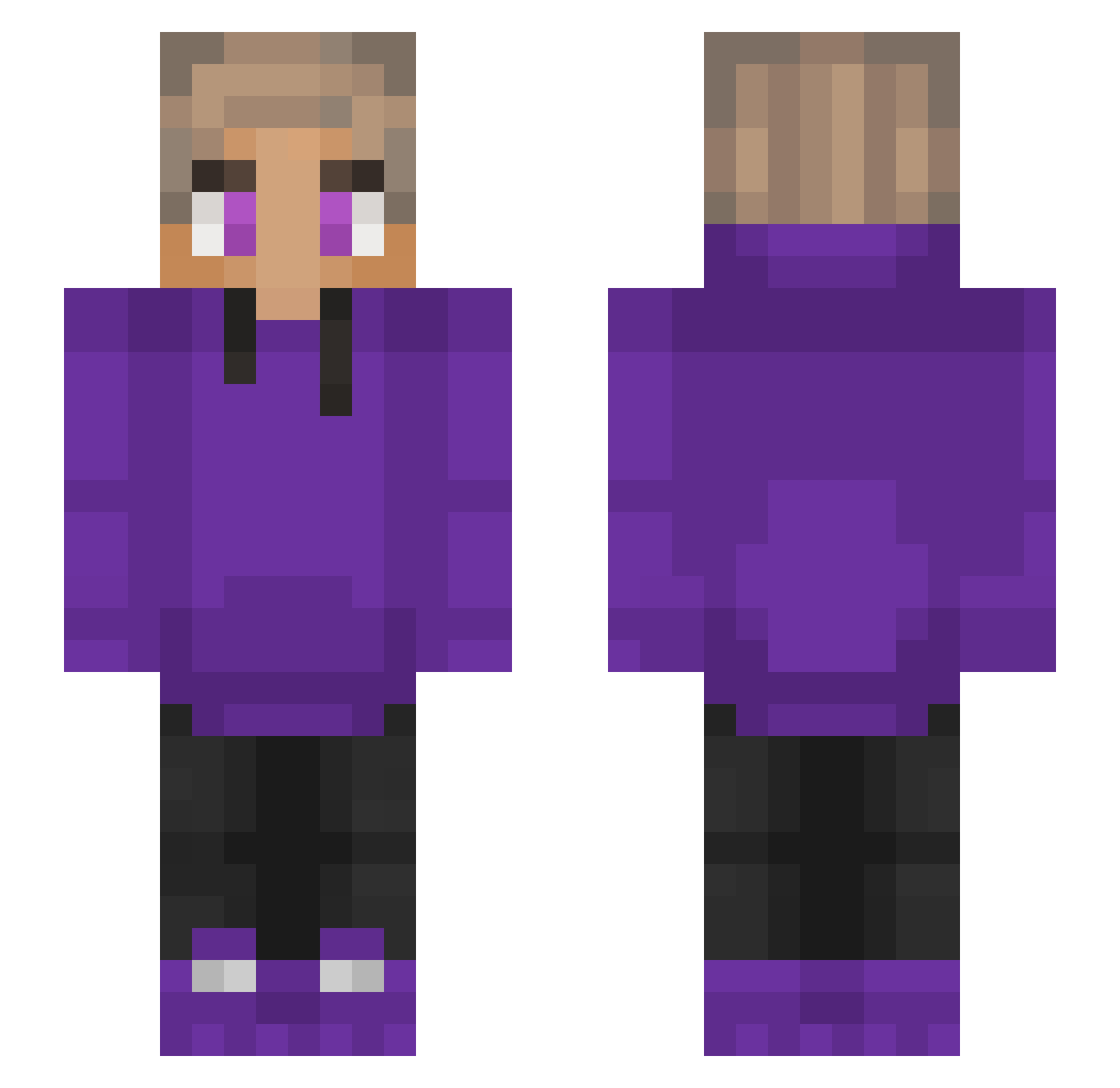
Current Minecraft skin of the player articolo5, loaded from the official Mojang API. Rotate the 3D model with your mouse or finger, then download the skin as a PNG file and use it in Minecraft: Bedrock Edition or Java Edition for free. When articolo5 changes their skin, this page updates automatically and the old skin stays in the history below.
Other players with this skin (230)
articolo5 was the 34th player we have seen with this skin, first spotted on 07.08.2026. The same skin was seen on these players. Open a nickname to see their current skin and skin history.
 m_Levi10 Blackbanana9726
 666aiissac RelikSama _Tie__ showtime55 ItzMapleBoy Haffenritter9 WMT2904 Triq danki4a09 PICKED0_0 SlurpyBoy751 ITSboss21 Dhufisuc eymenbaba2 Destikss lemurkinoko ChessMod Subtonicox Escorpiion MrShrimpsAlt GamerboyGRS Navluli UwUSpoke SirGeon Lukas_Ger Purpledullah FlippyArt ArcaneDuke77873 Shqrpends Keit0 hassebasse93 shresthispro45 jakeTheSnake8019 YaboyProject Fiona32 bakerynextdoor CriTheBest_ yuha0203 YuhNevaKnow
 strght_ Dadariuus unreadybear19 The_Gwnius7 JFKLOL Enrique1337 DragonX56 igouf Ricoffie WolfCoolSanta116 JedrulaP neupas Ramadansfam dinori_ Blue2618 wuyazhan ANZKidfury impulse_530 Nelnelstar
How to install the articolo5 skin
- Press the Download button above to save the skin as a PNG file.
- Minecraft: Bedrock Edition (PE): open the Dressing Room from the main menu (or tap your character → Edit Character), go to Classic Skins → Owned, press the + (new skin) button, choose the downloaded PNG and pick the Slim (Alex) model. Works on PC and mobile; consoles cannot import custom skins.
- Minecraft: Java Edition: open the Minecraft Launcher, go to the Skins tab, click New Skin, load the PNG, pick the Slim (Alex) model and press Save & Use. You can also upload it at minecraft.net → Profile → Change Skin.
The skin does not show up after import - what should I do?
Restart Minecraft and open the Dressing Room again - imported skins sometimes appear only after a restart. Also make sure you selected the imported skin and picked the Slim (Alex) model.
Which model should I choose, Classic or Slim?
This skin is designed for the Slim (Alex) model. If you pick the wrong model, the arms of the skin will look stretched or squeezed.
Is the skin of articolo5 free to download?
Yes. Press Download, save the PNG file and use it in Minecraft: Bedrock Edition or Java Edition - no payment or registration needed. The skin also works on multiplayer servers and Realms.
More skins
Looking for more? Go back to all Minecraft skins and check the top skins of the week, month and all time, or find any player's skin by nickname.