
aronhoe - Minecraft Skins & Skin History
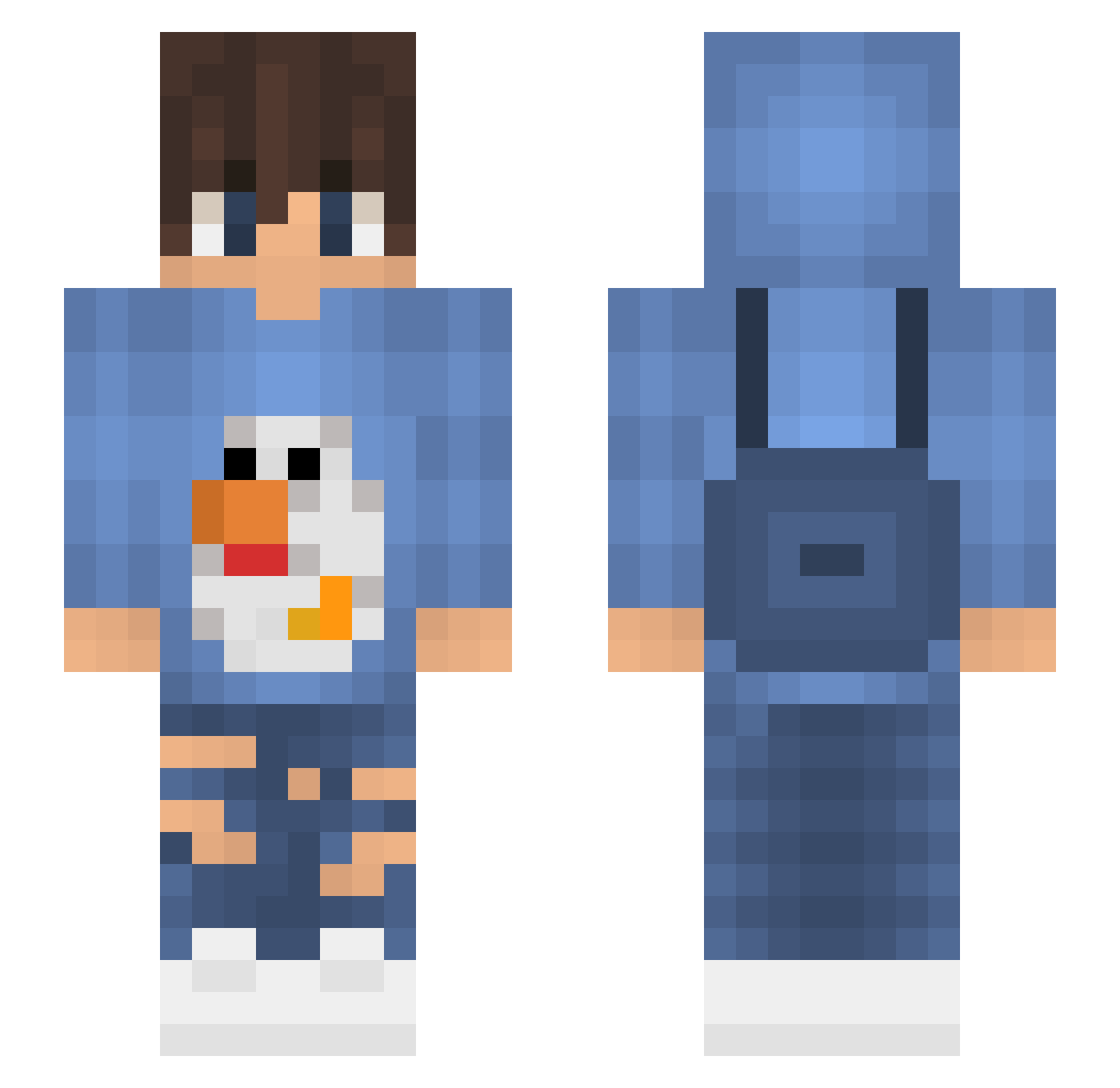
Current Minecraft skin of the player aronhoe, loaded from the official Mojang API. Rotate the 3D model with your mouse or finger, then download the skin as a PNG file and use it in Minecraft: Bedrock Edition or Java Edition for free. When aronhoe changes their skin, this page updates automatically and the old skin stays in the history below.
Other players with this skin (72)
aronhoe was the 19th player we have seen with this skin, first spotted on 23.08.2026. The same skin was seen on these players. Open a nickname to see their current skin and skin history.
 dada3523 hyyhyy877h Chip_n_Chap Osherrrrr Electricflies summer__time WU00 artsoccer OwlzMrtn_ zDqnonino lrkt brouwerss nyckdevries Ditraa PleaseQD Peeked Celuse Ordacious Laggerek69 MrSaechao Zeitsev Reaxzu RedGreyx7634 Henkoglobin _LordFabi_ 0RI1612 _mody_ liskee mfyn souIls Patres320 TunkiYT
 otenguunler Incognito_Boy Alan724 NiePytalemJakCos Drxp777 ChangL Chanda Lexinyk TeaIsSingle Arnold_Boczek Oogway_1 TaakofromTV69 Bonbon100 n0bAdi2401 Pacsu minsung8013 aqiv Qelton sadtyy Pimentellindo InflisterH Haayloo The_Pat omar10m Z9d_ Haannees Txsco_ Lty520Kaise
More Backpack Minecraft skins
How to install the aronhoe skin
- Press the Download button above to save the skin as a PNG file.
- Minecraft: Bedrock Edition (PE): open the Dressing Room from the main menu (or tap your character → Edit Character), go to Classic Skins → Owned, press the + (new skin) button, choose the downloaded PNG and pick the Slim (Alex) model. Works on PC and mobile; consoles cannot import custom skins.
- Minecraft: Java Edition: open the Minecraft Launcher, go to the Skins tab, click New Skin, load the PNG, pick the Slim (Alex) model and press Save & Use. You can also upload it at minecraft.net → Profile → Change Skin.
The skin does not show up after import - what should I do?
Restart Minecraft and open the Dressing Room again - imported skins sometimes appear only after a restart. Also make sure you selected the imported skin and picked the Slim (Alex) model.
Which model should I choose, Classic or Slim?
This skin is designed for the Slim (Alex) model. If you pick the wrong model, the arms of the skin will look stretched or squeezed.
Is the skin of aronhoe free to download?
Yes. Press Download, save the PNG file and use it in Minecraft: Bedrock Edition or Java Edition - no payment or registration needed. The skin also works on multiplayer servers and Realms.
More skins
Looking for more? Go back to all Minecraft skins and check the top skins of the week, month and all time, or find any player's skin by nickname.