
armyangle - Minecraft Skins & Skin History
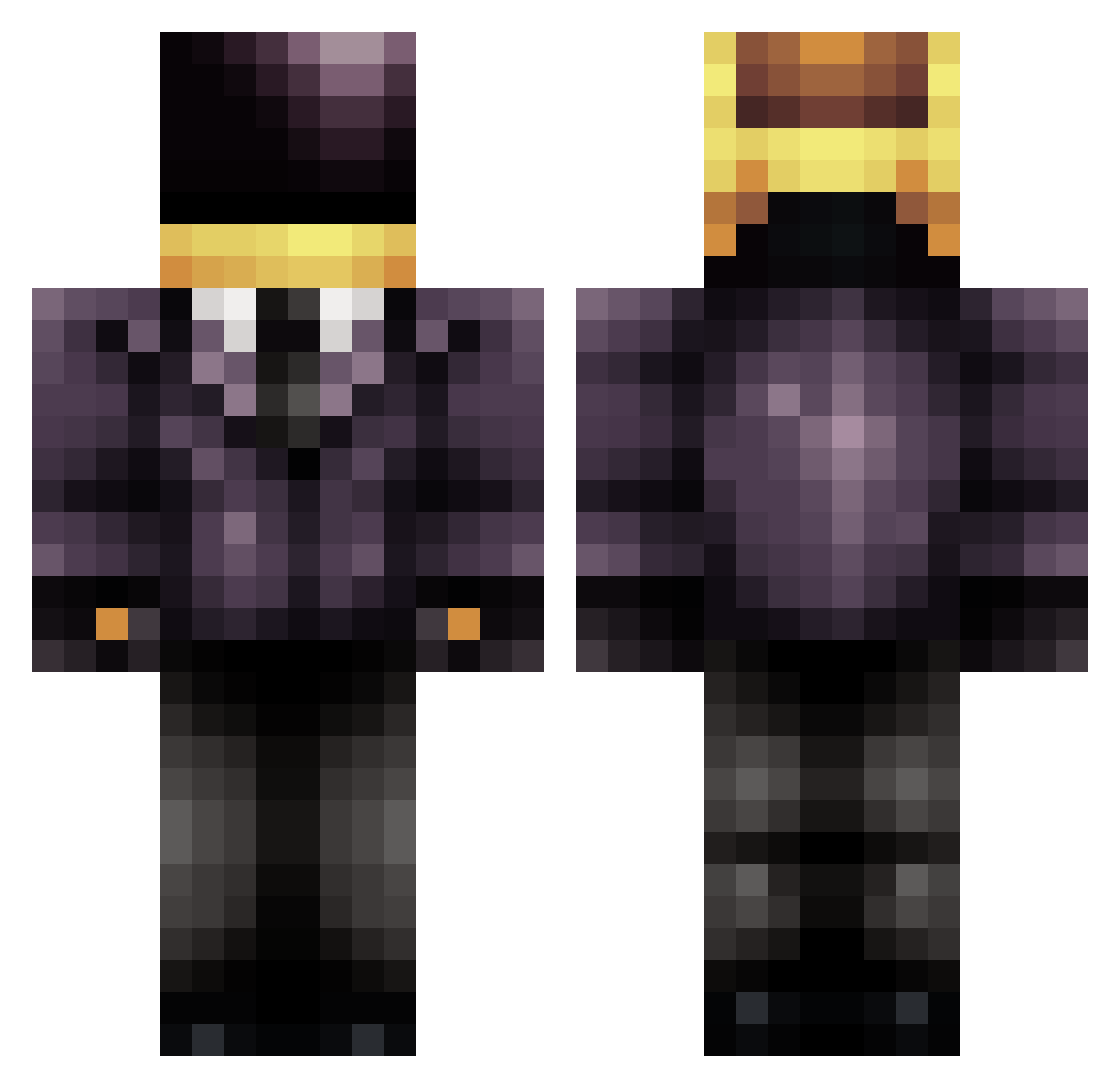
Current Minecraft skin of the player armyangle, loaded from the official Mojang API. Rotate the 3D model with your mouse or finger, then download the skin as a PNG file and use it in Minecraft: Bedrock Edition or Java Edition for free. When armyangle changes their skin, this page updates automatically and the old skin stays in the history below.
Other players with this skin (707)
armyangle was the 1st player we have seen with this skin, first spotted on 20.07.2026. The same skin was seen on these players. Open a nickname to see their current skin and skin history.
 Gianfrancodante chenDawg rk231 GuruSunset Poiloku76 Squakkkkk CurbyStomper minearmee ip00psoo Holmes619 MILKY__WAY Nardomatic NightScope Bkop 1redfire1 kristalwars Cronical_1 Ilegal JokkeKoo DeX_MyThiiC mekkanic rampage_1269 seanyboy341 xXCorruptedCPUXx beno271 tshs02 Pasta_ML jredeker36 twilly1 dylansmitty80031 ultogir123 SteamboatWilly28 Bronto_Thunder Crillecool123 StarMo0n Carlos_Oak willowhaus j_peezy Chuckstew02 Merkz101 NovaMarkus frozenxmonkey aboyd98 Ashtonr1112 seanyboy2k11 KnifeySkitty tapom5 GeoDud37 cheese_430 Daltoncullen26 114811 carltheman5467 _EnSynk_ Jackesun81 epser123 Logan_Robledo53 Lucky57 Lorde7845 hellison12312 dbiggie93
More Daft Punk Minecraft skins
How to install the armyangle skin
- Press the Download button above to save the skin as a PNG file.
- Minecraft: Bedrock Edition (PE): open the Dressing Room from the main menu (or tap your character → Edit Character), go to Classic Skins → Owned, press the + (new skin) button, choose the downloaded PNG and pick the Classic (Steve) model. Works on PC and mobile; consoles cannot import custom skins.
- Minecraft: Java Edition: open the Minecraft Launcher, go to the Skins tab, click New Skin, load the PNG, pick the Classic (Steve) model and press Save & Use. You can also upload it at minecraft.net → Profile → Change Skin.
The skin does not show up after import - what should I do?
Restart Minecraft and open the Dressing Room again - imported skins sometimes appear only after a restart. Also make sure you selected the imported skin and picked the Classic (Steve) model.
Which model should I choose, Classic or Slim?
This skin is designed for the Classic (Steve) model. If you pick the wrong model, the arms of the skin will look stretched or squeezed.
Is the skin of armyangle free to download?
Yes. Press Download, save the PNG file and use it in Minecraft: Bedrock Edition or Java Edition - no payment or registration needed. The skin also works on multiplayer servers and Realms.
More skins
Looking for more? Go back to all Minecraft skins and check the top skins of the week, month and all time, or find any player's skin by nickname.