
ankle8 - Minecraft Skins & Skin History
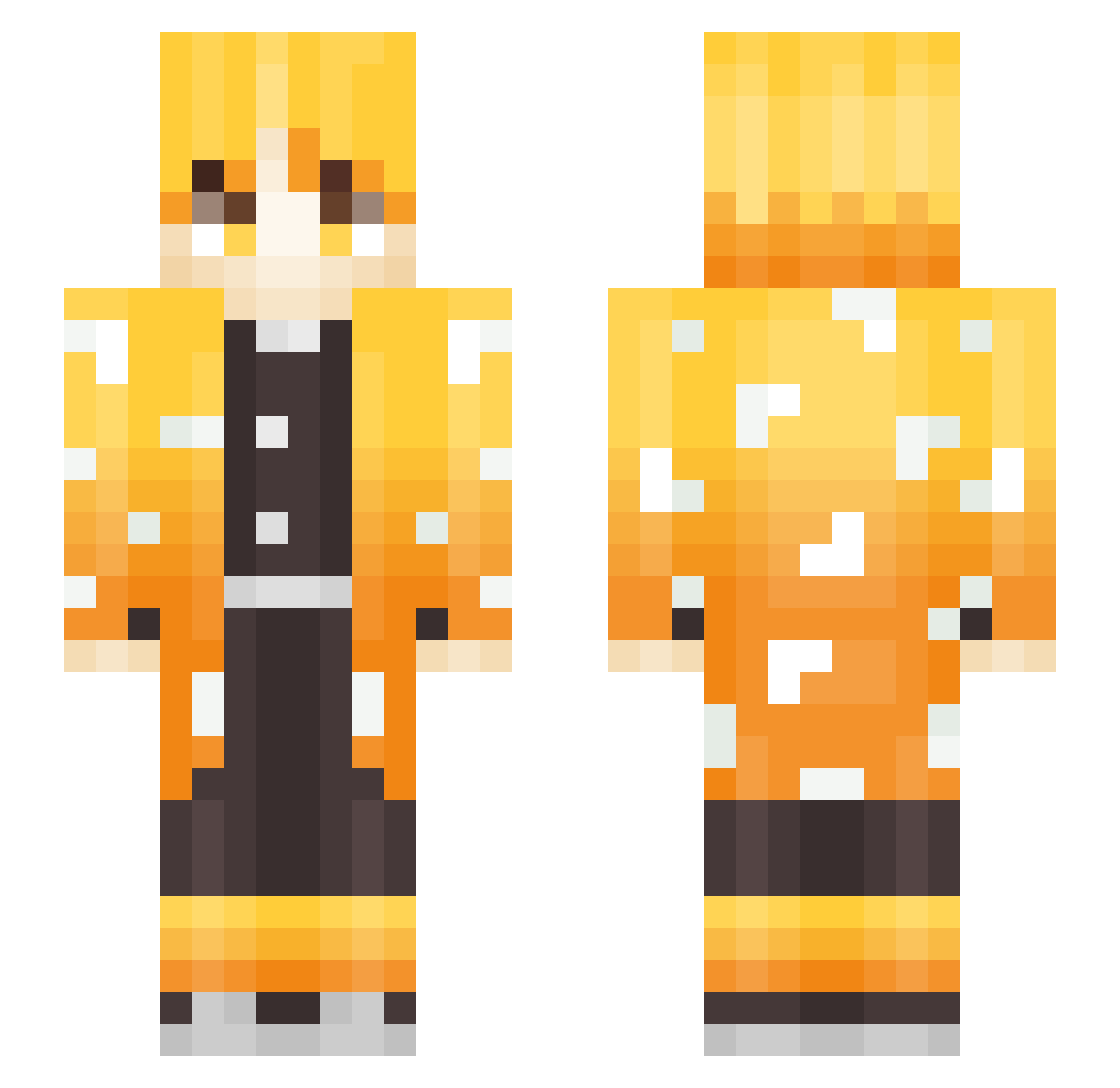
Current Minecraft skin of the player ankle8, loaded from the official Mojang API. Rotate the 3D model with your mouse or finger, then download the skin as a PNG file and use it in Minecraft: Bedrock Edition or Java Edition for free. When ankle8 changes their skin, this page updates automatically and the old skin stays in the history below.
Other players with this skin (341)
ankle8 was the 322nd player we have seen with this skin, first spotted on 05.11.2026. The same skin was seen on these players. Open a nickname to see their current skin and skin history.
 HunggHackNao kinggodyg gmltn25 watashOne Sekundlesz Morideaux MadsedPotatoes kuma1963 EpicNeros Matteo_47_XD skypai Josubeom03 TomatoSas panda752 kenta1320 MACACOSDELASELVA Gianmarx_ ljs0601 KaRToShKa_Ex FYR180 seamag argoo162 maestro0808 01Heisenberg sunabi_233 Joreld Contexto DooW28 Han_k_ Stupid_BB Oxwin pequenio martiniyeyo MrLalaf Kudamono_Kaze luisCc Pasture_2006 PimSum zeendawg XyrothG Jayden_Tsai KingZenitsu151 asc55661 Koutei97 ichigomiruki Blauder silk1234 QuirinoGG Goldglove1 plasmaflame NaokiSaito ltzos shazamed MrKewii 2XFADDY dqnielg0dd Xaref_01 HaejunGod Grechson prodGumi
More Zenitsu Agatsuma Minecraft skins
See all 209 Zenitsu Agatsuma skins
How to install the ankle8 skin
- Press the Download button above to save the skin as a PNG file.
- Minecraft: Bedrock Edition (PE): open the Dressing Room from the main menu (or tap your character → Edit Character), go to Classic Skins → Owned, press the + (new skin) button, choose the downloaded PNG and pick the Slim (Alex) model. Works on PC and mobile; consoles cannot import custom skins.
- Minecraft: Java Edition: open the Minecraft Launcher, go to the Skins tab, click New Skin, load the PNG, pick the Slim (Alex) model and press Save & Use. You can also upload it at minecraft.net → Profile → Change Skin.
The skin does not show up after import - what should I do?
Restart Minecraft and open the Dressing Room again - imported skins sometimes appear only after a restart. Also make sure you selected the imported skin and picked the Slim (Alex) model.
Which model should I choose, Classic or Slim?
This skin is designed for the Slim (Alex) model. If you pick the wrong model, the arms of the skin will look stretched or squeezed.
Is the skin of ankle8 free to download?
Yes. Press Download, save the PNG file and use it in Minecraft: Bedrock Edition or Java Edition - no payment or registration needed. The skin also works on multiplayer servers and Realms.
More skins
Looking for more? Go back to all Minecraft skins and check the top skins of the week, month and all time, or find any player's skin by nickname.