
ancienthero28 - Minecraft Skins & Skin History
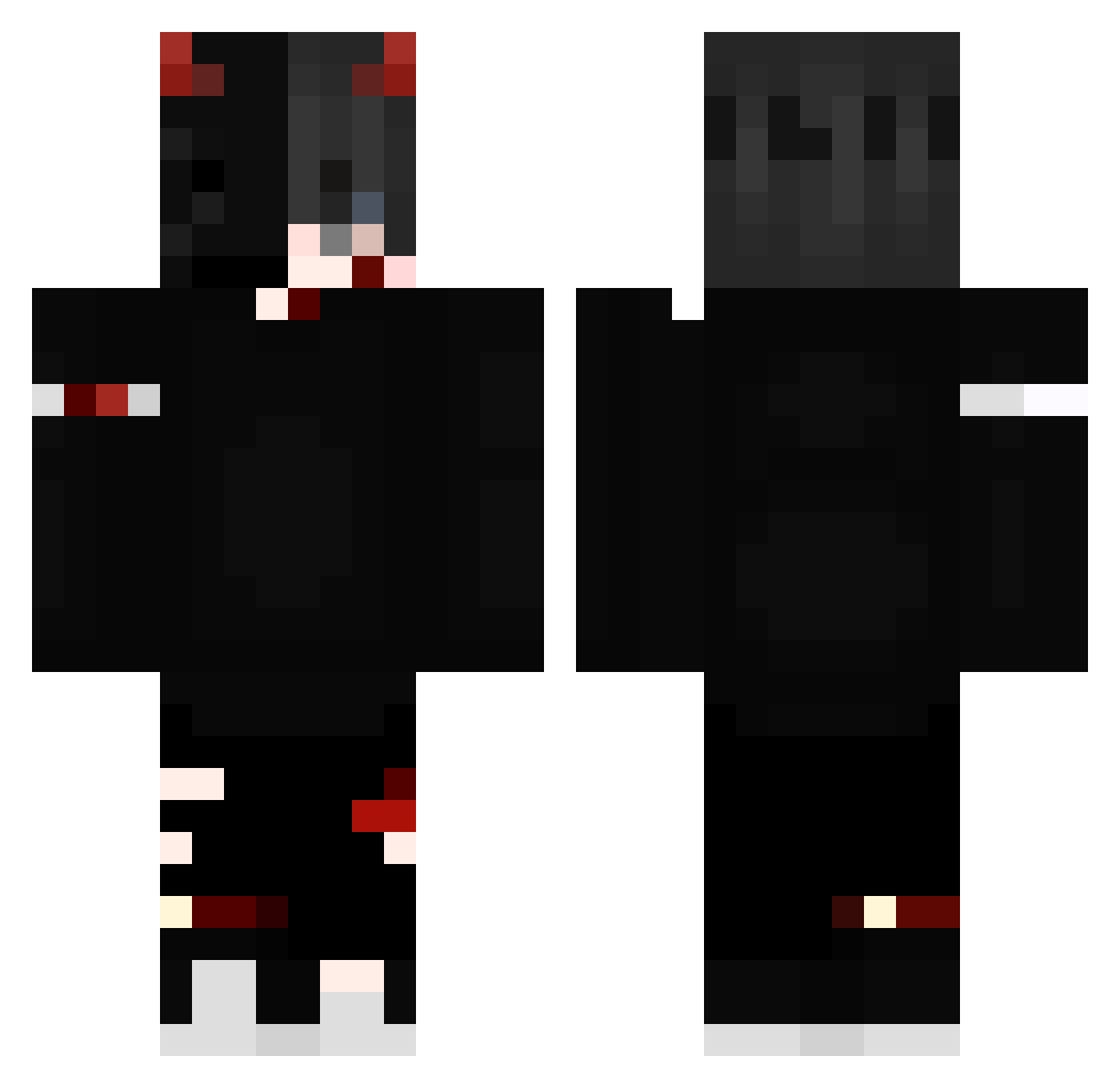
Current Minecraft skin of the player ancienthero28, loaded from the official Mojang API. Rotate the 3D model with your mouse or finger, then download the skin as a PNG file and use it in Minecraft: Bedrock Edition or Java Edition for free. When ancienthero28 changes their skin, this page updates automatically and the old skin stays in the history below.
Other players with this skin (239)
ancienthero28 was the 64th player we have seen with this skin, first spotted on 26.08.2026. The same skin was seen on these players. Open a nickname to see their current skin and skin history.
 qweursed1 NNejos BorgezZz BobSteinz D_e_m_o_n_1511 DARKxKAIZORgamer Hinthi LordDxrkKxi MarshallAvery Barretins_ Jerz91 EndgameLIfe Gezid Monster2410 KephasX _Spi4rit_ HenriG0D123 Lagratte Ranulf14 superbatman12
 Samotny_v2 DARKsumit Iamthejoker1958 SxITACHIxN Darkblack980793 Juandiego178 TheSpiritWorld MoonSter164 Zeron0va Grabille Death_OF_Angel Frostykingsv Saiyan_Klash Syno4 xxogmlgodxx SirAbuOP TeH__Tatsumi Redshunder Grdd33n darthvader4153 Hyoze Goldizer AlfaDem Sosiska929
 deathboi666 LegitIsNotCool Teamfight_Mech AlabamaKneeGrows Crowdart thund33rr BenYoshi WeedWadTaken AdminAsecas f80_ Tommy1205 G2BRIEL BlueBeez36 RemadeFuture Syuuu321 Nxghtman
More Edgy Minecraft skins
How to install the ancienthero28 skin
- Press the Download button above to save the skin as a PNG file.
- Minecraft: Bedrock Edition (PE): open the Dressing Room from the main menu (or tap your character → Edit Character), go to Classic Skins → Owned, press the + (new skin) button, choose the downloaded PNG and pick the Classic (Steve) model. Works on PC and mobile; consoles cannot import custom skins.
- Minecraft: Java Edition: open the Minecraft Launcher, go to the Skins tab, click New Skin, load the PNG, pick the Classic (Steve) model and press Save & Use. You can also upload it at minecraft.net → Profile → Change Skin.
The skin does not show up after import - what should I do?
Restart Minecraft and open the Dressing Room again - imported skins sometimes appear only after a restart. Also make sure you selected the imported skin and picked the Classic (Steve) model.
Which model should I choose, Classic or Slim?
This skin is designed for the Classic (Steve) model. If you pick the wrong model, the arms of the skin will look stretched or squeezed.
Is the skin of ancienthero28 free to download?
Yes. Press Download, save the PNG file and use it in Minecraft: Bedrock Edition or Java Edition - no payment or registration needed. The skin also works on multiplayer servers and Realms.
More skins
Looking for more? Go back to all Minecraft skins and check the top skins of the week, month and all time, or find any player's skin by nickname.