
alexBr09 - Minecraft Skins & Skin History
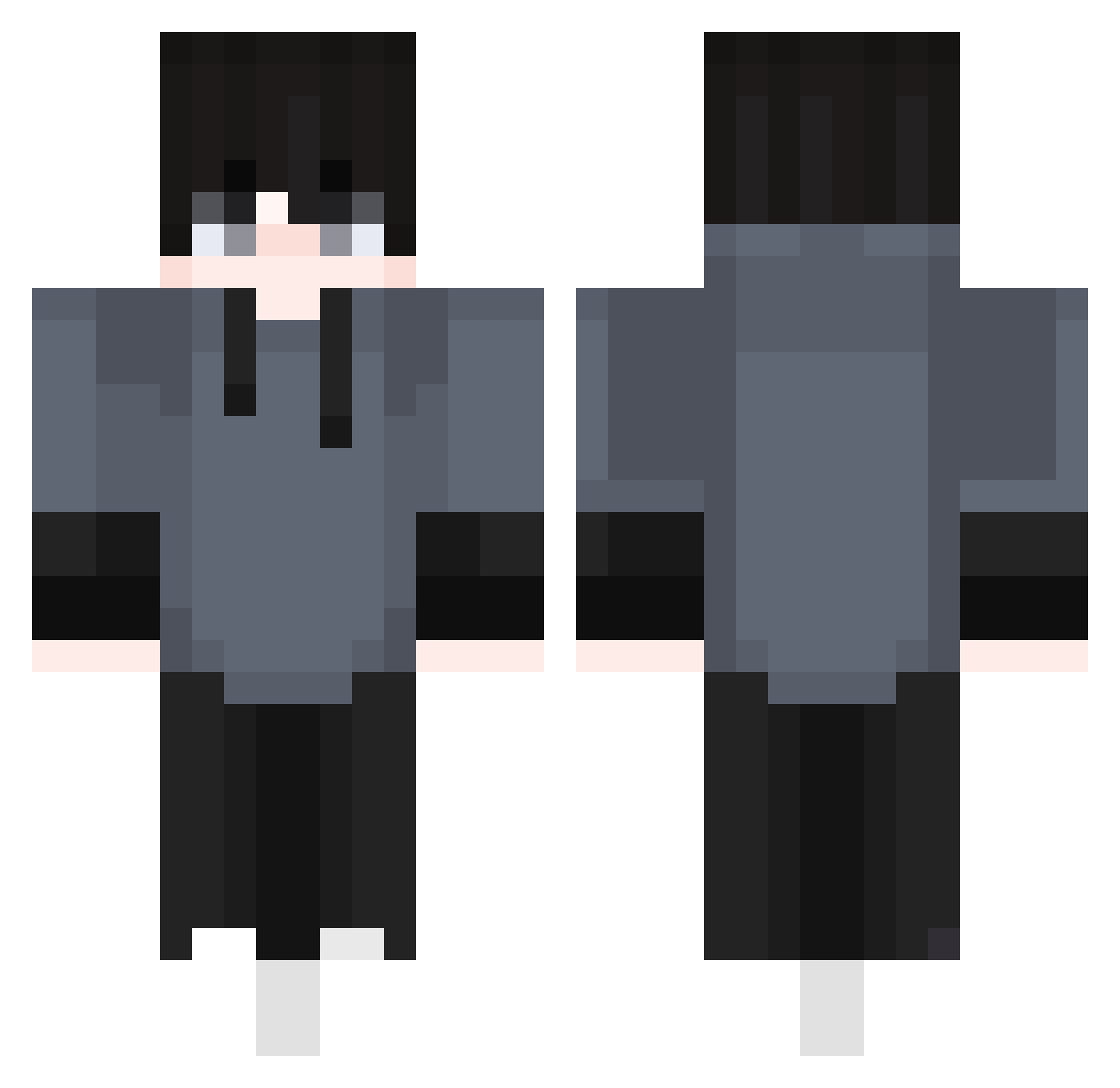
Current Minecraft skin of the player alexBr09, loaded from the official Mojang API. Rotate the 3D model with your mouse or finger, then download the skin as a PNG file and use it in Minecraft: Bedrock Edition or Java Edition for free. When alexBr09 changes their skin, this page updates automatically and the old skin stays in the history below.
Other players with this skin (410)
alexBr09 was the 272nd player we have seen with this skin, first spotted on 04.10.2026. The same skin was seen on these players. Open a nickname to see their current skin and skin history.
 DittoShawn GrinderGG beyond_410 Itzmemath jh3413 ManuelV3gan TO_SH Tarka_The0tter We2eeeerr L0wk4 K0EFOO joeyjoe826 Kimgidel liangoooo GustavoMaster Bove19760 VqRia Rhqnrdl Manrodjose Tanzim7siuu Do__Nyang Kadusis Negoney221 MC_YeZe PapaSALTY OmenFox IiHaveToGo syota14 Fynnisher CAOS87 toby294 t0miss karolinios12 Capitaomeni HU7SEN_S xJerdan XOCem XXWiktorXX0 KRVALORANT Shattered135 Michiham2014 aaronrss nicovillanum apnos mattwo1212 doranndo2 DJ0824 Tymek66 SUBIN_27 forzel2022 GD_OffSpring GutoMoreno PukDevil_05 Khanh1324 ItJae Bullet_Silver_ oi13 Kidariim Buffylon _misuu_
How to install the alexBr09 skin
- Press the Download button above to save the skin as a PNG file.
- Minecraft: Bedrock Edition (PE): open the Dressing Room from the main menu (or tap your character → Edit Character), go to Classic Skins → Owned, press the + (new skin) button, choose the downloaded PNG and pick the Classic (Steve) model. Works on PC and mobile; consoles cannot import custom skins.
- Minecraft: Java Edition: open the Minecraft Launcher, go to the Skins tab, click New Skin, load the PNG, pick the Classic (Steve) model and press Save & Use. You can also upload it at minecraft.net → Profile → Change Skin.
The skin does not show up after import - what should I do?
Restart Minecraft and open the Dressing Room again - imported skins sometimes appear only after a restart. Also make sure you selected the imported skin and picked the Classic (Steve) model.
Which model should I choose, Classic or Slim?
This skin is designed for the Classic (Steve) model. If you pick the wrong model, the arms of the skin will look stretched or squeezed.
Is the skin of alexBr09 free to download?
Yes. Press Download, save the PNG file and use it in Minecraft: Bedrock Edition or Java Edition - no payment or registration needed. The skin also works on multiplayer servers and Realms.
More skins
Looking for more? Go back to all Minecraft skins and check the top skins of the week, month and all time, or find any player's skin by nickname.