
afterburner - Minecraft Skins & Skin History
Current Minecraft skin of the player afterburner, loaded from the official Mojang API. Rotate the 3D model with your mouse or finger, then download the skin as a PNG file and use it in Minecraft: Bedrock Edition or Java Edition for free. When afterburner changes their skin, this page updates automatically and the old skin stays in the history below.
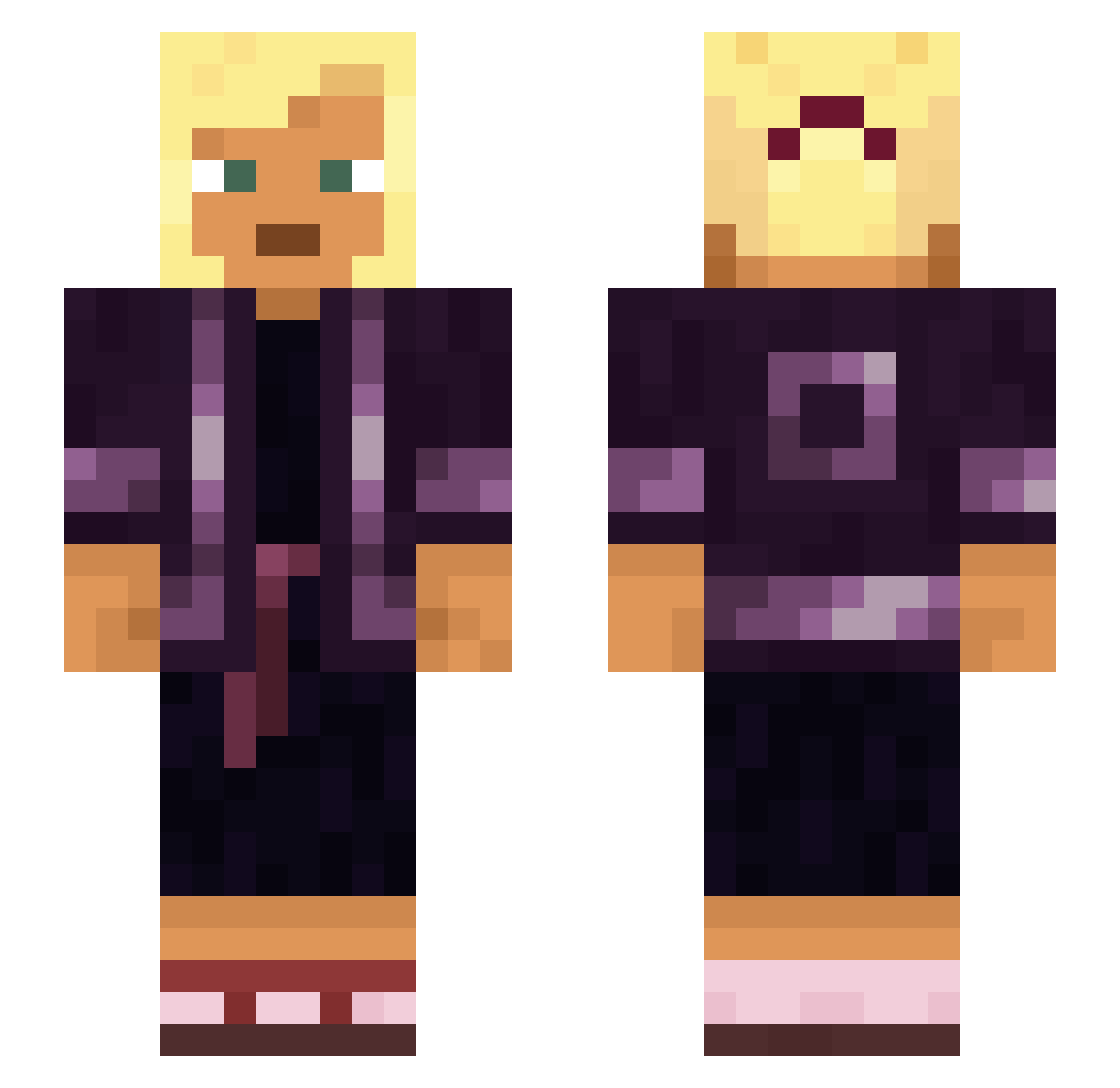
Other players with this skin (930)
afterburner was the 296th player we have seen with this skin, first spotted on 28.08.2026. The same skin was seen on these players. Open a nickname to see their current skin and skin history.
 SuperDeity parclose Fernando_x frailty Crossroads planetary2001 Cashiered Espinal Electromotive Subconsciousness Ousters
 Milkiman Mateless HelloThere9011 RinCalibur Mixosaurus Mistral Killifish
 mariocmc15
 Cryzonic HarryT1234 Minecraft_Profi Samatbae Hurricano hbd12
 GNGX mattattack444 Snakes83 vannet bill9000 Schnoerpel_ Ooqs Tom111 Pashalic NolatheNoodle1 SteveL HadesUnicorn fanchu Quintillions Ruthi Radiosurgery Imaginer AdidasBoxers gighe Guuroo Limpet Itz_Moloko clothespins crosby lTHORKANl pappLiimapuikko Eradicated Safflorite bongopojep HemiCardia Circusfreek TehHexify ria925 Mannish Clostridia
More Asian Minecraft skins
How to install the afterburner skin
- Press the Download button above to save the skin as a PNG file.
- Minecraft: Bedrock Edition (PE): open the Dressing Room from the main menu (or tap your character → Edit Character), go to Classic Skins → Owned, press the + (new skin) button, choose the downloaded PNG and pick the Slim (Alex) model. Works on PC and mobile; consoles cannot import custom skins.
- Minecraft: Java Edition: open the Minecraft Launcher, go to the Skins tab, click New Skin, load the PNG, pick the Slim (Alex) model and press Save & Use. You can also upload it at minecraft.net → Profile → Change Skin.
The skin does not show up after import - what should I do?
Restart Minecraft and open the Dressing Room again - imported skins sometimes appear only after a restart. Also make sure you selected the imported skin and picked the Slim (Alex) model.
Which model should I choose, Classic or Slim?
This skin is designed for the Slim (Alex) model. If you pick the wrong model, the arms of the skin will look stretched or squeezed.
Is the skin of afterburner free to download?
Yes. Press Download, save the PNG file and use it in Minecraft: Bedrock Edition or Java Edition - no payment or registration needed. The skin also works on multiplayer servers and Realms.
More skins
Looking for more? Go back to all Minecraft skins and check the top skins of the week, month and all time, or find any player's skin by nickname.