
_erintyler_ - Minecraft Skins & Skin History
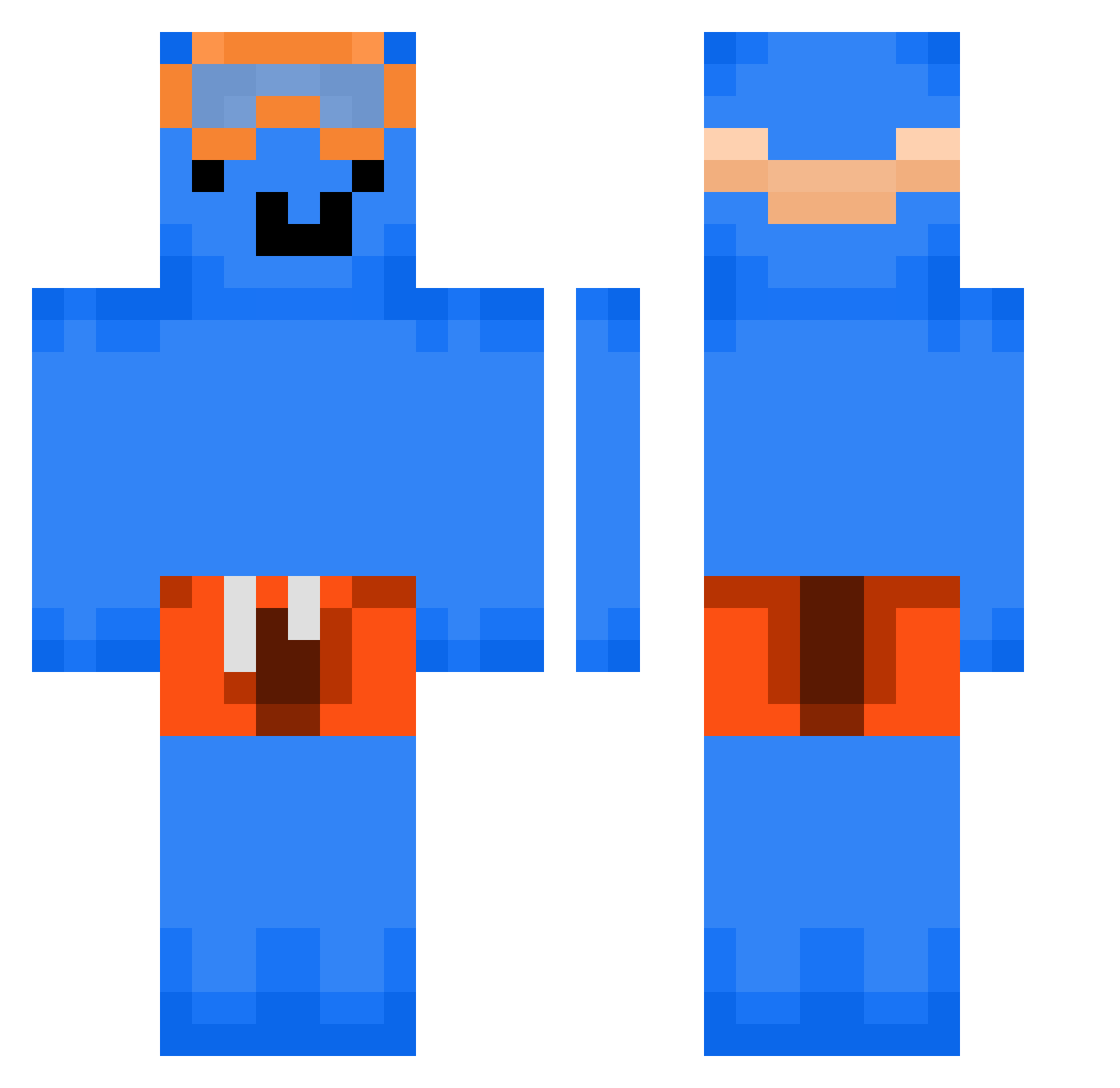
Current Minecraft skin of the player _erintyler_, loaded from the official Mojang API. Rotate the 3D model with your mouse or finger, then download the skin as a PNG file and use it in Minecraft: Bedrock Edition or Java Edition for free. When _erintyler_ changes their skin, this page updates automatically and the old skin stays in the history below.
Other players with this skin (254)
_erintyler_ was the 115th player we have seen with this skin, first spotted on 31.08.2026. The same skin was seen on these players. Open a nickname to see their current skin and skin history.
 eluzz Currythieff BIGGY____ rl_gus AKLAY checknichts cem1337_wGe454pr CyberManRead secondtea Sinthesinnner ShepardN7_ WallyFo ScallyDamirka KingChi1d zsofiix
 IOWAGAMERx Danielspro123 Closures Soen168 Katman2017 MTRIFF SpaghettiThinkin vixxiii greatguy0730 Yael33 dormammu15
 GUBBI_31 Mooon_ xXMonkeyXxDMC Qoeplx JustChrii Allthesaints eukoy
 jungmin2ne _Giermek
 m0vahedi WingedPotato457 Ollegaming Chopchop306 Baratagames com2memorativem Sigmen_ Guszxta Mr_coconut_2 nhby_ Killer66654 jaemming Tizzyfpss bro_zen_ CanSpoon MercMonkey1 mrchese Alrrxsz CringerMan04 Vexziz ElliotBergdahl relapseDarkwo5 Domthecool1014 Pavgeo ImNetoTheNeto
More Swimmer Minecraft skins
How to install the _erintyler_ skin
- Press the Download button above to save the skin as a PNG file.
- Minecraft: Bedrock Edition (PE): open the Dressing Room from the main menu (or tap your character → Edit Character), go to Classic Skins → Owned, press the + (new skin) button, choose the downloaded PNG and pick the Classic (Steve) model. Works on PC and mobile; consoles cannot import custom skins.
- Minecraft: Java Edition: open the Minecraft Launcher, go to the Skins tab, click New Skin, load the PNG, pick the Classic (Steve) model and press Save & Use. You can also upload it at minecraft.net → Profile → Change Skin.
The skin does not show up after import - what should I do?
Restart Minecraft and open the Dressing Room again - imported skins sometimes appear only after a restart. Also make sure you selected the imported skin and picked the Classic (Steve) model.
Which model should I choose, Classic or Slim?
This skin is designed for the Classic (Steve) model. If you pick the wrong model, the arms of the skin will look stretched or squeezed.
Is the skin of _erintyler_ free to download?
Yes. Press Download, save the PNG file and use it in Minecraft: Bedrock Edition or Java Edition - no payment or registration needed. The skin also works on multiplayer servers and Realms.
More skins
Looking for more? Go back to all Minecraft skins and check the top skins of the week, month and all time, or find any player's skin by nickname.