
_TrollCat - Minecraft Skins & Skin History
Current Minecraft skin of the player _TrollCat, loaded from the official Mojang API. Rotate the 3D model with your mouse or finger, then download the skin as a PNG file and use it in Minecraft: Bedrock Edition or Java Edition for free. When _TrollCat changes their skin, this page updates automatically and the old skin stays in the history below.
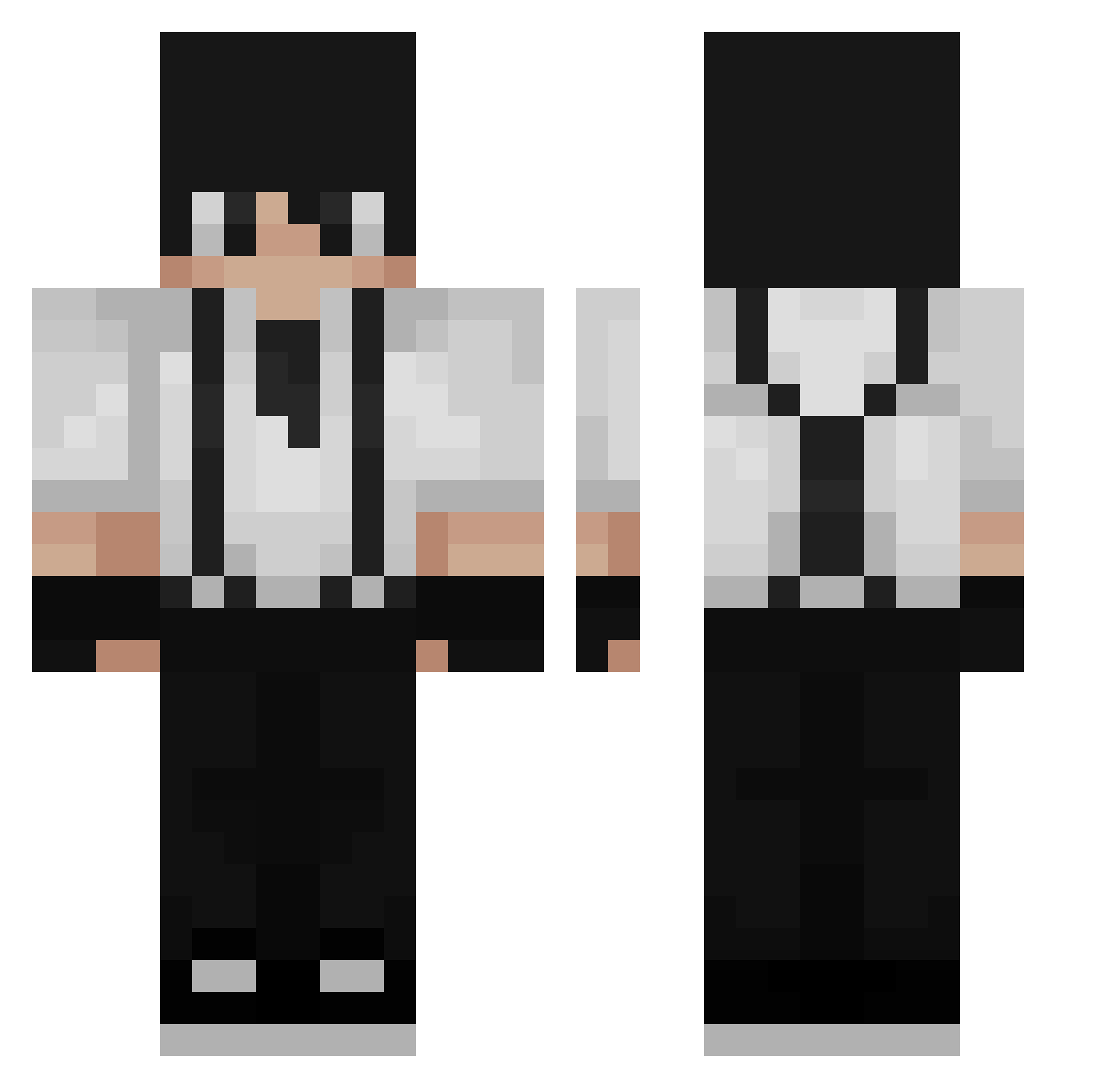
Other players with this skin (232)
_TrollCat was the 97th player we have seen with this skin, first spotted on 08.09.2026. The same skin was seen on these players. Open a nickname to see their current skin and skin history.
 HeiMachine BLind_vD WhyYouDontLoveMe Vinsce velvaic M4S_Viper Stroniko cocoko JteComboEnCostar LeFraudeur Lucas497 HORTZ251 Gm0il lnS4 20Wolf01 __Ad4m Artiex4090 dagun__ unsae44 ElBubar KSDHKSKS6626 Rexphel Papachang460 Balint0501 yariktwink Jjota1 raideN_SF Basin1880 aull0_0 sunrang44 Legalstory5 Fexna Novaelos Morning123 MaGkc Tomsmata loickgodin ArmerZyzy xRUKK Khazur Dyzar12345 DavaX297 WonderBook Macreus ZeSyrex Zexillez ESTRenx Ari940 ZxSergioxZ 3ABDX Julesrij Zeldros raslossa CronosJB HANSONXDXD emporio_13 Keshiyu Gamer2774 yVoid3 Ma3istro
How to install the _TrollCat skin
- Press the Download button above to save the skin as a PNG file.
- Minecraft: Bedrock Edition (PE): open the Dressing Room from the main menu (or tap your character → Edit Character), go to Classic Skins → Owned, press the + (new skin) button, choose the downloaded PNG and pick the Classic (Steve) model. Works on PC and mobile; consoles cannot import custom skins.
- Minecraft: Java Edition: open the Minecraft Launcher, go to the Skins tab, click New Skin, load the PNG, pick the Classic (Steve) model and press Save & Use. You can also upload it at minecraft.net → Profile → Change Skin.
The skin does not show up after import - what should I do?
Restart Minecraft and open the Dressing Room again - imported skins sometimes appear only after a restart. Also make sure you selected the imported skin and picked the Classic (Steve) model.
Which model should I choose, Classic or Slim?
This skin is designed for the Classic (Steve) model. If you pick the wrong model, the arms of the skin will look stretched or squeezed.
Is the skin of _TrollCat free to download?
Yes. Press Download, save the PNG file and use it in Minecraft: Bedrock Edition or Java Edition - no payment or registration needed. The skin also works on multiplayer servers and Realms.
More skins
Looking for more? Go back to all Minecraft skins and check the top skins of the week, month and all time, or find any player's skin by nickname.