
_Pr0B000szcz - Minecraft Skins & Skin History
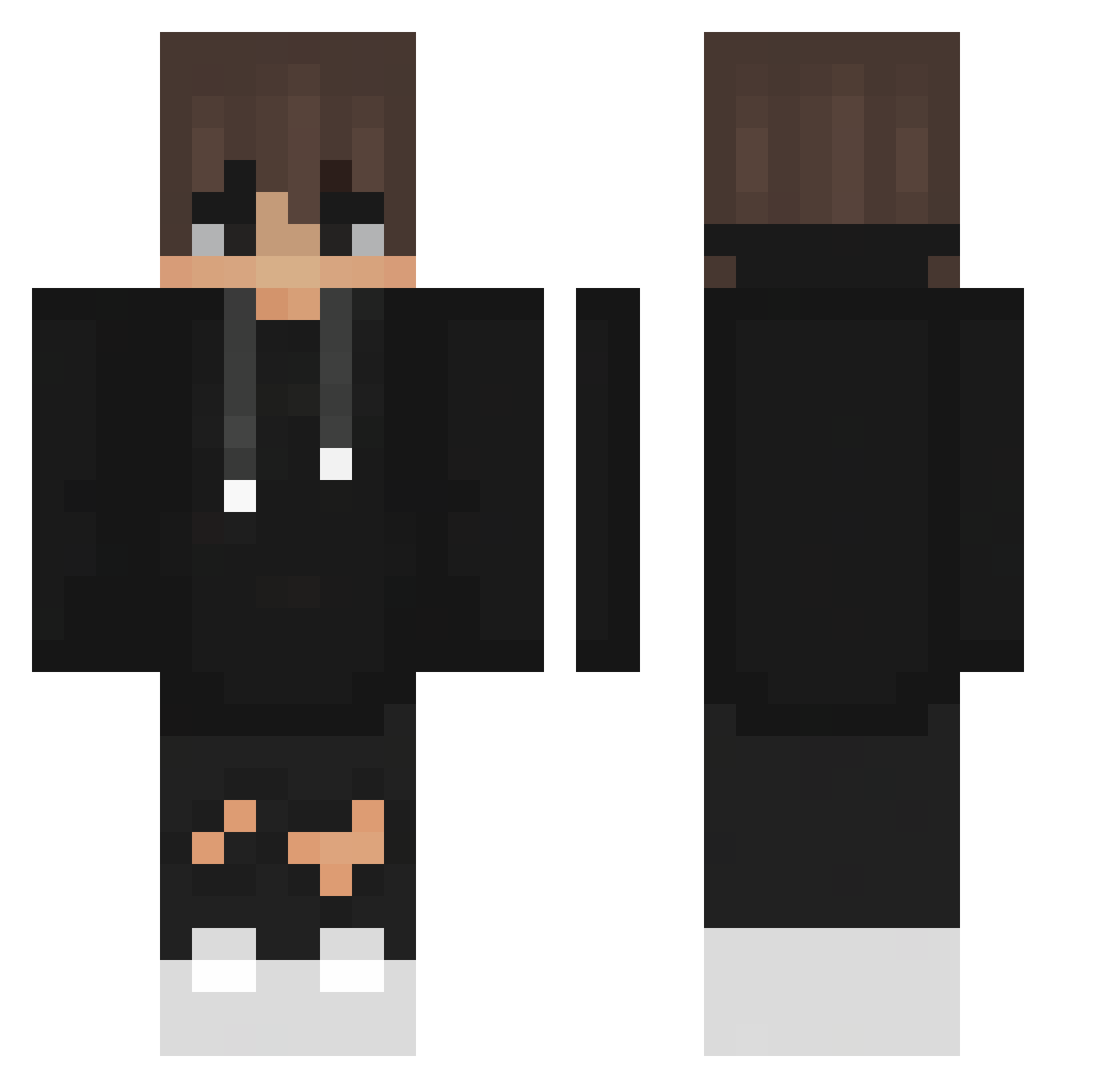
Current Minecraft skin of the player _Pr0B000szcz, loaded from the official Mojang API. Rotate the 3D model with your mouse or finger, then download the skin as a PNG file and use it in Minecraft: Bedrock Edition or Java Edition for free. When _Pr0B000szcz changes their skin, this page updates automatically and the old skin stays in the history below.
Other players with this skin (357)
_Pr0B000szcz was the 85th player we have seen with this skin, first spotted on 17.08.2026. The same skin was seen on these players. Open a nickname to see their current skin and skin history.
 bbboy104 BinbiniTheLegend alexgar99 Cj_rolack ItzDiego_PvP LilleAbeLort mastermomo2305 zevciak xhzzxt LightNip Ahlpa_Keks HazeMello matteopellico YCT88 itsSpiritwolf Diondoett _qFq_xFx_ Legendary_semaj A_TheNoob crazykid593 Dash39 eleck12 blueberrycool Kinng_123 chicken_moo07 tioADZ ImABurntToast toni_336 Mr_Slime_52 No_Liimits FernandoPassarin whyumadthoo J3w3ls_ AliOzgur chickpeabubble DoutorBarbosa McDysc zbest3v3r ArdaC LuanRh Prisma07 im_Bobo_ Nektroh BreH____1 Mateuko22 Matieczkowski qaz040625 jarvijaws13 zFlyx Karakurt89 Mk_Yt roseroemer Bosc0_ ShiKa35 itsjackyyy twitchfifek Thebosscole365 umdiche xVexora D_628
How to install the _Pr0B000szcz skin
- Press the Download button above to save the skin as a PNG file.
- Minecraft: Bedrock Edition (PE): open the Dressing Room from the main menu (or tap your character → Edit Character), go to Classic Skins → Owned, press the + (new skin) button, choose the downloaded PNG and pick the Classic (Steve) model. Works on PC and mobile; consoles cannot import custom skins.
- Minecraft: Java Edition: open the Minecraft Launcher, go to the Skins tab, click New Skin, load the PNG, pick the Classic (Steve) model and press Save & Use. You can also upload it at minecraft.net → Profile → Change Skin.
The skin does not show up after import - what should I do?
Restart Minecraft and open the Dressing Room again - imported skins sometimes appear only after a restart. Also make sure you selected the imported skin and picked the Classic (Steve) model.
Which model should I choose, Classic or Slim?
This skin is designed for the Classic (Steve) model. If you pick the wrong model, the arms of the skin will look stretched or squeezed.
Is the skin of _Pr0B000szcz free to download?
Yes. Press Download, save the PNG file and use it in Minecraft: Bedrock Edition or Java Edition - no payment or registration needed. The skin also works on multiplayer servers and Realms.
More skins
Looking for more? Go back to all Minecraft skins and check the top skins of the week, month and all time, or find any player's skin by nickname.