
Zorgon0_0 - Minecraft Skins & Skin History
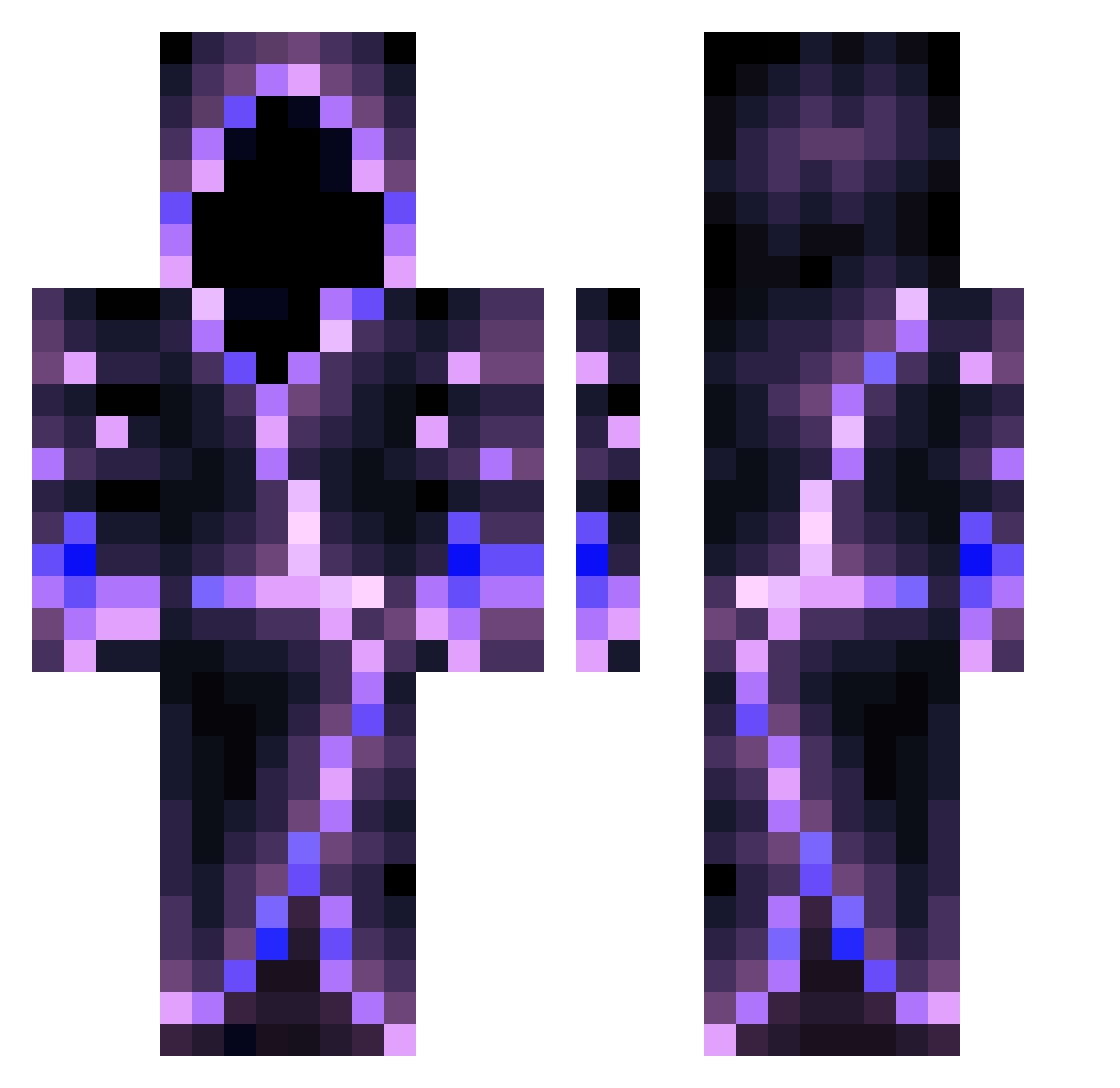
Current Minecraft skin of the player Zorgon0_0, loaded from the official Mojang API. Rotate the 3D model with your mouse or finger, then download the skin as a PNG file and use it in Minecraft: Bedrock Edition or Java Edition for free. When Zorgon0_0 changes their skin, this page updates automatically and the old skin stays in the history below.
Other players with this skin (558)
Zorgon0_0 was the 139th player we have seen with this skin, first spotted on 20.08.2026. The same skin was seen on these players. Open a nickname to see their current skin and skin history.
 BigBeder MetLouis ampro99 11414000 Taneli_Ankka Guuti19 Anonshadows Mike987673 jehyeon1 madie_boy D4RK_4D0X1 hus072 Meny_Bot 6_RG vloin drummingkid99 XxNightmarexX_64 brunoswag04 unloko junwon110240 th3_big_g3t kookls jeesteerr kolas109 zalt_sky XSNuZza Darth_Stoic ramboe42 Zqlegigabg blacklotus2002 DarkDays9000 Logaspool TheMagicalFart BamHammer1 nqsw Parentall nickidex Informal76 StringiZakonnicy Noel1905 zHxsky Nadirx Allure_YeeXuan39 MrEBI nipad AJ_2timez theJuany123 DDYYDS MentulTach DiFrak04 gimozziman733 Enderworlder Spenii MydriddKurilo AryOz05 Nimbuzz FindingNelly GuardianFil09 TheWishal Lazarus_713
More Hooded Figure Minecraft skins
See all 1222 Hooded Figure skins
How to install the Zorgon0_0 skin
- Press the Download button above to save the skin as a PNG file.
- Minecraft: Bedrock Edition (PE): open the Dressing Room from the main menu (or tap your character → Edit Character), go to Classic Skins → Owned, press the + (new skin) button, choose the downloaded PNG and pick the Classic (Steve) model. Works on PC and mobile; consoles cannot import custom skins.
- Minecraft: Java Edition: open the Minecraft Launcher, go to the Skins tab, click New Skin, load the PNG, pick the Classic (Steve) model and press Save & Use. You can also upload it at minecraft.net → Profile → Change Skin.
The skin does not show up after import - what should I do?
Restart Minecraft and open the Dressing Room again - imported skins sometimes appear only after a restart. Also make sure you selected the imported skin and picked the Classic (Steve) model.
Which model should I choose, Classic or Slim?
This skin is designed for the Classic (Steve) model. If you pick the wrong model, the arms of the skin will look stretched or squeezed.
Is the skin of Zorgon0_0 free to download?
Yes. Press Download, save the PNG file and use it in Minecraft: Bedrock Edition or Java Edition - no payment or registration needed. The skin also works on multiplayer servers and Realms.
More skins
Looking for more? Go back to all Minecraft skins and check the top skins of the week, month and all time, or find any player's skin by nickname.