
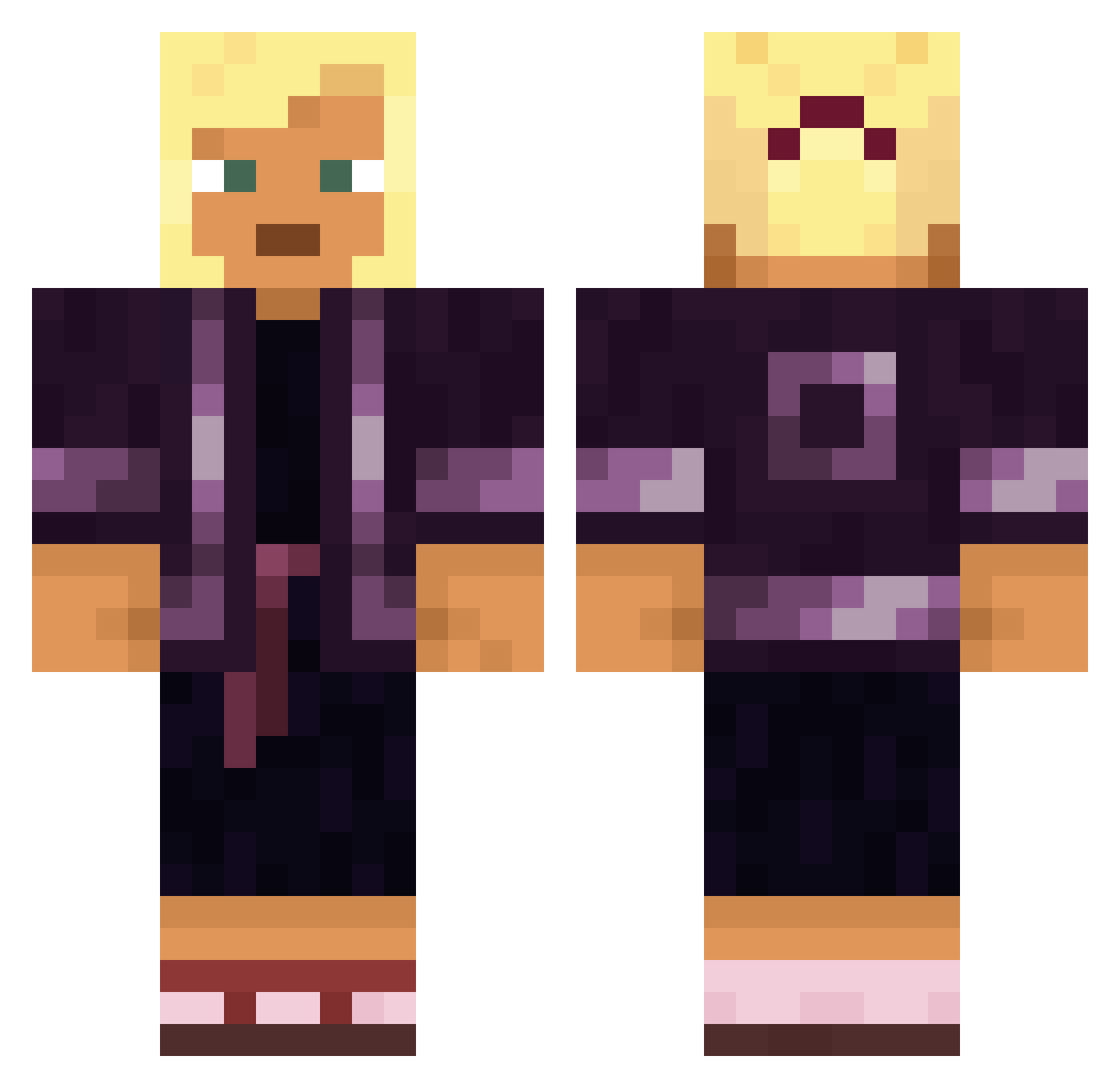
Current Minecraft skin of the player Zeralle, loaded from the official Mojang API. Rotate the 3D model with your mouse or finger, then download the skin as a PNG file and use it in Minecraft: Bedrock Edition or Java Edition for free. When Zeralle changes their skin, this page updates automatically and the old skin stays in the history below.
Other players with this skin (1250)
Zeralle was the 568th player we have seen with this skin, first spotted on 04.09.2026. The same skin was seen on these players. Open a nickname to see their current skin and skin history.
 Billy36
 jumbo40 B0BEK2115 Proethical itsMatrix10 MTD AmirYacoub Customerg I_Smell_Pi BabyAndale Nymphomaniac unresisting queiroguinha Sirs Kmz_ Corymb Brotel Jenifur Sandrox Plasmocyte Mecrinho
 Navilya sabrewolf243 PuffyOrdinary262 NN_Fighter_HD MVPCen4oys BigBowling cdJuancho32 Iceconk hexor__ ksfm TheSplashy Henbane Pixel_Thunder polskikox69 Vergil_MILK Austin2wild 3soups SUlRYU mathieugg EmilioIdk alternators Saberkick pedro55562 Kikup3431 igixboox King_Goaty Yekehom Younessekkat Nnayyy EternalPayne 95nb M3tty6 NilsGaming TaskoTango WAJANG SeanOK Semimatt Boniface oxol2366
More Kimono Minecraft skins
How to install the Zeralle skin
- Press the Download button above to save the skin as a PNG file.
- Minecraft: Bedrock Edition (PE): open the Dressing Room from the main menu (or tap your character → Edit Character), go to Classic Skins → Owned, press the + (new skin) button, choose the downloaded PNG and pick the Classic (Steve) model. Works on PC and mobile; consoles cannot import custom skins.
- Minecraft: Java Edition: open the Minecraft Launcher, go to the Skins tab, click New Skin, load the PNG, pick the Classic (Steve) model and press Save & Use. You can also upload it at minecraft.net → Profile → Change Skin.
The skin does not show up after import - what should I do?
Restart Minecraft and open the Dressing Room again - imported skins sometimes appear only after a restart. Also make sure you selected the imported skin and picked the Classic (Steve) model.
Which model should I choose, Classic or Slim?
This skin is designed for the Classic (Steve) model. If you pick the wrong model, the arms of the skin will look stretched or squeezed.
Is the skin of Zeralle free to download?
Yes. Press Download, save the PNG file and use it in Minecraft: Bedrock Edition or Java Edition - no payment or registration needed. The skin also works on multiplayer servers and Realms.
More skins
Looking for more? Go back to all Minecraft skins and check the top skins of the week, month and all time, or find any player's skin by nickname.