
Zarzoso7 - Minecraft Skins & Skin History
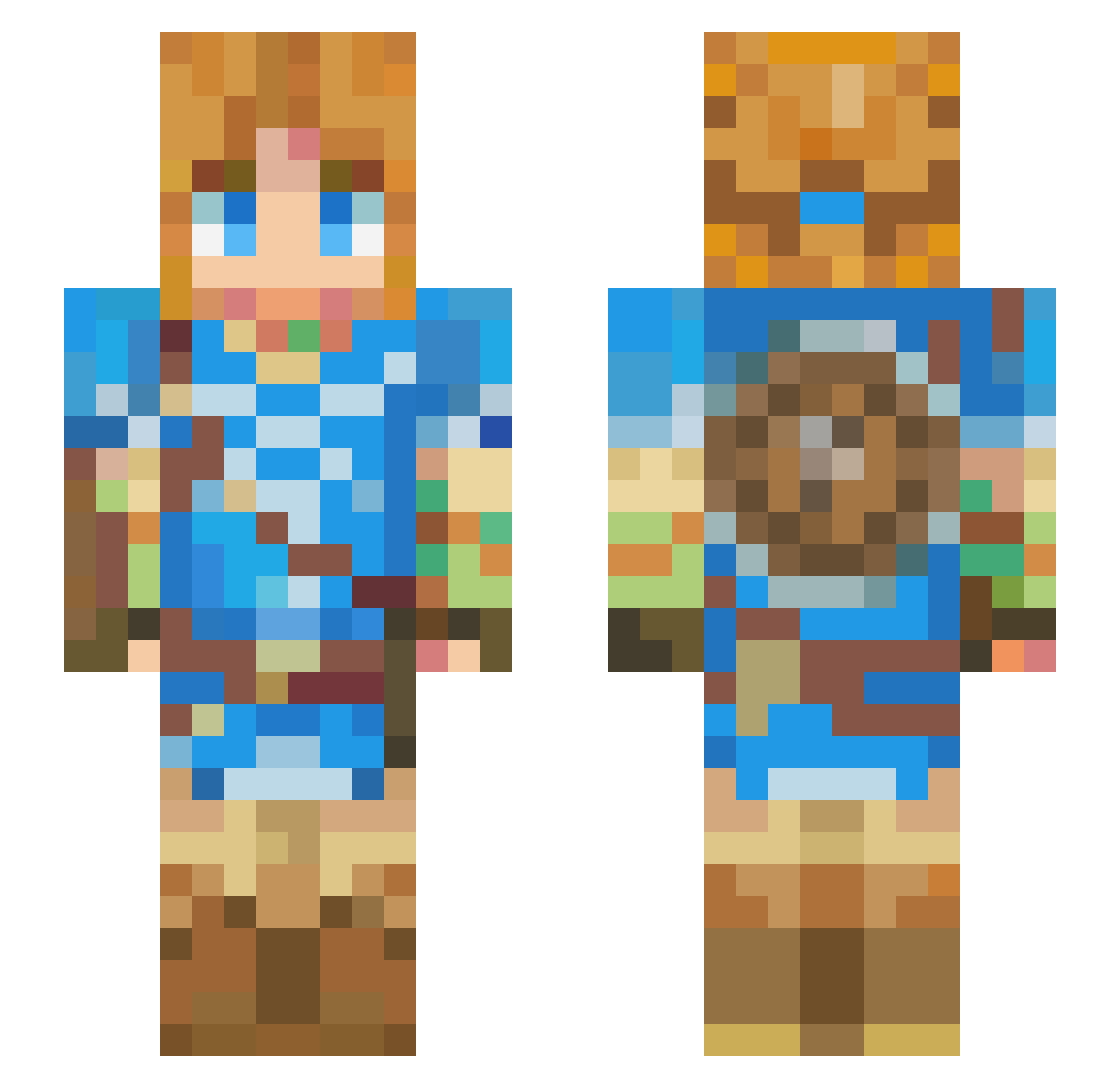
Current Minecraft skin of the player Zarzoso7, loaded from the official Mojang API. Rotate the 3D model with your mouse or finger, then download the skin as a PNG file and use it in Minecraft: Bedrock Edition or Java Edition for free. When Zarzoso7 changes their skin, this page updates automatically and the old skin stays in the history below.
Other players with this skin (426)
Zarzoso7 was the 169th player we have seen with this skin, first spotted on 09.09.2026. The same skin was seen on these players. Open a nickname to see their current skin and skin history.
 For3dom gauthvin blizzardwolf313 Kazu1070 Shades241
 LucaTK2 arta12345 _Cthugha_ Noels_ Krondesnuts Felini29 ContinentalShift Hooknas GoogleAdService panerana Flood1001 crispy_king Mantaray__ StevebluIV Natsuki_0501 b4rfboy Alan1505 Cyberelect lahmchis pesclar Giye_Calippo tanehiro ColonelKaden Toon_Time Unusuai_ EezyEm Link2S Charameltan Steph1215 1aurel iitzCob Jdiffely haruto_cyan LeCoward lazyforjesus_ pixel_gamer69 aidenvigue Cookieman0777 GuiwGuiw Momo0393 Mutsuki007 StefSkywalker FalkoNext Veniciano Doohee11 happyterMWTH SenpaiSchwifty HyruleOnly Sabth link876 MrBiloh qcumber1 HorseRicky Halino wildboi240
More Breath Of The Wild Minecraft skins
See all 154 Breath Of The Wild skins
How to install the Zarzoso7 skin
- Press the Download button above to save the skin as a PNG file.
- Minecraft: Bedrock Edition (PE): open the Dressing Room from the main menu (or tap your character → Edit Character), go to Classic Skins → Owned, press the + (new skin) button, choose the downloaded PNG and pick the Slim (Alex) model. Works on PC and mobile; consoles cannot import custom skins.
- Minecraft: Java Edition: open the Minecraft Launcher, go to the Skins tab, click New Skin, load the PNG, pick the Slim (Alex) model and press Save & Use. You can also upload it at minecraft.net → Profile → Change Skin.
The skin does not show up after import - what should I do?
Restart Minecraft and open the Dressing Room again - imported skins sometimes appear only after a restart. Also make sure you selected the imported skin and picked the Slim (Alex) model.
Which model should I choose, Classic or Slim?
This skin is designed for the Slim (Alex) model. If you pick the wrong model, the arms of the skin will look stretched or squeezed.
Is the skin of Zarzoso7 free to download?
Yes. Press Download, save the PNG file and use it in Minecraft: Bedrock Edition or Java Edition - no payment or registration needed. The skin also works on multiplayer servers and Realms.
More skins
Looking for more? Go back to all Minecraft skins and check the top skins of the week, month and all time, or find any player's skin by nickname.