
Zapppi - Minecraft Skins & Skin History
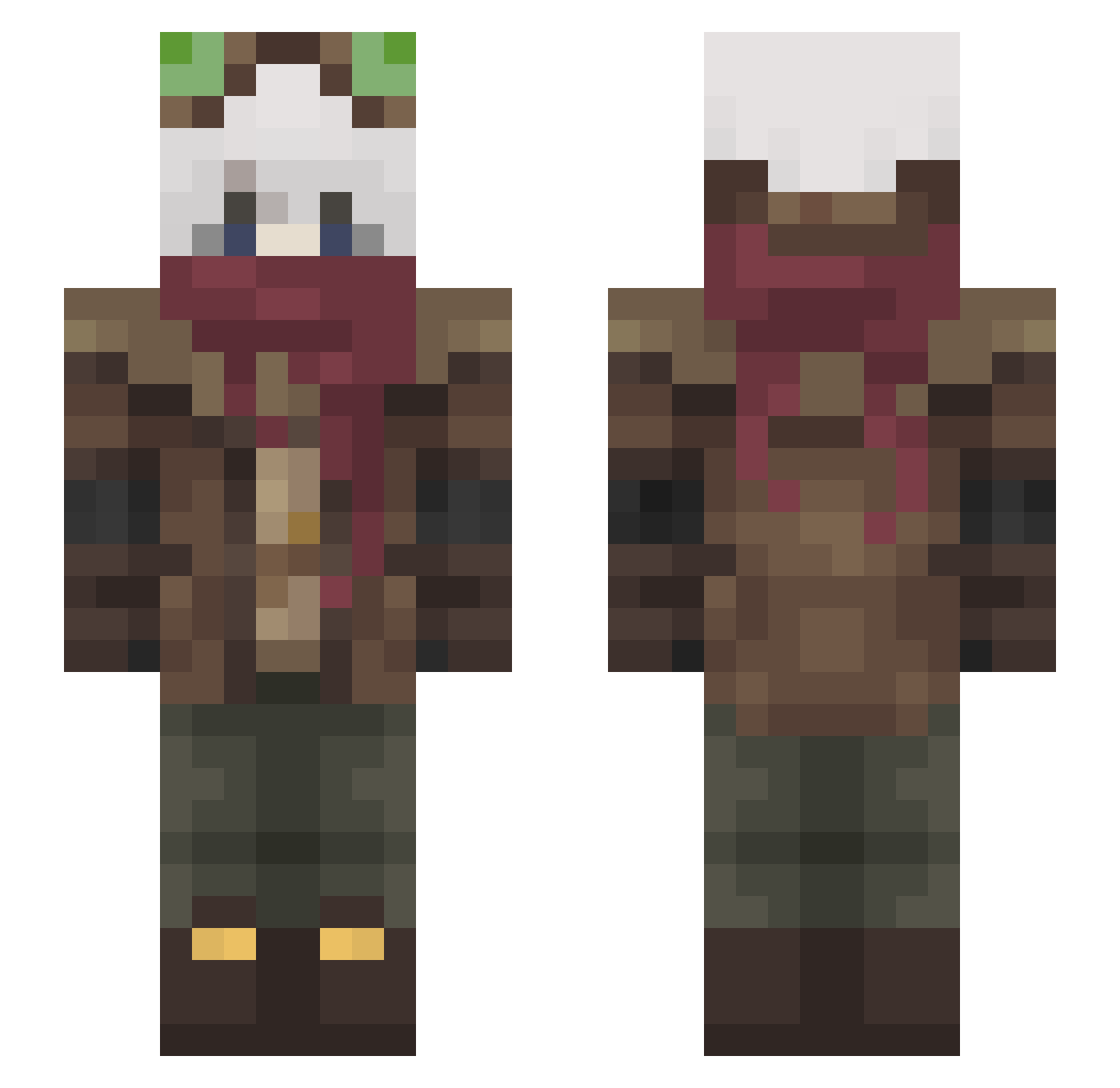
Current Minecraft skin of the player Zapppi, loaded from the official Mojang API. Rotate the 3D model with your mouse or finger, then download the skin as a PNG file and use it in Minecraft: Bedrock Edition or Java Edition for free. When Zapppi changes their skin, this page updates automatically and the old skin stays in the history below.
Other players with this skin (537)
Zapppi was the 512th player we have seen with this skin, first spotted on 11.11.2026. The same skin was seen on these players. Open a nickname to see their current skin and skin history.
 ethn07 Aizss HRSlepak Somi_707 MrKamikaz Dartrix_7 infinity209 Musmusculus123 SirKillsAlot201 HaxxMaGyat TribeQK Durphy_Mcb0b710 MilosArts Tigerlily0779 OshiMoon SayDiego Xendra000 Dakronn NotPhoenix123 DRAGONNE55550 Diio15 Suraiog2 Yigit1825 OmegaExE sulinz CryJacK21 lazykid2131 Kazieli L4WLIE7 Jojamcito oeVv Zyuchi Lazulyne SnowFluffs KazaRez7 SilverfangXD54 FlagMachine Me0we LinRin20 HaedisUmbra TheCookieKnightI fpsReaper Nylee69 Blameful136 EstelarUwU_ Cinnatoa FluffyAsh2 Xardos_97 NidgeyPidgey LoxinScarlett Inqizet BioArcane EvitlNecromancer x_Agness_x I8Baconpancakes FrancisDrake48 kazu0412 Lancerf7 __tomioka roblet1
More Pilot Minecraft skins
How to install the Zapppi skin
- Press the Download button above to save the skin as a PNG file.
- Minecraft: Bedrock Edition (PE): open the Dressing Room from the main menu (or tap your character → Edit Character), go to Classic Skins → Owned, press the + (new skin) button, choose the downloaded PNG and pick the Slim (Alex) model. Works on PC and mobile; consoles cannot import custom skins.
- Minecraft: Java Edition: open the Minecraft Launcher, go to the Skins tab, click New Skin, load the PNG, pick the Slim (Alex) model and press Save & Use. You can also upload it at minecraft.net → Profile → Change Skin.
The skin does not show up after import - what should I do?
Restart Minecraft and open the Dressing Room again - imported skins sometimes appear only after a restart. Also make sure you selected the imported skin and picked the Slim (Alex) model.
Which model should I choose, Classic or Slim?
This skin is designed for the Slim (Alex) model. If you pick the wrong model, the arms of the skin will look stretched or squeezed.
Is the skin of Zapppi free to download?
Yes. Press Download, save the PNG file and use it in Minecraft: Bedrock Edition or Java Edition - no payment or registration needed. The skin also works on multiplayer servers and Realms.
More skins
Looking for more? Go back to all Minecraft skins and check the top skins of the week, month and all time, or find any player's skin by nickname.