
Winwop8 - Minecraft Skins & Skin History
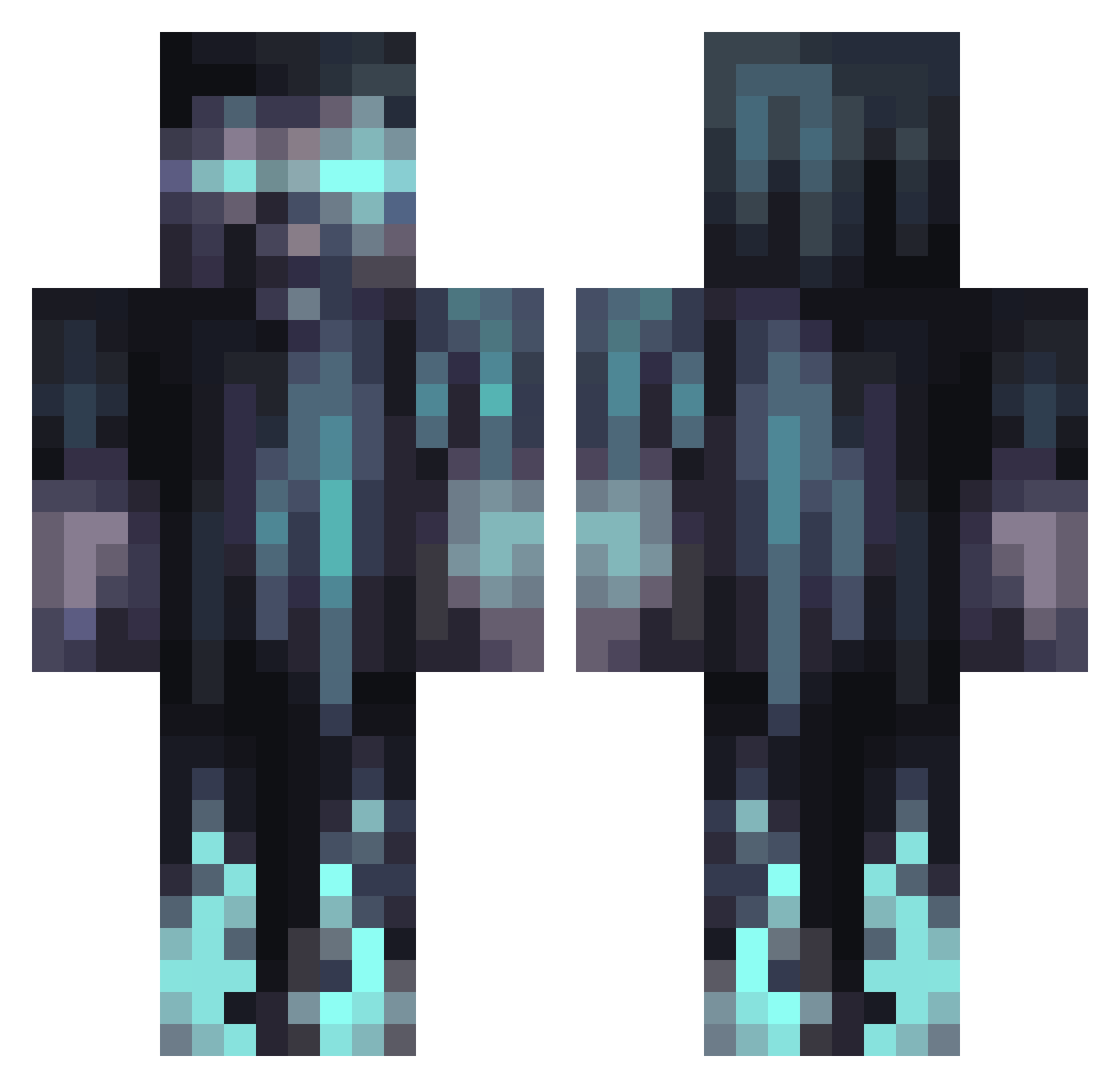
Current Minecraft skin of the player Winwop8, loaded from the official Mojang API. Rotate the 3D model with your mouse or finger, then download the skin as a PNG file and use it in Minecraft: Bedrock Edition or Java Edition for free. When Winwop8 changes their skin, this page updates automatically and the old skin stays in the history below.
Other players with this skin (1066)
Winwop8 was the 101st player we have seen with this skin, first spotted on 04.08.2026. The same skin was seen on these players. Open a nickname to see their current skin and skin history.
 Code_Gamer123
 Null4312 TheNotorietatus Azzroh SamH0408 Agentc0rn6666 TheBigAydi JacobUrowsky Kieeene Nilay2004 ishiddded HeromaticHD OdinSons225 Mowl_Ester cool_yeeter Face135 Bluebomber2013 Mojszczur Jimiplix foxdemon00 aguaecas27 InitialSand67 RebuiltSet82644 MonkeRsd SUPERGOTT GougouttePGM Dewguy1221 rtxjax20 Zeetzer E_cool1254 cufity03 Capacity8667 cousinsean0224 ezmez Blaze18 EpicGamerz007 Leo13004 SpadgeVI lilbigg1
 edvemeen MRLIGHTSKIN101 PhattAlbert rimuru1244 Azkaloz sinisterxbeats TheSjonnie_
 Meysan Redbeard89 zatorbeck Nigi_ Just_Bricked Peanut_335 Bumbl3B3e Khaos686 astra022 Florian_1328 Juvavum paperperson20309 Leroy_99 Nopefish763
More Warden Minecraft skins
How to install the Winwop8 skin
- Press the Download button above to save the skin as a PNG file.
- Minecraft: Bedrock Edition (PE): open the Dressing Room from the main menu (or tap your character → Edit Character), go to Classic Skins → Owned, press the + (new skin) button, choose the downloaded PNG and pick the Classic (Steve) model. Works on PC and mobile; consoles cannot import custom skins.
- Minecraft: Java Edition: open the Minecraft Launcher, go to the Skins tab, click New Skin, load the PNG, pick the Classic (Steve) model and press Save & Use. You can also upload it at minecraft.net → Profile → Change Skin.
The skin does not show up after import - what should I do?
Restart Minecraft and open the Dressing Room again - imported skins sometimes appear only after a restart. Also make sure you selected the imported skin and picked the Classic (Steve) model.
Which model should I choose, Classic or Slim?
This skin is designed for the Classic (Steve) model. If you pick the wrong model, the arms of the skin will look stretched or squeezed.
Is the skin of Winwop8 free to download?
Yes. Press Download, save the PNG file and use it in Minecraft: Bedrock Edition or Java Edition - no payment or registration needed. The skin also works on multiplayer servers and Realms.
More skins
Looking for more? Go back to all Minecraft skins and check the top skins of the week, month and all time, or find any player's skin by nickname.