
Widowmaker20l0 - Minecraft Skins & Skin History
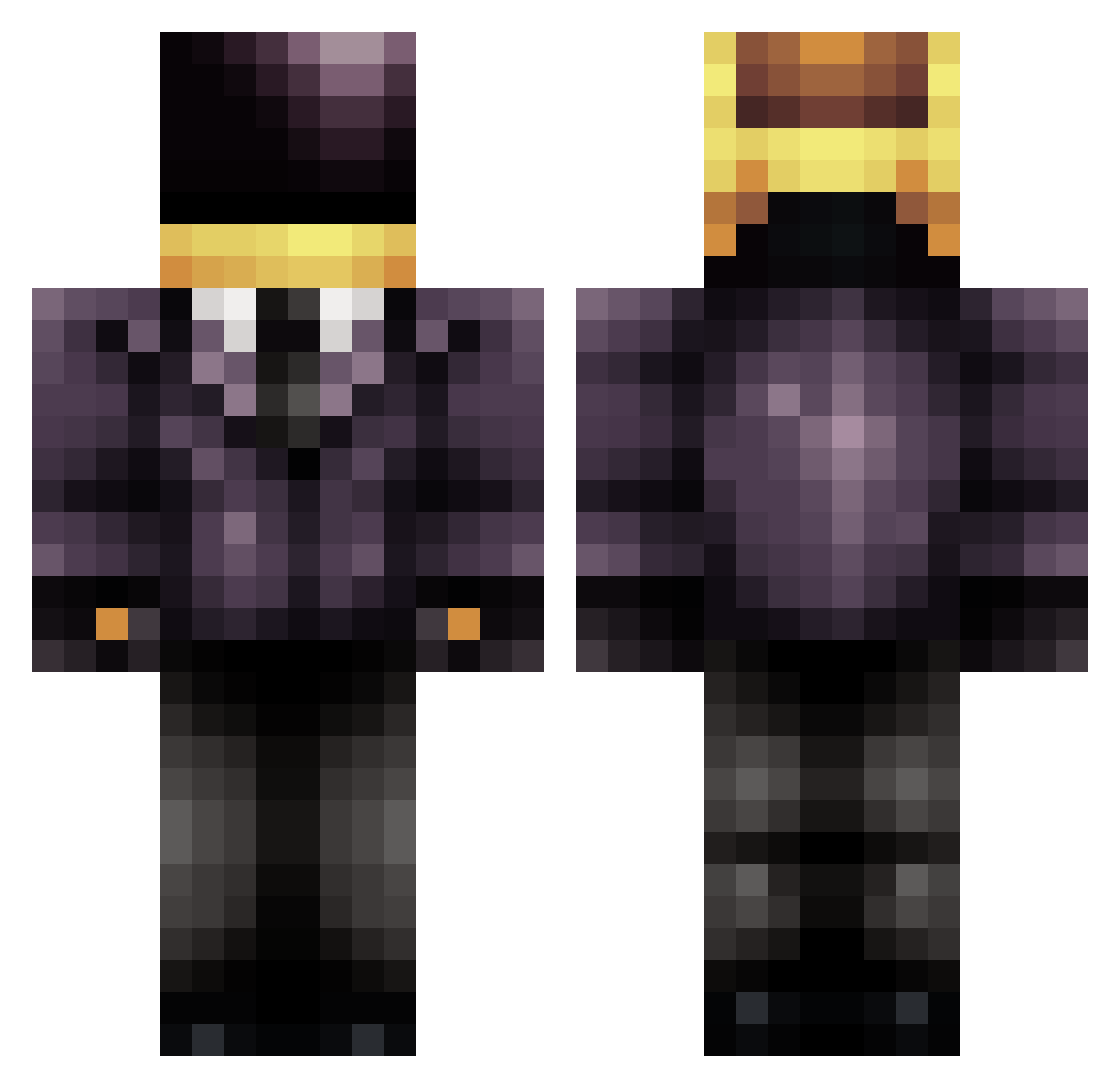
Current Minecraft skin of the player Widowmaker20l0, loaded from the official Mojang API. Rotate the 3D model with your mouse or finger, then download the skin as a PNG file and use it in Minecraft: Bedrock Edition or Java Edition for free. When Widowmaker20l0 changes their skin, this page updates automatically and the old skin stays in the history below.
Other players with this skin (610)
Widowmaker20l0 was the 568th player we have seen with this skin, first spotted on 16.10.2026. The same skin was seen on these players. Open a nickname to see their current skin and skin history.
 OMGim2Good Stubbzzie invasionslayer1 Smolhabit hrcaa zAeliosz FeralFurby curlycurly jeremiahw FroztBight c_stephan708 Jynxd2 randomcheddar Caligula9292 CommandoDoesMC henky442 Zathomir Yaldabaoth413 anonymouspuppy messimaxime ArneGamerDK Fjinactive eanda9 twisted24 Mr_Looney65 mrpotato6677 Mefterman Morcains sukface endlessflamet ZedEd GhostKaJa ImACr4cker Ayypek King_C0N Kingvarulf Tsurahasho Ivannnnn juicemongrel KarlChristian Mojoenzo robinovski HIGHTOPPEDGUY chocolatelemons clarkyboy28 Silverocco Gamerstage famortega jasonfox613 WillyGo4t z1zon awolsail radbryan lobbydosser vanskee10 bootymac Kills2020 GreyeI CovisM LGR614
More Daft Punk Minecraft skins
How to install the Widowmaker20l0 skin
- Press the Download button above to save the skin as a PNG file.
- Minecraft: Bedrock Edition (PE): open the Dressing Room from the main menu (or tap your character → Edit Character), go to Classic Skins → Owned, press the + (new skin) button, choose the downloaded PNG and pick the Classic (Steve) model. Works on PC and mobile; consoles cannot import custom skins.
- Minecraft: Java Edition: open the Minecraft Launcher, go to the Skins tab, click New Skin, load the PNG, pick the Classic (Steve) model and press Save & Use. You can also upload it at minecraft.net → Profile → Change Skin.
The skin does not show up after import - what should I do?
Restart Minecraft and open the Dressing Room again - imported skins sometimes appear only after a restart. Also make sure you selected the imported skin and picked the Classic (Steve) model.
Which model should I choose, Classic or Slim?
This skin is designed for the Classic (Steve) model. If you pick the wrong model, the arms of the skin will look stretched or squeezed.
Is the skin of Widowmaker20l0 free to download?
Yes. Press Download, save the PNG file and use it in Minecraft: Bedrock Edition or Java Edition - no payment or registration needed. The skin also works on multiplayer servers and Realms.
More skins
Looking for more? Go back to all Minecraft skins and check the top skins of the week, month and all time, or find any player's skin by nickname.