
Ward3n86 - Minecraft Skins & Skin History
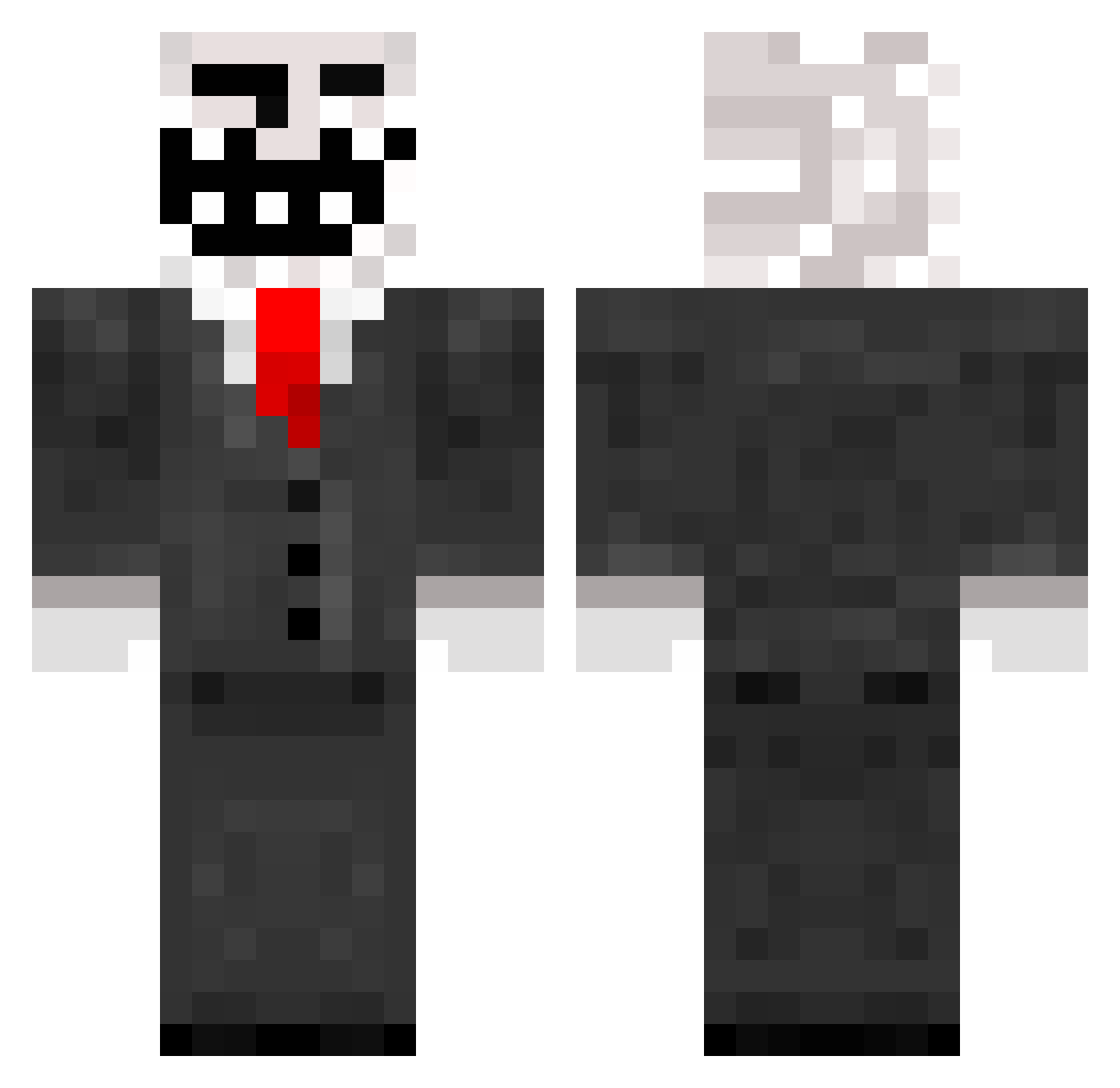
Current Minecraft skin of the player Ward3n86, loaded from the official Mojang API. Rotate the 3D model with your mouse or finger, then download the skin as a PNG file and use it in Minecraft: Bedrock Edition or Java Edition for free. When Ward3n86 changes their skin, this page updates automatically and the old skin stays in the history below.
Other players with this skin (252)
Ward3n86 was the 206th player we have seen with this skin, first spotted on 30.10.2026. The same skin was seen on these players. Open a nickname to see their current skin and skin history.
 galaxy3457 lino06 Chinois23 GreenDemonzz baroo666 NutterButter640 heaathv2 Litang_DJ_ RS1337 TheFinisher12 Cybysek TeaSack ShrekYolo PantherNoire3 XB0X360 klobasa_55789 CramCramForever KJS007 jroro23 Anton8bus_ yobomokeanos upxqu bratedog5 xPopBob Miguel456xd bumsawce DRico nnayzlu Dukey_Gaming Malte888 Retu22 Amadeus_EP _Kraven_ thiccXautism Aurora_Borealis2 Xinkly sniperboy650 Mesteren ReIics Hrommy BorivojSlama pogchamper21 THEbadmicnut Raisio FRISCO66 StrangeEyelander soulgriever nilosoft Ninjaxel11 Czar99ny Namseh BOT_Minecraft Nickeyyy1 guppgotswag Lloydyboy2005 Ladbook what_mati AAQCX_ Camlax22 LastDay606
More Trollface Minecraft skins
How to install the Ward3n86 skin
- Press the Download button above to save the skin as a PNG file.
- Minecraft: Bedrock Edition (PE): open the Dressing Room from the main menu (or tap your character → Edit Character), go to Classic Skins → Owned, press the + (new skin) button, choose the downloaded PNG and pick the Classic (Steve) model. Works on PC and mobile; consoles cannot import custom skins.
- Minecraft: Java Edition: open the Minecraft Launcher, go to the Skins tab, click New Skin, load the PNG, pick the Classic (Steve) model and press Save & Use. You can also upload it at minecraft.net → Profile → Change Skin.
The skin does not show up after import - what should I do?
Restart Minecraft and open the Dressing Room again - imported skins sometimes appear only after a restart. Also make sure you selected the imported skin and picked the Classic (Steve) model.
Which model should I choose, Classic or Slim?
This skin is designed for the Classic (Steve) model. If you pick the wrong model, the arms of the skin will look stretched or squeezed.
Is the skin of Ward3n86 free to download?
Yes. Press Download, save the PNG file and use it in Minecraft: Bedrock Edition or Java Edition - no payment or registration needed. The skin also works on multiplayer servers and Realms.
More skins
Looking for more? Go back to all Minecraft skins and check the top skins of the week, month and all time, or find any player's skin by nickname.