
WWalton1996 - Minecraft Skins & Skin History
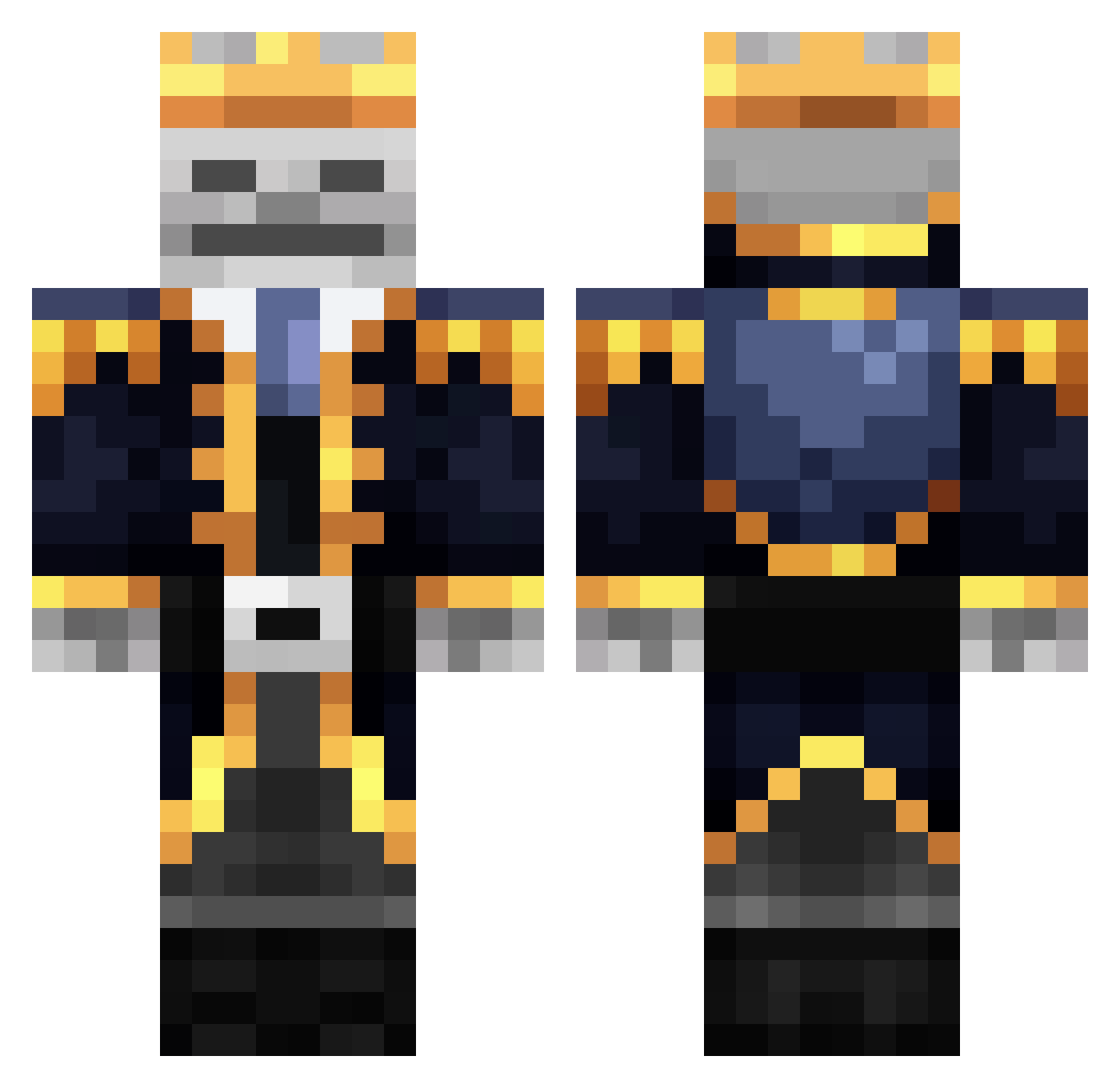
Current Minecraft skin of the player WWalton1996, loaded from the official Mojang API. Rotate the 3D model with your mouse or finger, then download the skin as a PNG file and use it in Minecraft: Bedrock Edition or Java Edition for free. When WWalton1996 changes their skin, this page updates automatically and the old skin stays in the history below.
Other players with this skin (343)
WWalton1996 was the 18th player we have seen with this skin, first spotted on 26.07.2026. The same skin was seen on these players. Open a nickname to see their current skin and skin history.
 xRoXy_Zz CooLPLaYeR_PvP2 DLYWIYM GuilleDev Ahmet_Gamerr PirateGhost2007 DarckPhon Lugatto MIN1416 Santa_55 RoroBanana44 ElLionya Aqyles Martina162010 NikodemP15 Dudu_Lucas ItzNu_ oeildelynx chen2333333 pepepepeco GuiGuiXxZz xxIRONxSKULLxx barenek SkeleNOBONE BUBUKA92 SZMIGI1 White_Lobo HounDoom666 Zombie_Jimi SleepyJimbo09 Furnoz00 SaltyBeefman GTRoyy llIlIllIllIlIllI NightPower Xat3n AriJoFL GermanGuy88 TimidWaters Horusrubix Whysck NotAWobbuffet Witipi LuloxSama Depe2 9855360 Abell3627 Stelorm _KrzyWy_ TigerBoy16D Jacky9778 Thelong_
 swordfishfreddy PhoenixOnFir3 Murilo_Guilherme PkZinHz MoodMadu Gokuyellow _6qz_ SHAMPYS
More Skeleton King Minecraft skins
See all 26 Skeleton King skins
How to install the WWalton1996 skin
- Press the Download button above to save the skin as a PNG file.
- Minecraft: Bedrock Edition (PE): open the Dressing Room from the main menu (or tap your character → Edit Character), go to Classic Skins → Owned, press the + (new skin) button, choose the downloaded PNG and pick the Classic (Steve) model. Works on PC and mobile; consoles cannot import custom skins.
- Minecraft: Java Edition: open the Minecraft Launcher, go to the Skins tab, click New Skin, load the PNG, pick the Classic (Steve) model and press Save & Use. You can also upload it at minecraft.net → Profile → Change Skin.
The skin does not show up after import - what should I do?
Restart Minecraft and open the Dressing Room again - imported skins sometimes appear only after a restart. Also make sure you selected the imported skin and picked the Classic (Steve) model.
Which model should I choose, Classic or Slim?
This skin is designed for the Classic (Steve) model. If you pick the wrong model, the arms of the skin will look stretched or squeezed.
Is the skin of WWalton1996 free to download?
Yes. Press Download, save the PNG file and use it in Minecraft: Bedrock Edition or Java Edition - no payment or registration needed. The skin also works on multiplayer servers and Realms.
More skins
Looking for more? Go back to all Minecraft skins and check the top skins of the week, month and all time, or find any player's skin by nickname.